

A DAM Claude integration connects an asset library directly to Claude, allowing teams to search approved assets, retrieve metadata, check guidelines, and in some cases manage assets without leaving the conversation. That context switch, drafting in one tool, retrieving in another, is exactly what a DAM Claude integration is built to remove.
Through 2026, MCP (Model Context Protocol) became the standard bridge for this. Frontify, Adobe, Cloudinary, Aprimo, Acquia, Bynder, and Air have all shipped some form of connection between their asset libraries and Claude, each with a different scope of what Claude can actually see and do once connected. This guide maps who connects how, what teams actually use these integrations for, and where Recharm fits for teams working primarily in video.
TL;DR
A DAM Claude integration lets Claude search, read, and in some cases act on your asset library directly from a conversation, instead of you pasting in stale files or hunting for approved assets separately.
Most of the major DAM platforms, Frontify, Adobe Experience Manager, Cloudinary, Aprimo, Acquia DAM, Bynder, and Air, now offer some form of native MCP connection to Claude; a few, including Canto, Brandfolder, and MediaValet, had no public native connector at the time of writing.
The most common uses are conversational asset search, on-brand content drafting grounded in real guidelines, metadata and rights audits, and checking what already exists in the library before commissioning new production.
Recharm's Claude integration is scoped specifically to footage and ad creative: matching briefs to real clips, finding coverage gaps, and building variants of winning ads from the existing library.
Setup effort varies by vendor, from a one-click connector in Claude's directory to an admin-created OAuth app or a locally run package with an API key.
How We Evaluated Each DAM's Claude Integration

Five things determined how each platform is described below:
Connection type. Four routes exist in practice: an official Claude directory connector (one-click, listed in Claude's own connector gallery), a native remote MCP server (a URL an admin or user adds manually), a locally run MCP package (installed via a command like npx, typically for Claude Desktop or Claude Code), or a third-party bridge (tools like CI HUB or Zapier wrapping a vendor's API where no native connector exists).
Read versus write. Whether Claude can only search and retrieve assets, or also upload, tag, move files, and edit metadata. This varies significantly by vendor and sometimes by which specific tool pack or scope is enabled.
Governance. Whether the connection requires OAuth sign-in, and whether it enforces each user's existing DAM permissions rather than exposing the full library to anyone who connects.
Brand context. Whether guidelines, templates, or brand rules are exposed to Claude as structured, readable data, not just raw files.
Setup effort. Rated as a one-click directory install, an admin-created OAuth app that individual users then authenticate against, or an API key plus manual config-file editing.
What Is a DAM Claude Integration?

A DAM Claude integration is a governed connection that lets Claude search, read, and in some cases act on assets and metadata stored in a digital asset management platform, directly from inside a conversation.
MCP in two sentences: The Model Context Protocol is an open standard, originally released by Anthropic, that lets an external system expose a defined set of tools an AI model can call when relevant. The DAM decides what it exposes, Claude decides when to call it, and the connection runs under whatever permissions the person using it already has.
It's worth separating three terms that get used loosely: a connector gives Claude access to a system, a plugin bundles one or more connectors together with a specific workflow built around them, and a skill packages repeatable instructions for how to use that access well. Cloudinary, for example, ships a Claude plugin that bundles five MCP servers plus a transformations skill.
The practical difference is that a live, permission-aware connection can return the current, approved version of an asset while respecting the access the user already has. Pasting a screenshot or downloaded file into a prompt, by comparison, can mean working from something stale, unapproved, or outdated as soon as the library changes.
How Leading DAM Platforms Connect to Claude
This space moves fast. Several vendors have shipped or updated their MCP servers in recent months, so the details below are a snapshot of what each vendor offered at the time of research. Confirm current capabilities and setup requirements directly with the vendor before choosing a platform.
Platform | How It Connects to Claude | Read or Read/Write | Standout Capability | Setup Effort | Last Verified |
Frontify | Official Claude connector; native MCP server with multiple tool packs | Both, by pack (discovery is read-only; asset-organization and bulk-operations write) | Brand guideline and tone-of-voice retrieval, grounded in live brand data | Low, per-user OAuth sign-in | Oct 2026 |
Adobe Experience Manager Assets | Native AEM MCP Server powering a Claude directory connector | Read/Write | Asset upload, metadata edits, reference inspection, unused-asset detection | Low to moderate | Oct 2026 |
Cloudinary | Anthropic-verified connector plus a Claude plugin bundling five MCP servers | Read/Write | Upload, tagging, folder moves, visual search, and transformation URLs by request | Low | Oct 2026 |
Aprimo | Native MCP server, added in its May 2026 release | Read, search-focused | Enterprise orchestration alongside tools like Copilot Studio or n8n | Moderate, OAuth setup | Oct 2026 |
Acquia DAM | Native OAuth MCP server | Read-only at launch | Metadata audits, expiration checks, CDN-ready links, pre-production library checks | Moderate, admin must enable first | Oct 2026 |
Bynder | Admin-created OAuth2 app, then per-user Claude connection | Read, search and guideline retrieval | Conversational asset search plus querying published brand guidelines | Moderate, admin setup required | Oct 2026 |
Air | Local @air/mcp package | Read/Write | Find and organize assets, apply tags, import and upload files | Moderate, API key plus config | Oct 2026 |
Uplifted | Native MCP server | Read, plus live performance data | Creative library and tagging connected directly to real ad-performance data | Low | Oct 2026 |
Recharm | Claude plugin plus connector | Read/search with brief-matching workflows | AI-tagged footage library searchable by visuals, transcript, filename, and labels | Low | Oct 2026 |
Canto, Brandfolder, MediaValet | No public native MCP server found at research time | N/A | N/A, workarounds via third-party bridges | High if bridged | Oct 2026 |
Frontify
Frontify is listed as an official Claude connector, and its MCP server, currently in beta, is organized into distinct tool packs rather than one flat connection. The discovery pack is read-only and built for browsing guidelines and assets. Other packs, such as asset-organization and bulk-operations, add write capabilities including tagging, metadata updates, moves, and multi-asset updates.
The standout is brand-rules retrieval. Connected to Claude, an agent can pull tone-of-voice guidance and approved logos directly, with access following the connecting user's existing Frontify permissions.
Adobe Experience Manager Assets
Adobe's unified AEM MCP Server powers its connector in Claude's directory, covering pages, content fragments, and assets through a single configured endpoint.
Capability here goes beyond search: asset upload, metadata editing, reference inspection, and identifying unused assets are all supported. Deeper brand-governance checks sit behind a separate Agents license rather than being included in the base MCP connection.
Cloudinary
Cloudinary is an Anthropic-verified connector and separately ships a Claude plugin bundling five MCP servers covering asset management, environment configuration, structured metadata, analysis, and more, alongside a dedicated transformations skill.
Write actions are the standout here: upload, tagging, folder moves, visual search, and generating delivery URLs from a plain-language request, rather than read-only retrieval alone.
Aprimo
Aprimo added a native MCP server as part of its May 2026 release, authenticated through OAuth and focused primarily on search at launch.
It's positioned for enterprises already orchestrating AI agents across multiple tools, including Copilot Studio, Glean, or n8n, rather than Claude being the sole entry point into the asset library.
Acquia DAM
Acquia's native OAuth MCP server is read-only at launch, and an Acquia administrator has to enable it first under Global Settings before anyone can connect. Once enabled, it enforces the same permission model as the DAM's own web UI and API.
Documented use cases include metadata audits, expiration checks on assets, generating CDN-ready embed links, and checking existing creative coverage before anyone books a new shoot.
Bynder
Setup here runs through an admin first: an admin creates an OAuth2 app inside Bynder, then individual users connect their own Claude client using their Bynder credentials.
Once connected, the standout is conversational asset search paired with the ability to query published brand guidelines directly, without leaving the Claude conversation.
Air
Air's official MCP package, @air/mcp, runs locally rather than as a hosted remote connection. It is installed via a single command and configured with an API key and workspace ID. It's built for Claude Desktop and Claude Code, alongside support for other MCP clients.
Scope here is read and write: finding and previewing assets, organizing boards, applying tags and custom fields, and importing or uploading files directly.
Uplifted
Uplifted's MCP server connects its creative library, AI tagging, and asset descriptions to Claude, but the differentiator is what sits alongside the creative data: live, cross-channel ad performance data in the same connection.
For paid-social teams specifically, that pairing of creative data and performance data is a genuine point of distinction compared with more DAM-focused MCP connections.
Canto, Brandfolder, and MediaValet
At the time of this research, none of the three had a public native MCP server available. This is the kind of status that can change quickly, so re-check each vendor directly before relying on it.
Where no native connector exists, third-party bridges such as CI HUB or Zapier can wrap a vendor's existing API to approximate similar functionality. That adds another tool and potential point of failure, and may require a separate subscription.
Top Use Cases for a DAM Claude Integration
A DAM Claude integration is most useful when teams need to work with existing assets without constantly switching between their DAM and Claude. The specific workflows depend on the connection's permissions and capabilities, but common use cases include:

Conversational asset discovery. A prompt like "find the approved spring campaign hero image" can return the current file instead of relying on a stale download sitting in someone's folder.
On-brand drafting. Connected to a platform like Frontify or Bynder, Claude can pull real guidelines and approved assets while writing copy or building a layout, helping teams keep the output aligned with brand rules.
Metadata audits. Asking Claude to flag assets missing tags, alt text, or required fields can turn a manual audit into a conversational request. Acquia documents metadata audits as one of its MCP use cases.
Rights and expiry checks. Before a campaign launches, Claude can identify assets with expiring licenses or usage restrictions, helping teams catch potential issues before publication.
Bulk organization. Where write access exists, platforms such as Cloudinary, Air, and AEM support actions like tagging and moving assets by prompt rather than requiring users to update each asset manually.
Transformation and delivery. Some integrations can generate resized or reformatted versions of an asset and provide delivery links based on a plain-language request.
Reuse before new production. Searching the existing library before booking a shoot can help teams determine whether the required footage or creative already exists, avoiding unnecessary production.
Library-matched briefs. Claude can take a creative brief and match sections of it to real assets already in the library, connecting the brief to available creative rather than treating the two as separate workflows.
What Recharm Can Do When Connected to Claude
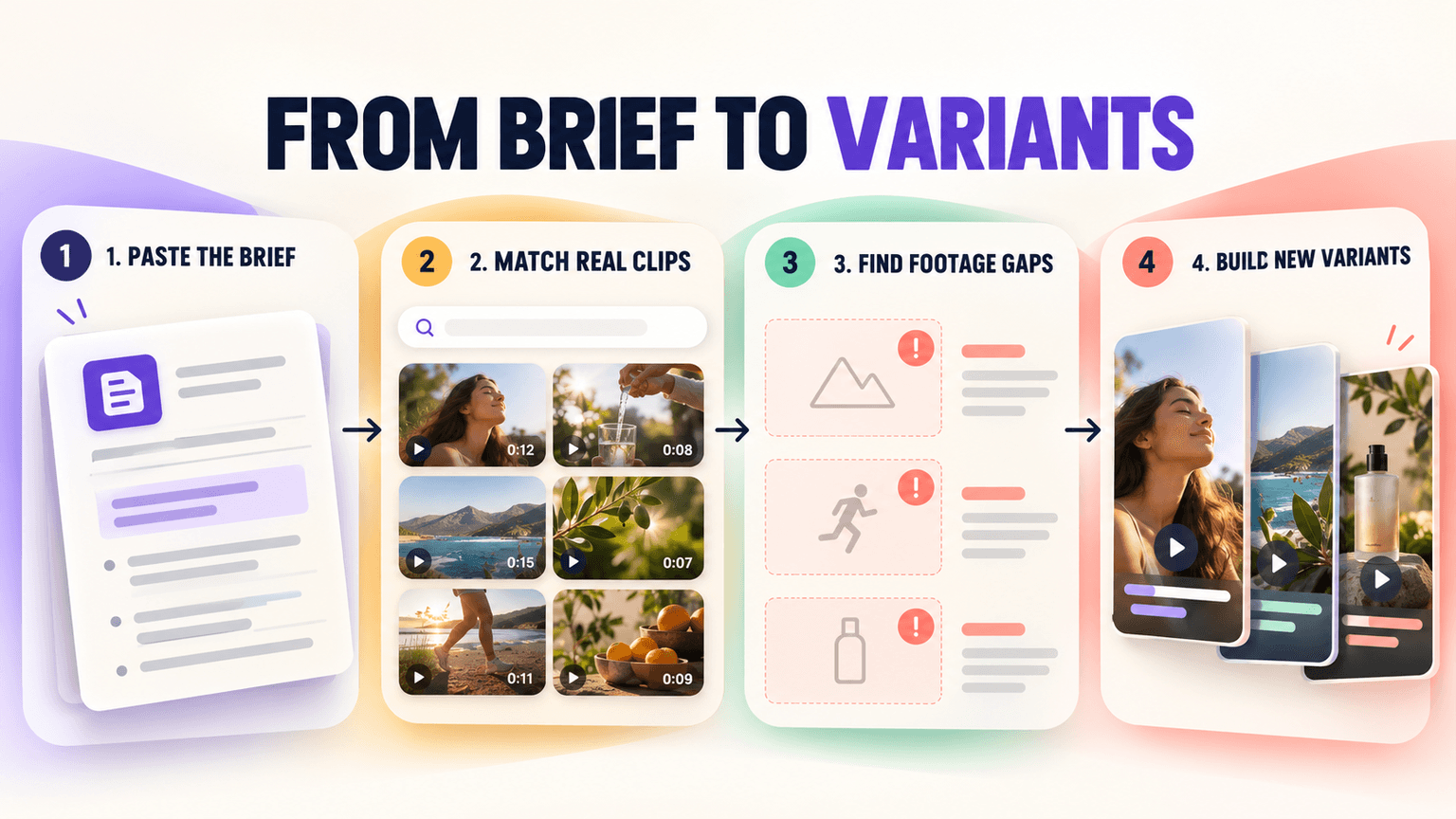
Recharm connects Claude to an AI-tagged footage library that can be searched by visuals, transcript, filename, and labels. This lets creative teams describe the footage they need in natural language and retrieve relevant clips from their existing library.
Recharm's Claude plugin and connector support workflows built around video briefs and ad creative, including:
Executing a brief. Paste a brief or script into Claude and get a shot-by-shot plan with relevant library clips matched to each scene.
Finding coverage gaps. Footage Gap Finder checks the shots a brief calls for against the footage available in the library and identifies what is missing.
Iterating on winners. Claude can build new ad variants using different clips from the existing library while keeping the underlying creative concept.
Analyzing a reference. Given a reference ad, Claude can break down its scene structure and match that structure against the brand's own asset library.
Finding the right creator. Creator Finder recommends a creator already present in the library for a given brief, along with the reasoning behind the match.
Building by creative angle. Some skills build the brief itself around where the audience sits. The Problem-Aware Ad Brief speaks directly to someone who already feels something is wrong but doesn't know the fix yet, building the pivot toward the product and matching every scene to real clips already in the library.
Persuasion-specific skills. A set of Cialdini-lever skills applies specific psychological triggers to the same brief-matching process. The Social Proof Ad Brief leads with the receipts, stacking reviews, ratings, and real customer results until skepticism collapses..
Why tagging matters. A Claude connection is only as useful as the asset data it can access. Consistent tags, transcripts, labels, and other metadata give Claude more context to work with and make it easier to retrieve relevant footage from a large library.
Where humans stay. Claude and Recharm can speed up execution by matching briefs, finding coverage gaps, and surfacing creative variations. Research, strategic positioning, and interpreting campaign performance still require human judgment. The goal is to reduce the manual work between a brief and the final edit, not replace creative decision-making.
For a closer look at how creative teams use Claude with Recharm, see how creative teams use Claude with Recharm.
How to Set Up a DAM Claude Integration
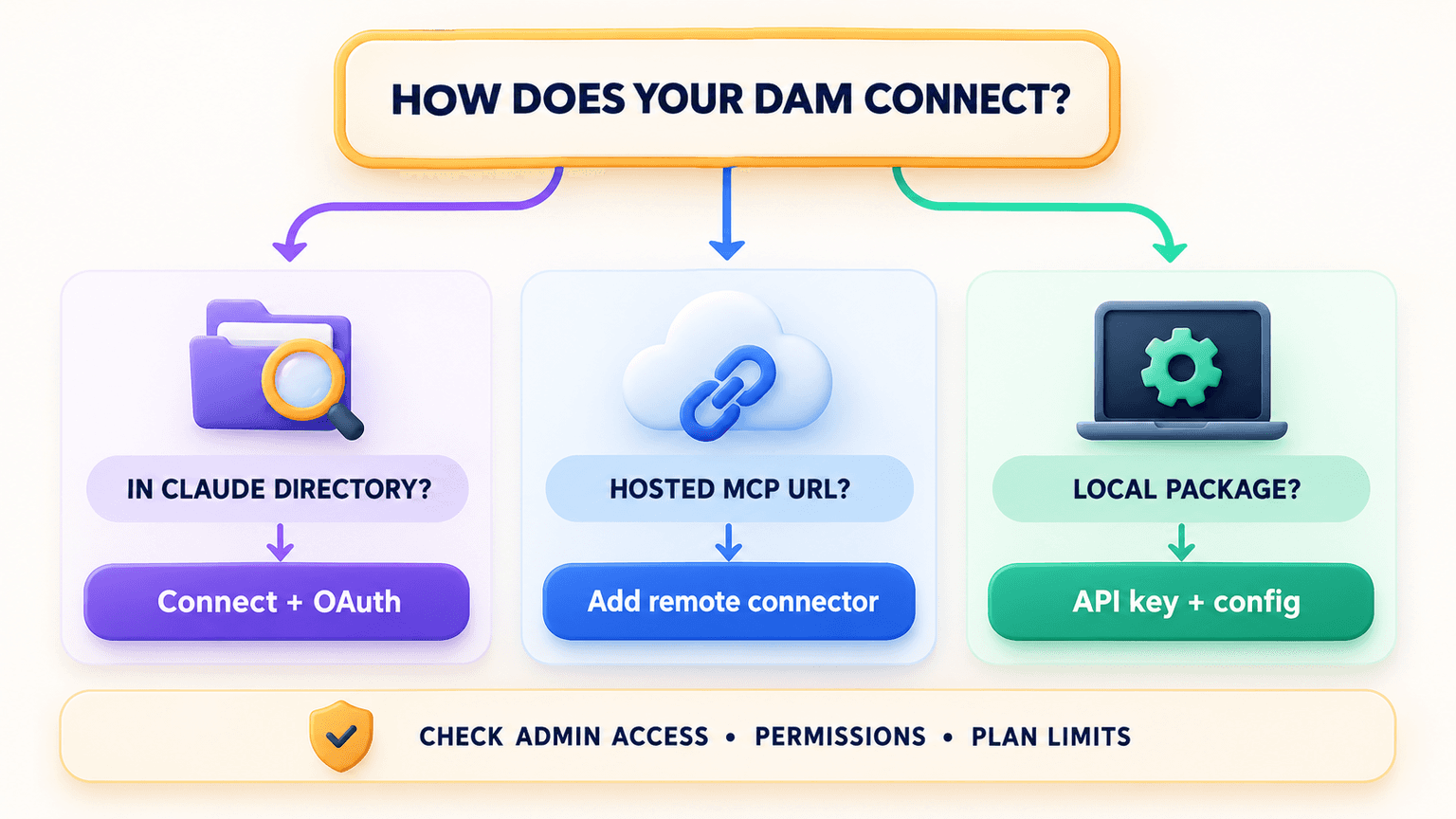
The setup process depends on how the DAM exposes its connection to Claude. Some platforms can be connected directly from Claude's connector directory, while others require an administrator to configure OAuth, add a remote MCP server, or install a local package.
Check your route first. Look for your DAM in Claude's connector directory before anything else. If it's listed, that's usually the lowest-effort path. If not, check whether the vendor offers a custom remote connector or a locally run package instead.
Directory connectors. For vendors listed in Claude's directory, the process generally involves opening Settings, going to Connectors, signing in through OAuth, and enabling the connector for the relevant conversation.
Custom remote connectors. For vendors offering a hosted MCP server outside the directory, the vendor's MCP URL can be added through Claude's connector settings. Team and Enterprise admins may also be able to add connectors organization-wide, depending on the plan and setup.
Local MCP packages. Vendors such as Air or Cloudinary's CLI-based option require an API key and local setup for supported MCP clients. Never commit an API key inside a shared or version-controlled config file.
Admin prerequisites. Some platforms require an admin to create an OAuth app or enable API access before individual users can connect. Bynder and Acquia DAM both require administrative setup, so account for that step before starting.
Recharm in four steps: install the plugin from the marketplace, add the Recharm connector, authenticate, then run a first brief prompt to see matched clips come back.
Plan limits. Check your Claude plan's connector limits before committing to a setup, especially if you plan to connect multiple systems.
Ready to connect your footage library to Claude? Install the Recharm Claude plugin or start free to try it with your own library.
FAQs
Can Claude Connect to a Digital Asset Management System?
Yes. Several major DAM platforms now offer some form of connection to Claude, either through an official connector listed in Claude's directory, a native MCP server a user or admin adds manually, or a locally run package. A handful of platforms, including Canto, Brandfolder, and MediaValet, had no public native connector at the time of writing, though that status can change quickly.
What Is a DAM MCP Server?
It's the technical component a DAM exposes that lets Claude, or another MCP-compatible AI tool, search, read, and sometimes act on assets and metadata in that platform. The DAM defines what tools it exposes; Claude calls them when a request requires it, under whatever permissions the connecting user has.
Will Connecting Claude to My DAM Expose Assets to People Without Access?
A properly implemented connection should enforce the permissions a user already has in the DAM itself. Acquia DAM, for example, explicitly limits MCP access to whatever that user is authorized to see in the platform's own web UI. Confirm the permission model with the vendor before connecting, since enforcement can vary by implementation.
Can Claude Upload, Tag, or Edit Assets, or Only Search Them?
It depends on the vendor and sometimes the specific connection scope. Some platforms, such as Cloudinary, Air, and Adobe Experience Manager Assets, support read and write actions including upload, tagging, and metadata edits. Others, such as Acquia DAM at launch, are read-only. Always check a vendor's documented scope before assuming write access is included.
What Is the Difference Between a Claude Connector, Plugin, and Skill?
A connector gives Claude access to an external system. A plugin bundles one or more connectors together with a specific workflow. A skill packages repeatable instructions for how to use that access effectively. In simple terms, the connector provides access, while plugins and skills help structure what you do with it.
Do I Need a Paid Claude Plan to Connect My DAM?
It depends on the type and number of connectors you need, as well as your Claude plan. Check Anthropic's current plan and connector documentation for the latest limits before setting up multiple connections.