Creative brief workflow Write a creative brief in 20 minutes,
not 4 hours.
Stop searching folders, guessing timestamps and writing long explanations for editors. In Recharm, strategists find the footage first and link the exact clips into the brief.
- Hook
“I stopped wearing foundation, and nobody noticed.”
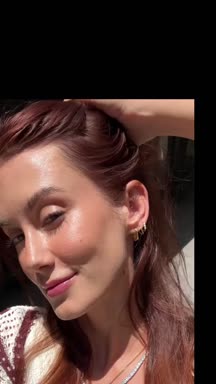 0:03
0:03 - Demo
Tint goes on with fingers in one pass.
 0:33
0:33 - Proof
Real skin, close-up, no filter.
 0:08
0:08 - CTA
Find your shade.
 0:02
0:02
An example brief built from our demo library of ILIA Beauty creator videos.
Why briefing slows you down.
Tick the statements that are true for your team. If two or more are, your briefing process is the bottleneck.
Tick the ones that are true for your team.
Know if the idea is possible before you write it.
Recharm cuts raw videos into tagged clips: hooks, testimonials, product shots and more. Check a new concept against the library in seconds, and anything missing goes on the shoot list instead of surprising the editor.
- Browse by scene, creator, persona or angle.
- See what you already own before you book a creator.
- Spot gaps early and shoot only what’s missing.
- HookScene81 clips
- Tint applied with fingersScene56 clips
- Shade matchingAngle17 clips
- Customer testimonialScene79 clips
- Male creator applying tintGenderAdd to shoot list
Describe the shot. Get the clip.
Search by what’s on screen or what’s said. Recharm’s AI visual search and transcript search jump straight to the moment you need, with no scrubbing.
 0:11
0:11 0:17
0:17 0:06
0:06 0:07
0:07 0:17
0:17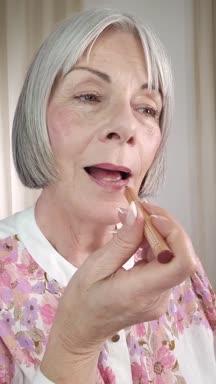 0:05
0:05 0:15
0:15 0:05
0:05Real results from a Recharm library of beauty creator footage.
Live results from our demo library. Try another search or hover a clip to play it.
Send clip links, not timestamps.
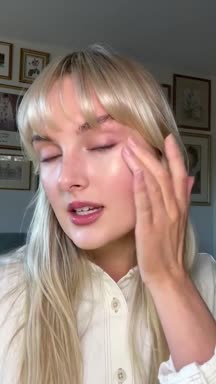
Every clip in Recharm has its own link. Drop it in the brief and the editor lands on the exact moment you meant.
Use the bit in creator_take_02.mov around 1:42 where she taps the tint onto her cheek. Not the first tap, the second one, after she laughs. Maybe 1:47?
 0:05
0:05Here are three from your Recharm library:
 0:04
0:04 0:04
0:04 0:07
0:07Or just ask Claude.
With the Recharm plugin, Claude runs visual search on your library for you. Hand it a brief or a rough idea and it pulls the matching shots, then flags what you still need to film.
Explore Claude skillsUse the brief template behind this workflow.
The same creative brief our customers use: hook, on-ramp, sales sequence, CTA, with a slot for every clip link.
Briefing, before and after Recharm.
- Strategist writes a long brief in a doc
- Editor searches folders for the clips
- First cut misses key visuals
- Strategist requests revisions
- Editor searches again
- Strategist searches the footage
- Links the exact clips in the brief
- Editor opens the right moments
- Editing starts immediately
Ads move from idea to edit in a fraction of the time.
Built for teams that brief every week.
Performance marketing teams
Brief several ad concepts every week without a footage hunt for each.
Creative strategists
Turn ideas into structured briefs grounded in footage you own.
Editors and agencies
Get clear, clip-linked instructions and start cutting right away.
DTC brands running paid ads
Produce and test more creative without slowing production.
“If you want us to keep the same level of quality and speed, you can’t get rid of Recharm. Without it, our whole team slows down, and that would affect revenue.”
Frequently asked questions
How detailed should a video ad brief be?
Clear enough that the editor isn’t guessing, but no longer than that. The most effective briefs outline the hook, the core message, the ad sequence and the key visuals. When strategists attach the exact clips they want, editors can execute quickly without paragraphs of explanation.
What structure should a performance video ad follow?
Most high-performing ads follow a simple structure: hook → on-ramp → sales sequence → off-ramp → CTA → end card. The hook stops the scroll, the on-ramp establishes the problem, the sales sequence introduces the product as the solution, and the CTA asks the viewer to act.
Why do so many creative briefs lead to multiple revision rounds?
Revisions usually happen when the brief is disconnected from the footage that exists. If the strategist describes a visual and the editor has to guess which clip it means, the first cut often misses. Attaching the exact clips to the brief removes most of that guesswork.
How do strategists choose the right clips when writing a brief?
Start with the message and structure of the ad, then pick visuals that directly illustrate each line of the script. The goal isn’t clips that simply look good; it’s clips that clearly communicate the idea behind each moment.
How does Recharm help creative strategists write briefs faster?
Recharm cuts raw videos into tagged, searchable clips. Strategists find hooks, testimonials or product shots in seconds and link those exact moments in the brief, so there’s no digging through folders or describing visuals with timestamps.
Why is clip hunting such a big bottleneck in creative production?
Searching large Google Drive or Dropbox folders can take hours, and strategists get stuck scrubbing for the right moment. When the library is organized and searchable, they spend that time on strategy instead of file management.
What’s the biggest mistake strategists make when briefing editors?
Over-explaining instead of showing. Long written instructions still leave room for interpretation. Attaching the exact clips makes the intended story obvious, and the editor can start cutting right away.