

A creative strategist needs a testimonial clip about sleep quality, with valid usage rights. The library contains thousands of videos, but finding the right clip means searching folders, checking tags, reviewing footage, and confirming permissions.
The footage is there. Finding and preparing it for use still takes time.
That's where agentic digital asset management (DAM) comes in. Instead of only helping teams store and find assets, agentic DAM uses AI agents to carry out connected tasks, such as searching footage, checking available rights information, and preparing assets for review.
This guide explains how agentic DAM works, how it differs from traditional DAM, its core capabilities, and what video ad teams should consider before choosing a platform.
TL;DR
Agentic DAM uses AI agents to carry out multi-step tasks involving digital assets, rather than only retrieving files.
Traditional DAM vs. agentic DAM: Traditional systems can already automate tasks, but agentic workflows can coordinate multiple steps based on a goal.
Core capabilities: Metadata management, intelligent search, workflow orchestration, governance, content activation, and integrations with external agents.
Human oversight matters: Teams still need to review important decisions, especially those involving usage rights, approvals, and publishing.
For video ad teams: Agentic workflows can help find relevant footage, identify missing assets, and prepare creative briefs using existing content.
Where Traditional DAM Falls Short
Traditional DAM systems help teams store, organize, and manage digital assets. Many also offer AI tagging, advanced search, rights management, and automated workflows.
However, video ad teams can still face challenges when these capabilities don't work together.
Disconnected workflows: Finding footage, checking rights, and preparing creative briefs may still require several manual steps.
Growing footage libraries: As new footage arrives, maintaining accurate metadata and organizing individual scenes becomes harder.
Limited video discovery: File-level tags and basic keyword searches may not help editors find specific moments within long videos.
Rights management gaps: Even when usage rights are tracked, teams may need to check permissions manually before reusing footage.
The Hidden Cost of Inefficient Asset Management
These challenges can take up valuable production time.
Before using Recharm, FabFitFun editors spent 30 minutes to 2 hours finding suitable footage. Similarly, HexClad's team spent around 30 minutes finding a single clip.
For teams producing multiple ad variations, repeated footage searches can slow down the creative process.
Where Bolt-On AI Tools Fall Short
Adding AI search or automatic tagging to a DAM can improve asset discovery. However, these features alone don't make a system agentic.
Agentic AI needs to do more than respond to individual requests. It should be able to plan and coordinate multiple steps toward a goal, using connected tools and working within defined permissions.
Gartner has also raised concerns about agent washing, where vendors describe existing AI capabilities as agentic without offering meaningful autonomy. It estimates that only about 130 of thousands of agentic AI vendors have genuinely agentic offerings.
Why Agentic DAM Matters Now
Video ad teams need to manage growing footage libraries while producing more creative variations. This creates a need for tools that can connect asset discovery with everyday production workflows.
The broader adoption of agentic AI is also increasing. Gartner predicts that 33% of enterprise software applications will include agentic AI by 2028, compared with less than 1% in 2024.
For DAM, the opportunity is to move beyond finding assets and help teams complete the tasks that follow.
What Is Agentic DAM?
Agentic DAM refers to digital asset management workflows where AI agents can plan and carry out multiple tasks using assets and information from a connected library.
For example, a creative strategist could ask an agent to find testimonial footage for a new campaign. Depending on the system's capabilities, the agent could:
Search the library for relevant creator clips.
Check available usage rights and flag restrictions.
Identify missing footage needed for the concept.
Prepare a shot list or creative brief for review.
Instead of handling each step separately, the team can use an agent to coordinate the process. The available actions depend on the platform, its integrations, and the permissions provided.
What Is Agentic AI?
Agentic AI refers to AI systems that can work toward a goal by planning steps, using tools, and responding to the results of their actions.
A traditional AI assistant generally responds to individual requests. An AI agent can carry out a sequence of connected tasks with less step-by-step instruction.
However, agentic AI doesn't mean removing human control. Teams can define which actions happen automatically and which require approval, particularly when publishing, deleting, or sharing assets.
What Makes a DAM “Agentic”
The main difference is how AI participates in the workflow.
A DAM with AI search can help someone find a relevant video. An agentic workflow can take that search result and use it for another task, such as checking available rights information or preparing a creative brief.
From Automation to Orchestration
Automation follows predefined rules. For example, a DAM might automatically apply metadata when someone uploads a new file.
Agentic orchestration goes further by coordinating actions based on a goal and the information available.
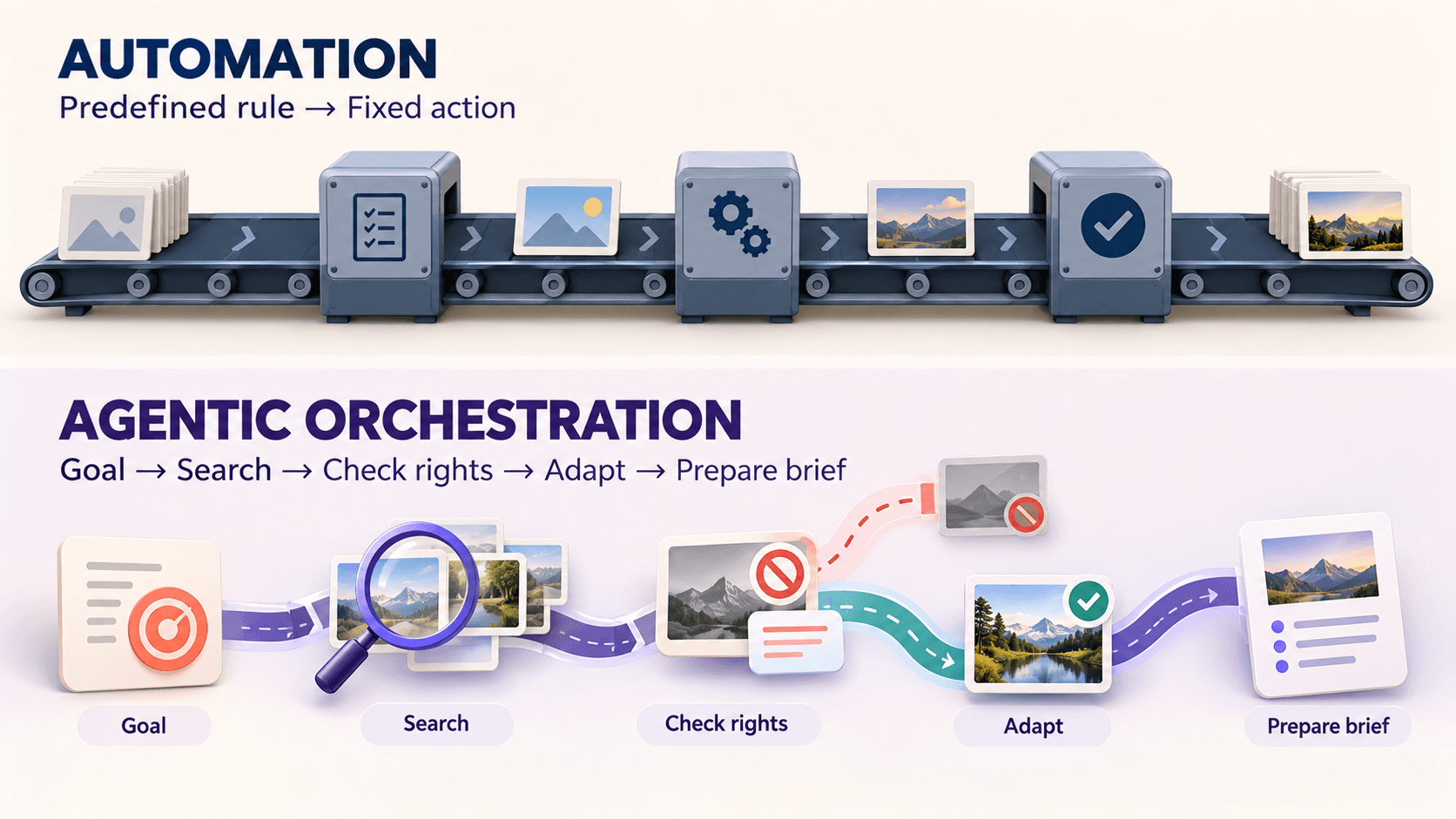
For example, an agent preparing a campaign brief could search for relevant footage, identify a licensing restriction, and suggest an alternative clip.
This ability to connect decisions and actions is what distinguishes agentic workflows from isolated AI features.
How Agentic AI Works Inside a DAM
Agentic workflows can use different tools or specialized agents to complete a task. Some systems rely on a single agent with access to multiple tools, while others coordinate several agents.
The specific setup depends on the platform and the workflows it supports.
Types of AI Agents in a DAM
Different agents can support different parts of asset management and creative production.

Metadata agents: Generate or improve asset tags and descriptions.
Search agents: Interpret requests and find relevant footage or files.
Compliance agents: Check available rights information and flag potential restrictions.
Workflow agents: Coordinate asset reviews, approvals, and handoffs.
Production agents: Help prepare creative briefs, shot lists, or draft content using existing assets.
These are functional categories, not a standard set of agents every platform includes. Some systems combine several of these capabilities within a single agent.
Build-Your-Own and Composable Agents
Some DAM platforms offer prebuilt AI agents, while others allow teams to configure workflows or connect external agents such as Claude.
These connections can use APIs or standards like the Model Context Protocol (MCP), allowing approved AI tools to access relevant asset information.
For example, an agent could search for footage, check available rights information, and prepare a creative brief using connected tools. The actions it can perform depend on the integrations and permissions available.
Why Clean Metadata and Taxonomy Come First
AI agents depend on accurate asset information to make useful decisions. Missing tags, inconsistent naming, or outdated rights information can lead to incorrect recommendations.
A consistent DAM taxonomy and reliable metadata tagging help agents find relevant assets and use them appropriately.
The Core Pillars of Agentic DAM
Agentic DAM combines asset management capabilities with AI-driven workflows. These six areas are useful when evaluating how well a platform supports agentic tasks.
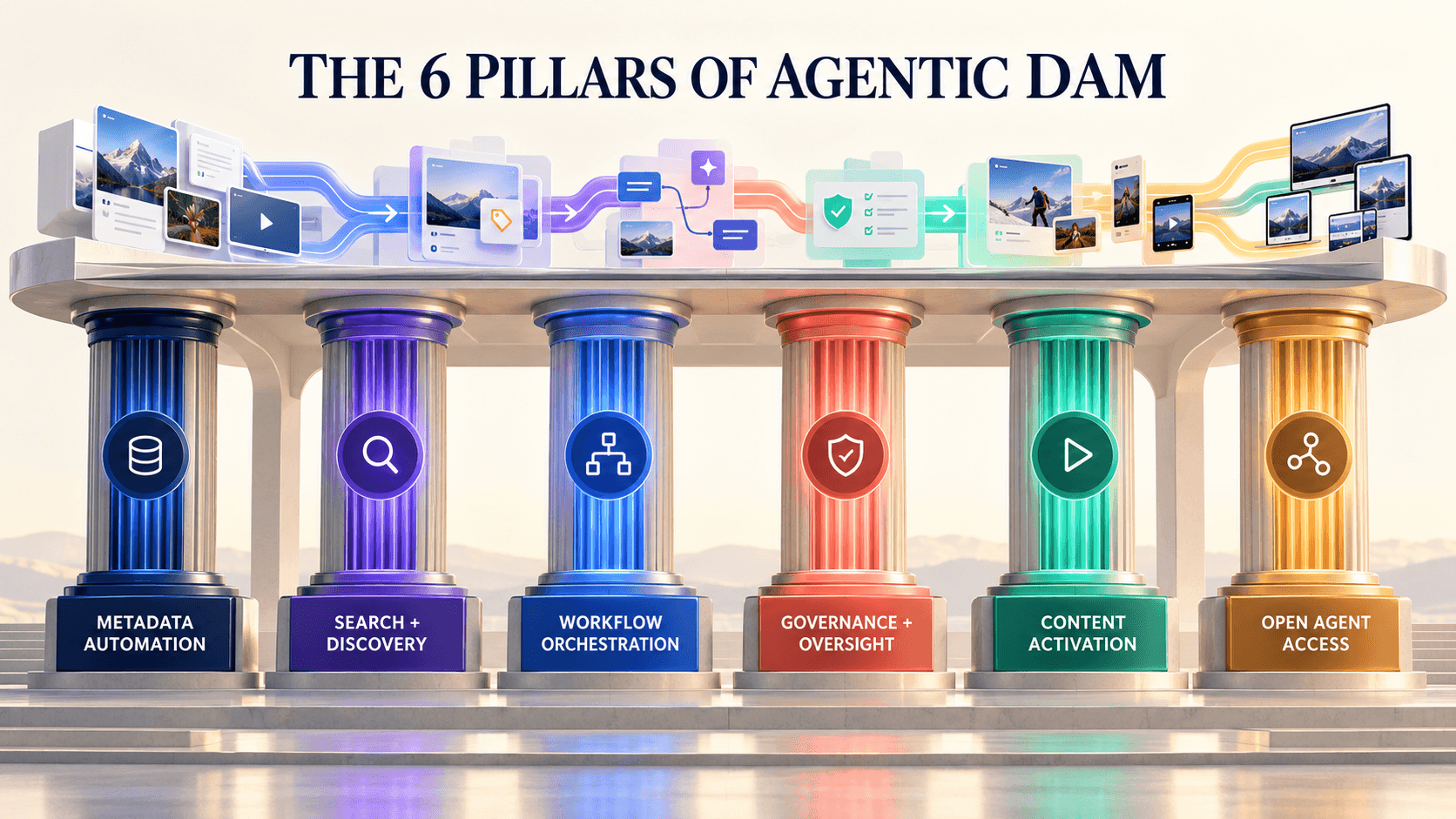
1. Metadata Automation
AI can generate or suggest metadata as assets enter the library. For video, this may include identifying products, creators, scenes, and shot types.
Accurate metadata helps agents find and work with relevant footage.
2. Search and Discovery
AI-powered search can interpret natural language requests and identify relevant assets beyond exact keyword matches.
For example, a search for "creator unboxing a product" may return matching footage based on visual content, metadata, or both.
3. Workflow Orchestration
Agentic workflows can connect tasks such as asset discovery, rights review, and creative briefing.
Instead of requiring users to complete each step separately, an agent can coordinate supported actions and flag decisions that need human input.
4. Governance, Brand Safety, and Human Oversight
Agents need access to accurate permissions, usage rights, and brand guidelines.
When this information is available and integrated into the workflow, agents can help identify restricted assets or expired licenses. Human approval remains important for sensitive actions.
Usage rights tracking provides information that teams and connected tools can use when reviewing assets.
5. Activation and Content Intelligence
Agentic workflows can help teams reuse existing assets by matching footage to creative briefs, identifying suitable clips, and highlighting missing content.
This can support production planning without requiring teams to search through every file manually.
6. Open Access for External Agents
Some teams use external AI tools such as Claude alongside their existing software.
An agentic DAM should provide secure ways for approved tools to access relevant asset information, with permissions and controls that match the intended workflow.
Agentic DAM vs Traditional DAM
Traditional DAM platforms already support many advanced capabilities, including AI tagging, search, and workflow automation.
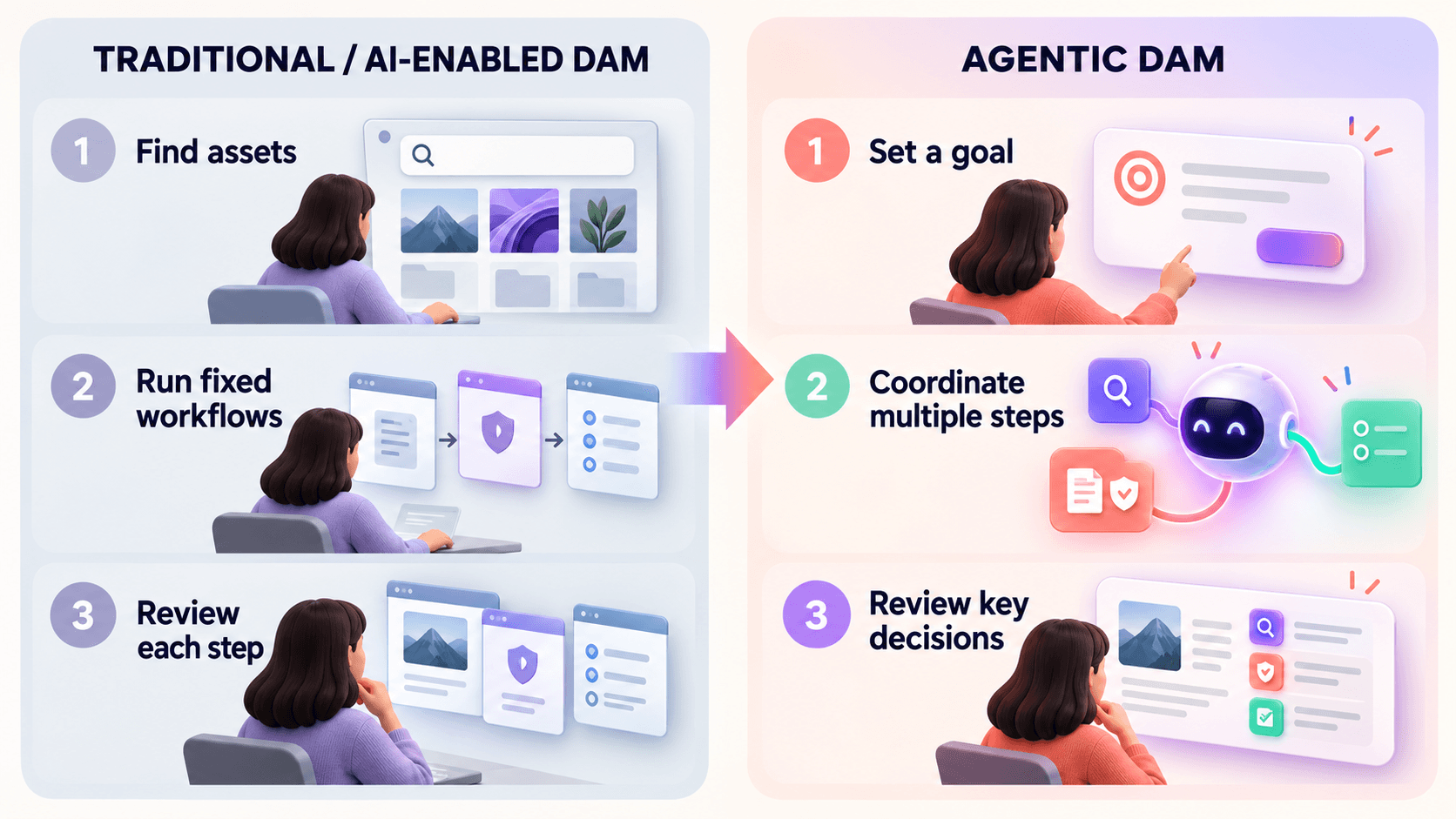
The main difference is how AI coordinates tasks and acts on the information available.
Area | Traditional or AI-Enabled DAM | Agentic DAM |
Metadata | Manual and automated tagging | Can coordinate enrichment and review |
Search | Keywords, filters, and AI-powered discovery | Can use search results within multi-step tasks |
Workflows | Manual and rule-based automation | Can plan and adapt steps toward a goal |
Rights | Rights tracking and permissions | Can use rights information to support decisions |
Human role | Manages workflows and reviews assets | Sets goals, permissions, and approval requirements |
Cloud Storage Is Not the Same as DAM
Cloud storage platforms such as Google Drive help teams store, sync, and share files.
A cloud-based DAM adds specialized asset management capabilities, such as structured metadata, advanced discovery, and usage rights tracking.
Which Approach Should You Choose?
Traditional DAM may be sufficient when teams primarily need organized storage, search, and established workflows.
Agentic DAM becomes more useful when teams need AI to coordinate several tasks, such as finding footage, checking available rights information, and preparing assets for production.
The right choice depends on the complexity of your workflows, not just the size of your asset library.
How Agentic DAM Changes Everyday Workflows
For video ad teams, agentic workflows can reduce the number of manual steps involved in finding and preparing creative assets.
Here's how common tasks can change:
Finding footage: Search for specific scenes or actions instead of manually reviewing entire videos.
Checking rights: Use available rights metadata to flag restrictions before assets are reused.
Creating briefs: Match creative requirements with relevant footage and prepare a shot list for review.
Managing uploads: Generate metadata suggestions and organize incoming footage with less manual effort.
Example: Preparing a Testimonial Ad
Consider a creative strategist preparing a testimonial ad about sleep quality.
An agentic workflow could:
Search the library for relevant creator testimonials.
Identify suitable clips based on available metadata and footage.
Check recorded usage rights and flag potential restrictions.
Highlight missing shots needed for the concept.
Prepare a footage-matched brief for the creative team to review.
The exact steps depend on the platform's capabilities and integrations, but the goal is to connect asset discovery with production planning.
What Agentic DAM Means for Video Ad Teams
Video ad teams often work with large amounts of creator footage, product demonstrations, and campaign variations. Finding the right clips and preparing them for reuse can take considerable time.
Recharm supports this process through AI-powered footage organization and discovery.
Its AI tagging helps organize video assets using creative metadata, while visual search helps teams find relevant moments within footage.
Through Recharm's Claude plugin, teams can also use Claude-assisted workflows for tasks such as identifying missing footage and preparing creative briefs.
For example, Footage Gap Finder helps identify missing shots for a campaign concept, while Brief Creator supports the process of matching creative requirements with available footage.
The aim is to help creative teams spend less time searching and more time working with relevant assets.
Recharm customers have also reported improvements in their creative workflows. HexClad increased its ad edits by 3x, while FabFitFun scaled video production from 100 to 400 videos per quarter.
These are customer outcomes associated with their broader Recharm workflows, not proof that agentic AI alone produced the results.
For more information about organizing creative assets, explore our DAM features guide.
Who Benefits From Agentic AI in DAM?
Agentic workflows can support teams that regularly search, organize, review, and reuse digital assets.
Different roles benefit in different ways:
Creative strategists: Prepare footage-matched briefs and identify missing assets using a creative brief workflow.
Video editors: Spend less time searching for relevant footage and more time editing. See how Recharm helps video editors work faster.
Marketing teams: Find and reuse relevant campaign assets through DAM for marketing.
Legal and compliance teams: Review recorded usage rights and identify potential restrictions using digital rights management workflows.
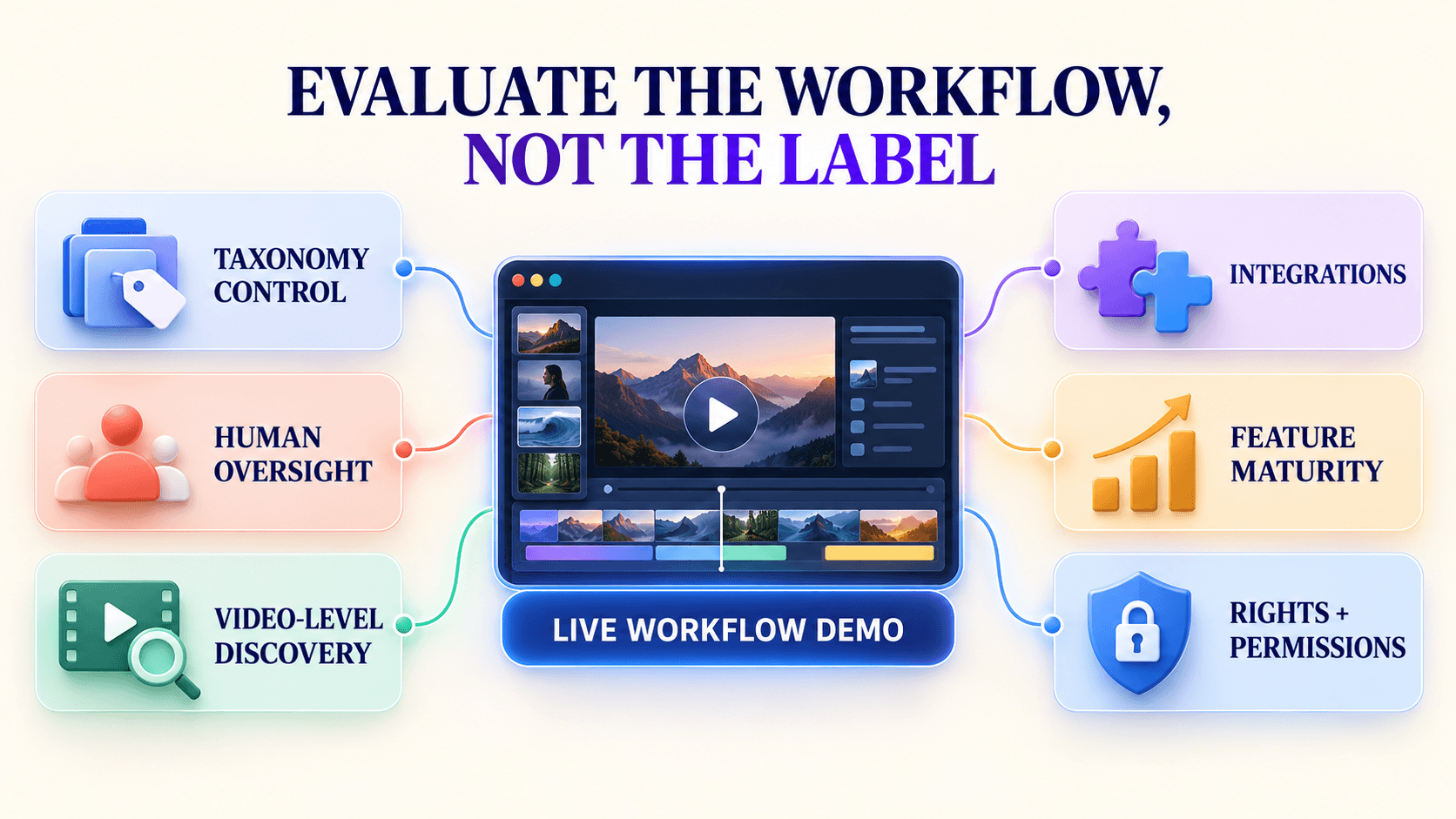
How to Evaluate Agentic DAM Platforms
Not every platform offering AI features supports genuinely agentic workflows.
Before choosing a platform, test how its capabilities work with your actual assets and production requirements.
Taxonomy control: Can you customize metadata and asset categories to match your workflow?
Human oversight: Can team members review, correct, or approve actions before they are completed?
Video-level discovery: Can the system identify relevant moments within videos, or does it only search entire files?
Integrations: Can it connect with your storage platforms, production tools, and external AI agents?
Feature maturity: Can the platform demonstrate a complete multi-step workflow rather than isolated AI features?
Rights and permissions: Does it respect user access controls and use available rights information when making recommendations?
Feature maturity is particularly important. Gartner predicts that more than 40% of agentic AI projects will be canceled by the end of 2027, citing factors such as rising costs, unclear business value, and inadequate risk controls.
Ask vendors to demonstrate a complete workflow using your own assets before making a decision.
The Future of Agentic DAM
Agentic AI is expected to become more common across enterprise software.
Gartner predicts that at least 15% of day-to-day work decisions will be made autonomously through agentic AI by 2028, compared with 0% in 2024.
For digital asset management, several developments could shape how teams work with their libraries:
Multi-agent workflows: Specialized agents may coordinate asset discovery, rights review, and production tasks.
External AI connections: Standards such as MCP may make it easier for approved AI tools to work with DAM libraries.
Better rights and provenance tracking: More structured information about ownership, permissions, and asset history could support safer reuse.
These developments will depend on reliable metadata, secure integrations, and clear human oversight.
Make Your Creative Library More Useful With Recharm
A well-organized asset library helps teams find footage. Connected AI workflows can help them use that footage more effectively.
Recharm brings video organization, AI-powered discovery, and Claude-assisted workflows together to support creative production.
Explore Recharm's Claude skills to see how your team can connect existing footage with creative briefs and production planning.
FAQs
What Is an Agentic DAM?
An agentic DAM uses AI agents to plan and carry out connected tasks involving digital assets. Depending on the platform, these tasks may include searching footage, checking available rights information, and preparing assets for review.
What Is the Difference Between Traditional DAM and Agentic DAM?
Traditional DAM platforms focus on organizing, managing, and retrieving assets, often with AI-powered features and automation.
Agentic DAM extends these capabilities by allowing AI agents to coordinate multiple tasks toward a defined goal.
Does Agentic DAM Replace Creative or DAM Teams?
No. AI agents can assist with repetitive tasks such as tagging, footage discovery, and preparing drafts.
Creative teams still make decisions about strategy, messaging, quality, and approvals. DAM administrators remain responsible for metadata standards, access controls, and governance.
Do I Need a Dedicated DAM If I Already Use Google Drive?
Google Drive supports file storage, organization, and sharing. However, teams managing large creative libraries may need more specialized capabilities, including video-level discovery, structured metadata, and usage rights tracking.
What Does DAM Mean in Marketing?
DAM stands for digital asset management. It refers to the systems and processes marketing teams use to organize, find, manage, and share creative assets such as videos, images, and documents.

