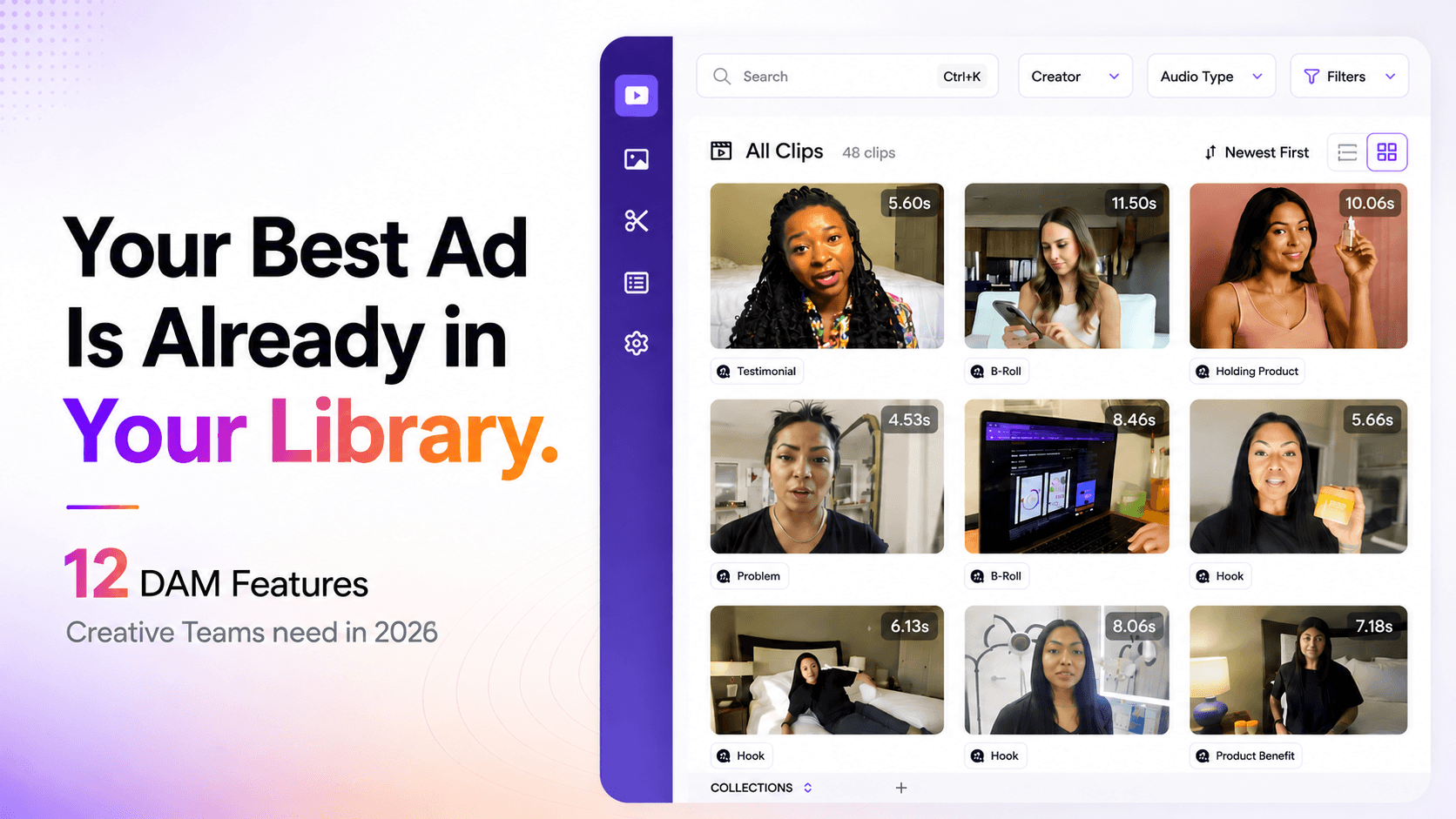

Most DAM comparison guides simply list dozens of features (50+!), which can overwhelm creative teams. These lists are usually written for enterprise brand managers, not for video focused teams producing ads at scale.
But more features don’t necessarily mean better results. Performance marketers and video editors need a smaller set of high-impact capabilities that actually speed up creative production.
This guide focuses on the 12 essential DAM features for 2026, specifically for teams managing large volumes of UGC videos and ad creatives. Instead of listing everything a DAM can do, we focus on what actually helps creative teams find, reuse, and iterate content faster.
TL;DR:
Static vs Video: Traditional DAMs work well for images and documents but struggle with video, which is larger and time-based. Without video-specific features, they quickly become a bottleneck.
Must-Have Features: Modern DAMs should include AI auto tagging, transcript search, modular clip libraries, version control, and workflow automation.
Creative Iteration: Video ad teams need tools that let them search inside content for a spoken phrase or scene, not just filenames.
Video-First Platforms: Platforms like Recharm act as a search engine for footage, automatically indexing transcripts and clips to enable rapid creative testing.
These recommendations are based on industry guides, vendor documentation, and analysis of more than seven leading DAM platforms.
We also incorporate insights from creative teams managing large ad libraries, where fast search, tagging, and iteration matter far more than enterprise-style asset governance.
This guide is written specifically for creative strategists, video editors, and performance marketers, focusing on video workflows and creative iteration, not IT-driven document management.
2026 Selection Matrix: Criteria for High-Performance Asset Management
When evaluating DAMs for modern creative teams, focus on these criteria:
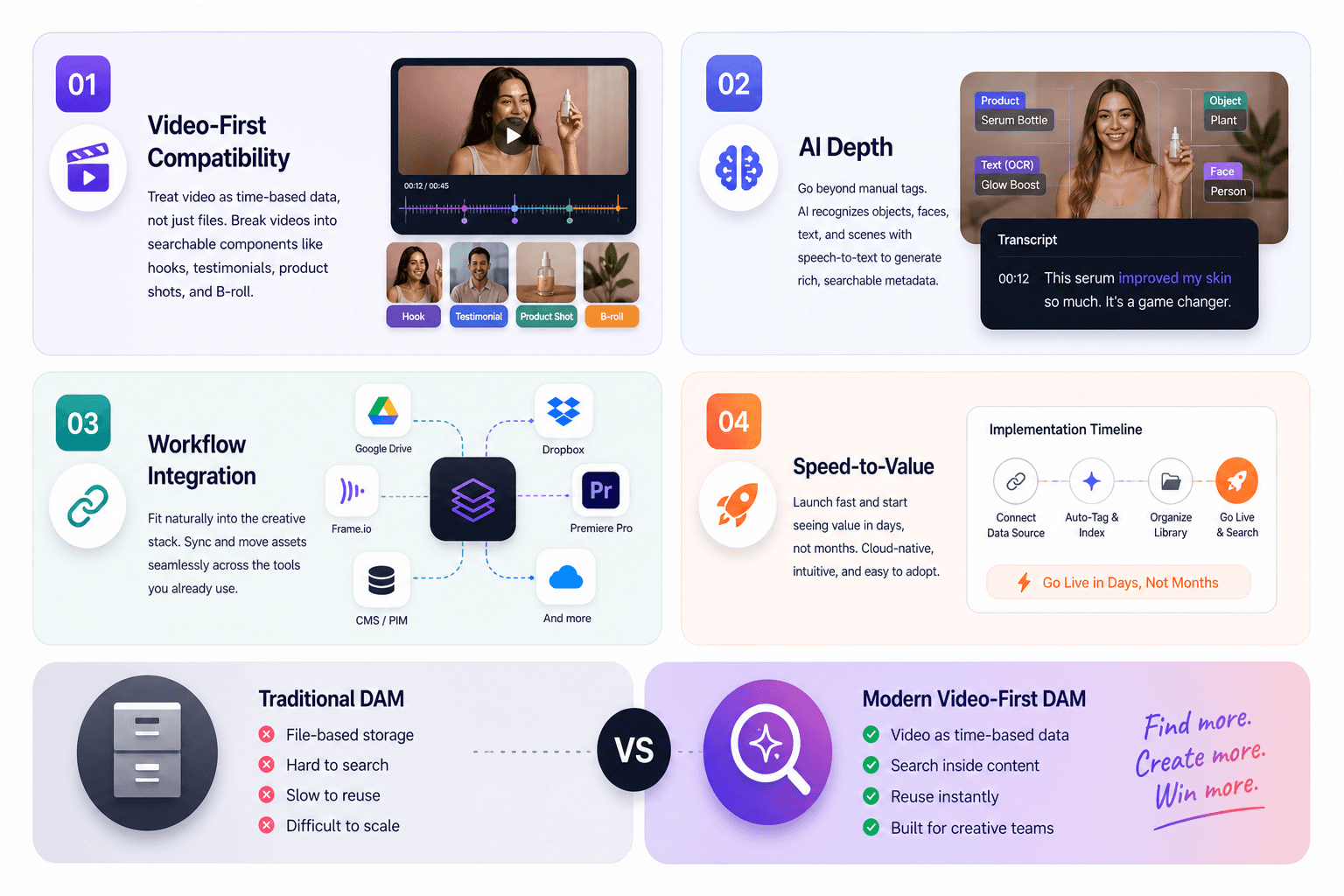
Video-First Compatibility: A good DAM for ads should treat video as time-based data, not just files. It must handle high-resolution UGC, B-roll, and multi-clip ad shoots without slowing down. Ideally, it breaks videos into searchable components like hooks, testimonials, product shots, and B-roll, so teams can find clips by content instead of scrubbing entire files.
AI Depth: Modern DAMs should go beyond manual tags by using AI for visual recognition and speech-to-text transcription. Features like object detection, face recognition, OCR, and scene analysis automatically generate rich metadata. This allows teams to search videos by spoken lines, visual elements, or context, while humans only need to review or refine the tags.
Workflow Integration: A DAM should fit naturally into the existing creative stack. Look for integrations with tools like Google Drive, Dropbox, Frame.io, Premiere Pro, and CMS/PIM systems. These connections allow assets to sync automatically and move between tools without manual transfers or duplicated uploads.
Speed-to-Value: Creative teams cannot wait months for implementation. The best DAM platforms are cloud-based, intuitive, and quick to adopt, allowing teams to start organizing and searching assets within days or weeks rather than going through a long enterprise setup process.
What Is Digital Asset Management Software?
Digital Asset Management (DAM) is a centralized system for storing, organizing, searching, and distributing your rich media files. In plain terms, it’s a “single source of truth” for all assets – images, videos, audio, documents – so teams don’t waste time hunting through email, shared drives, or old folders. DAMs let you attach rich metadata (descriptions, tags, usage rights, custom fields) and make everything searchable.
How DAM Differs from Cloud Storage
A DAM does far more than tools like Google Drive or Dropbox. Cloud drives organize files through folders and filenames, while a DAM indexes the actual content inside assets. This enables advanced search using metadata, transcripts, and NLP. Drives may preview files, but they lack deep search, structured metadata, and video indexing, which makes large libraries difficult to manage at scale.
Video assets are large, time-based, and often contain multiple usable moments within one file. A single shoot can include hooks, testimonials, and product shots inside one clip. Video-ready DAMs track creator attribution, campaign tags, and usage rights, and allow teams to jump directly to specific moments instead of scrubbing through files. In practice, they treat each video as a searchable library of clips and transcripts, not just a file.
Why Traditional DAM Features Are No Longer Enough
Creative production has changed. Simply having a brand asset library is not enough in the era of user-generated content (UGC) and data-driven ads.
UGC Explosion: DTC brands now receive hundreds of creator videos each month from influencer campaigns and social ads. Without a DAM, these assets quickly scatter across Google Drive folders and become difficult to manage. Traditional DAMs built for brand assets often struggle with this volume of raw video content.
Performance Marketing Demands: Ad teams treat every video as a testing ground for new hooks. They need to quickly answer questions like: Which clip contains a certain phrase? Which creator recorded it? Do we have usage rights? Basic DAM search by filename or simple tags can’t support this. Modern teams rely on transcript search and creator tagging to locate specific moments inside videos.
Ad Platforms’ Creative Pressure: Platforms like Meta and TikTok reward constant creative variation, which requires remixing assets quickly. Without searchable clips and transcripts, teams must recut videos from scratch. A modern DAM enables faster iteration by letting teams reuse existing footage and assemble new ad variations quickly.
12 Key Digital Asset Management Features (The 2026 Standard)
Below are the 12 must-have DAM features for creative production teams today. Each feature is explained, with why it matters and a real-world example.
1. AI-Powered Auto-Tagging
The DAM should automatically label assets with relevant tags. Modern systems use computer vision and NLP to recognize objects, scenes, text, and even emotions in images and videos.
For example, a smart DAM may auto-tag a shot as “female model,” “outdoor scene,” or the product name, eliminating the need for manual tagging.
These AI-generated tags, from simple ones like color or object to contextual ones like celebrity names or campaign themes, power asset search. Advanced DAMs apply tagging at the scene or creator level, not just the file level.
This dramatically reduces search time. Teams can locate clips by subject or theme in seconds instead of digging through folders.
2. Transcript Search and NLP
A modern DAM should allow users to search the spoken words inside videos just like text. This requires full speech-to-text transcription combined with natural-language search.
In UGC workflows, a marketer should be able to type a phrase someone said — for example “improved my skin”, and jump directly to the exact second where that line appears.
Strong systems index the entire transcript of every clip. Searches return timestamps inside videos, not just filenames.
This capability transforms content reuse. Teams can rediscover valuable moments from older footage and reuse them in new campaigns much faster.
3. Modular Clip Organization
A video-focused DAM treats videos as libraries of clips, not single files.
Instead of one long file, the system automatically segments footage into meaningful parts such as hooks, testimonials, product shots, B-roll, and callouts.
This allows teams to browse clips across the entire library. For example, searching “product demo” can show all relevant segments regardless of which video they came from.
Without this feature, editors must scrub through long files to find a single moment. A modular clip system ensures that valuable 3-second moments inside long videos are never lost.
4. Metadata and Taxonomy Management
Strong metadata systems form the backbone of any DAM.
The platform should support structured metadata fields such as campaign name, creator, product SKU, usage rights, and market region.
It should also enforce controlled vocabularies so tagging remains consistent across teams. For example, tags like “Campaign: Summer Launch” or “Market: APAC” should follow a standardized format.
Advanced systems support hierarchical categories and synonyms, allowing searches for related terms such as “running shoes” and “sneakers.”
With a clear taxonomy, teams can filter assets precisely — for example, showing only licensed influencer videos or approved ad creatives.
5. Version Control and Asset Lifecycle
Creative assets constantly evolve. A DAM must track the entire lifecycle of every file.
The system should store every version while defaulting users to the latest approved one. This removes confusion around filenames like Final_v3_USE_THIS.mp4.
Version control also records who edited the file, when it changed, and which version was approved for publishing.
For video teams, this ensures that all cuts — v1, v2, v3 — stay organized in one place while clearly marking the approved version.
6. Granular Access Control
Not every user should have the same level of access.
A DAM must support role-based permissions that control who can view, edit, download, or share assets.
For example, external collaborators may only see campaign-specific content, while internal editors can access raw footage.
Many DAM platforms also support SSO authentication and approval workflows to ensure security and governance.
These controls prevent leaks and ensure that sensitive footage or license-restricted assets never reach the wrong users.
7. Cloud Storage Integration
A good DAM should work alongside existing storage tools rather than replacing them.
Many platforms integrate directly with Google Drive, Dropbox, AWS, or Frame.io, automatically ingesting files uploaded to those systems.
For example, if an editor drops footage into a synced Drive folder, the DAM can automatically index, tag, and organize the file.
This allows teams to keep their familiar workflows while still benefiting from the DAM’s search and metadata features.
8. Scene Navigation and Fast Scrub
Video search should not require endless scrubbing.
Modern DAMs allow timeline navigation, scene previews, and deep linking to specific moments inside a video.
A strategist might highlight a line in the transcript and share a link that opens the video exactly at that timestamp.
Storyboard thumbnails and frame-level navigation further help editors quickly locate specific shots.
Instead of opening files and scrubbing manually, teams can search first and jump directly to the moment they need.
9. Usage Rights and Compliance Management
Marketing teams must track usage rights carefully.
A DAM should store metadata fields for license expiry dates, territories, and usage restrictions.
Advanced systems can automatically flag expiring assets or remove them from active libraries when licenses expire.
This prevents accidental misuse of stock footage or influencer content and ensures campaigns remain legally compliant.
By embedding compliance into the workflow, teams can focus on creative work instead of manual tracking.
10. Workflow Automation and Approvals
Creative production involves multiple reviews and approvals.
A DAM should centralize this process with built-in workflow automation, allowing teams to comment, approve, or reject assets directly in the platform.
Assets can also move automatically through review stages based on metadata tags.
For example, when an editor uploads a new cut and labels it “Ready for Review,” the system can notify stakeholders automatically.
This keeps feedback, revisions, and approvals organized in one place.
11. DAM Analytics and Reporting
A smart DAM also provides insight into how assets are used.
Analytics tools can show which files are viewed, downloaded, or reused most frequently.
This data helps teams identify top-performing creatives and underused assets.
For example, a creative lead might discover that a particular product clip appears in most campaigns, guiding future production decisions.
These insights turn the DAM into a strategic tool, not just a storage system.
12. Human-Verified Tagging
AI tagging is powerful but imperfect.
Leading DAM platforms combine automated tagging with human validation to ensure accuracy.
AI may tag a scene as “woman” or “outdoor,” but a human reviewer can refine this to “Beauty Influencer” or “Product Demo – Serum.”
This hybrid approach ensures tags align with brand language and campaign strategy.
The result is a clean, consistent taxonomy that keeps search results accurate across the entire library.
What to Look for in DAM Software: A 2026 Buying Checklist
When choosing a DAM today, use this checklist, organized by category:
Core Infrastructure & Security:
Multi-tenant cloud architecture (for scalable performance).
Global CDN delivery (fast access worldwide).
Granular permissions and SSO (fine-grained user access).
AI & Creative Intelligence:
Visual recognition search (objects, scenes, faces).
Transcript (speech-to-text) search across all video/audio.
Scene-level metadata (hooks, actions, emotions).
Video-First Workflow Tools:
Timeline proofing and time-stamped commenting.
Version stacking (compare/edit on top of older cuts).
Dynamic resizing and format exports (auto-create social/landscape/crop versions).
Ecosystem Connectivity:
Ad-stack integrations (connect to Facebook Ads, YouTube, etc. for direct publishing).
Creative suite plugins (Photoshop/Premiere panels to browse DAM).
CMS/PIM sync (link rich media to product records or websites).
Implementation & Adoption:
Rapid onboarding timeline (weeks, not months).
Intuitive UI (low training overhead, like a “pilot’s cockpit” of features).
Active customer support and training (to ensure fast adoption).
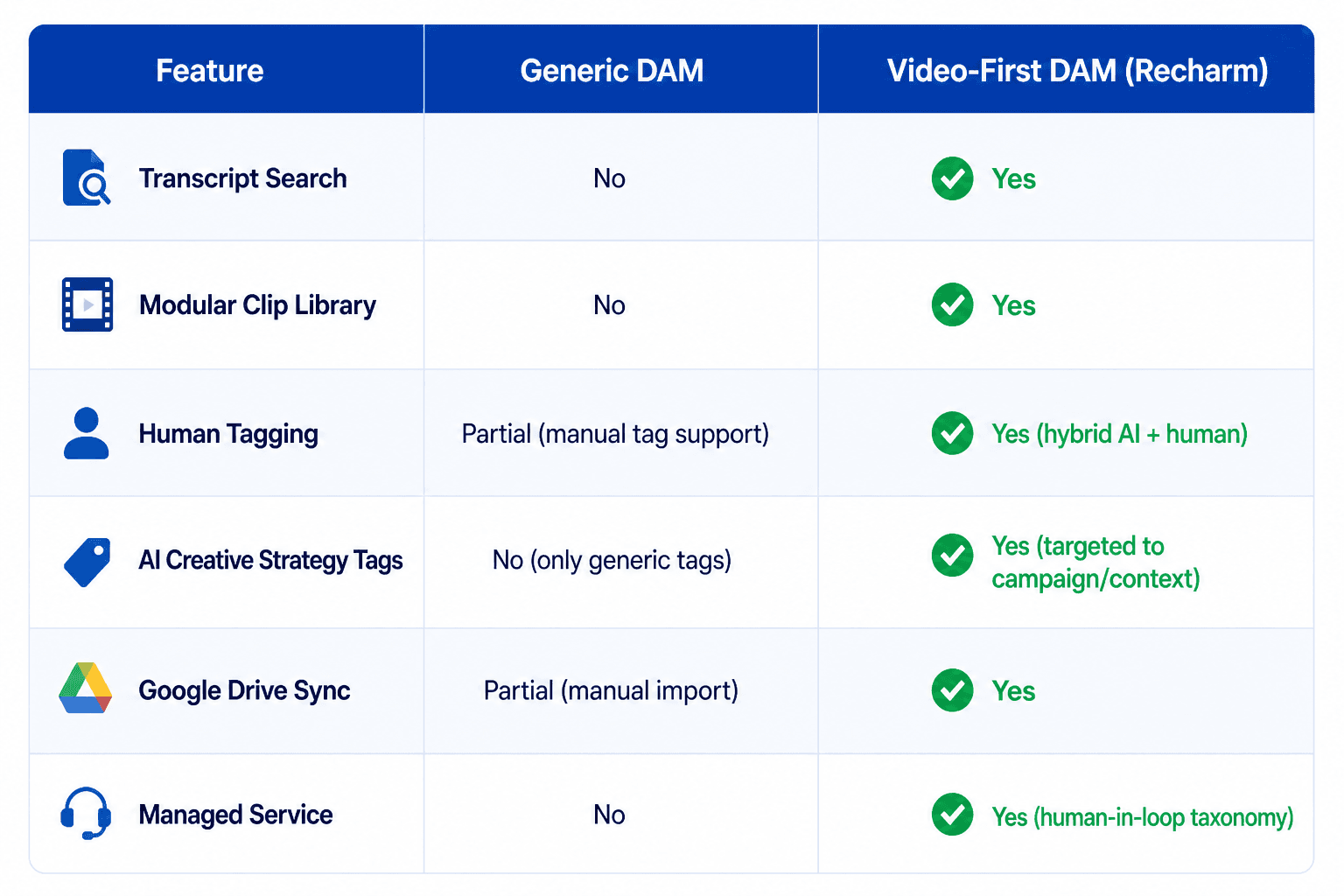
Recharm is built for active creative iteration, not just asset storage. Instead of asking “Where is this file?”, it helps teams answer a more important question: “What is the best clip for this ad angle?”
The platform treats video as a searchable database of clips. Its Hook-Swapping workflow allows marketers to find a winning ad body and quickly test new hooks or testimonials using transcript search.
For example, a strategist might identify a strong line like “game-changer for my skin,” search the library for similar phrases, and instantly assemble new ad variations using existing footage.
In contrast, most generic DAM systems function primarily as file lockers. Recharm actively supports the creative workflow by auto-detecting creators and products, enforcing structured tagging, and syncing directly with tools like Google Drive so files don’t need to be uploaded twice.
It also integrates with tools such as Frame.io, allowing teams to discover clips in Recharm and review edits in Frame.io, creating a smoother production pipeline.
The impact can be significant. Lume, a personal-care brand, doubled its number of winning ads and significantly reduced CPC after adopting Recharm. Their team produced 800 new video ads in just two months, enabling faster experimentation with creative hooks.
Results like these show how an organized video library can unlock faster creative iteration. When teams can quickly find and reuse footage, they spend less time managing files and more time producing winning ads.
Ready to accelerate your creative pipeline?
Book a demo or start a 14-day free trial of Recharm to see how a video-first DAM can streamline your workflow and scale creative production.
FAQs
Q: What are the most important features to look for in a DAM system?
A: Creative teams should prioritize advanced search, version control, and collaboration tools. Features like AI tagging, transcript search, and structured metadata make assets instantly discoverable. A good DAM should also integrate with existing tools and support workflow approvals. If your team can’t quickly find assets by content, the system won’t be used.
Q: Can digital asset management software handle large video files?
A: Yes, if the platform is built for video. Video DAMs support large 4K or 8K files, generate proxy previews for faster playback, and add metadata like transcripts and thumbnails for search. With cloud infrastructure and CDN delivery, teams can store and access large video libraries without slowing down workflows.
Q: What is the difference between AI auto-tagging and human tagging?
A: AI tagging automatically labels assets using computer vision and NLP. It’s fast but can sometimes miss context. Human tagging adds strategic and brand-specific labels that AI may not detect. The best systems combine both, AI handles the bulk tagging, while humans refine and verify the metadata.
Q: How does transcript search work in a DAM?
A: A DAM automatically transcribes video and audio files into text and indexes the transcript. Users can search for spoken phrases and jump directly to the exact moment where those words appear. This allows teams to locate specific clips or lines without manually reviewing entire videos.
Q: Do I need a DAM if I already use Google Drive or Dropbox?
A: Cloud drives are useful for file storage, but they lack advanced features like AI tagging, transcript search, and clip-level organization. As video libraries grow, assets become harder to find. A DAM adds intelligence on top of storage, making content searchable, organized, and easier to reuse.
Q: How long does DAM implementation take?
A: Modern cloud-based DAM systems can usually be implemented within a few weeks. Setup time depends on metadata structure, integrations, and team onboarding. Many mid-sized teams become fully operational within 30 days with the right onboarding support.