

A creative ops lead commissions a new product shoot because nobody can locate last quarter’s footage, even though it's sitting in the library right now, three folders deep, tagged inconsistently by whoever uploaded it. This happens constantly, and it's rarely a storage problem. The files exist. What's missing is the structure that would let anyone find them.
Without a taxonomy, an asset library is just storage with a search bar bolted on. Taxonomy is the structural layer underneath everything else: search, reuse, and governance.
TL;DR
-
A DAM taxonomy is the agreed structure for classifying assets: the categories, terms, and relationships that organize a library.
-
Taxonomy and metadata are different things that work together. Taxonomy is the structure assets sit in; metadata is the data attached to each one.
-
The three main structures, flat, hierarchical, and faceted, suit different library sizes and search patterns, and choosing wrong causes adoption to fail quietly.
-
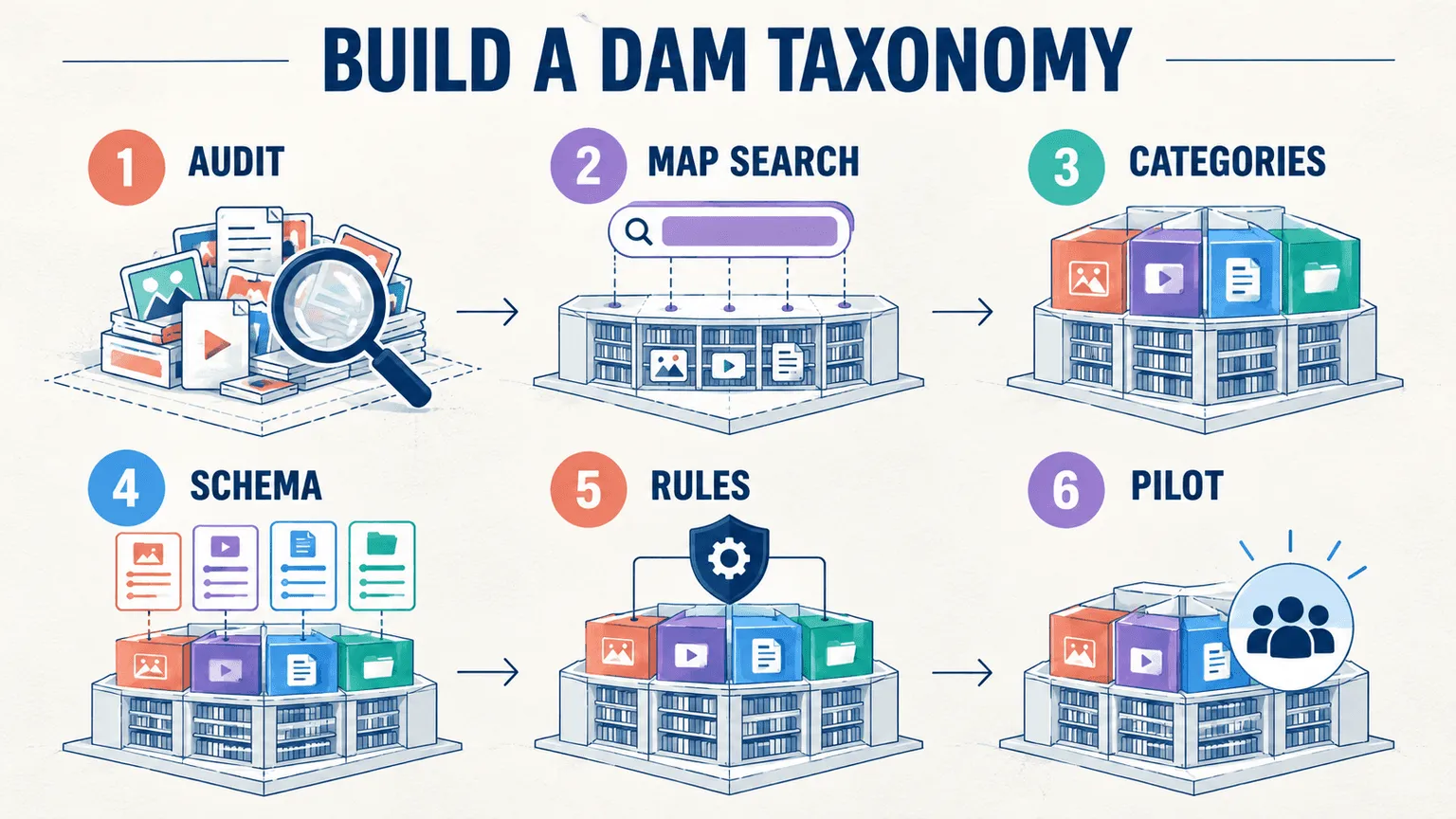
Building a working taxonomy is a six-step process: audit, map search behavior, define categories, design the metadata schema, document naming rules, then pilot before full rollout.
-
Video assets break traditional taxonomy models in a way most DAM guides don't address, since a single video often contains several distinct sub-assets that each need their own place in the structure.
What Is a DAM Taxonomy?
A digital asset management taxonomy is the agreed structure for classifying assets: the categories, controlled terms, and relationships between them that determine where an asset lives and how it gets found.
A simple example makes this concrete. A three-level tree might look like: Campaign → Asset Type → Product Line. A single video ad sits under "Spring Launch 2026" → "Testimonial" → "Skincare Line," and that position alone tells anyone browsing exactly what it is without opening the file.
This applies to every asset type, images, documents, and video alike, not just one format. If you're still working out whether a full DAM system is the right move before investing in taxonomy, see our guide to what digital asset management actually is first.
Taxonomy vs. Metadata: How They Differ and How They Work Together
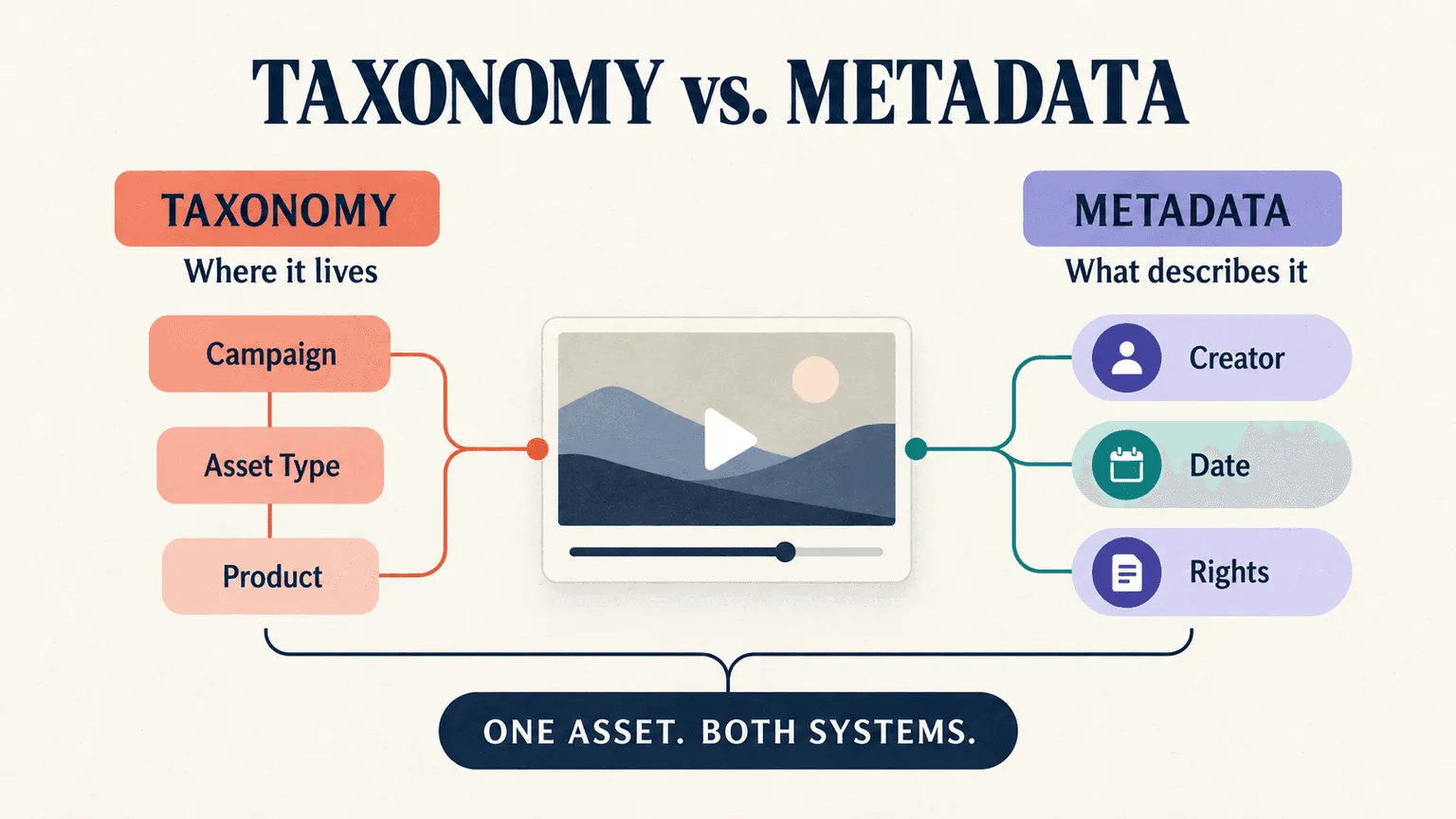
Taxonomy is the structure. Metadata is the description. Taxonomy determines where an asset sits within a classification system. Metadata is the descriptive data attached to that specific asset: its creator, date, usage rights, and resolution. Neither one works well without the other: metadata with no taxonomy behind it produces a flat pile of tagged files with no browsable structure, and taxonomy with no metadata gives you folders but no way to filter or search within them.
A single asset carries both at once. That testimonial video sits in its taxonomy position (Campaign → Asset Type → Product Line) while separately carrying metadata fields: creator name, shoot date, usage rights expiration, talent release status. Recharm's usage rights tracking is a good example of a metadata layer that only becomes useful once it's sitting on top of a working taxonomy; the rights data means little if nobody can find the asset it's attached to.
The confusion between the two persists partly because most DAM interfaces blur them visually; folders and tags often sit in the same sidebar, which is exactly why teams end up conflating "where does this live" with "what does this say about itself." They're solving different problems.
Why Taxonomy Decides Whether Your Asset Library Is Usable
The cost of no structure shows up as duplicate shoots, recreated assets, and hours lost to search that should have taken seconds. Teams that switch to a properly structured library see this directly: one HexClad creative lead reported clip search time dropping from 30 minutes to under 5 minutes, an 83% reduction, once footage was organized under a real taxonomy rather than scattered across folders.
It's worth noting that even AI-powered search is more useful when consistent classification exists underneath it. AI can surface an asset based on visual content, but it still relies on a taxonomy to group related assets, apply consistent categories, and make browsing possible for someone who isn't running a specific search, just scanning what's available.
Onboarding speed is the other quiet cost. A new editor or an agency partner brought in for a single campaign finds what they need on day one when the structure is legible, and spends their first week asking colleagues where things are when it isn't.
Flat vs. Hierarchical vs. Faceted: Choosing a Structure
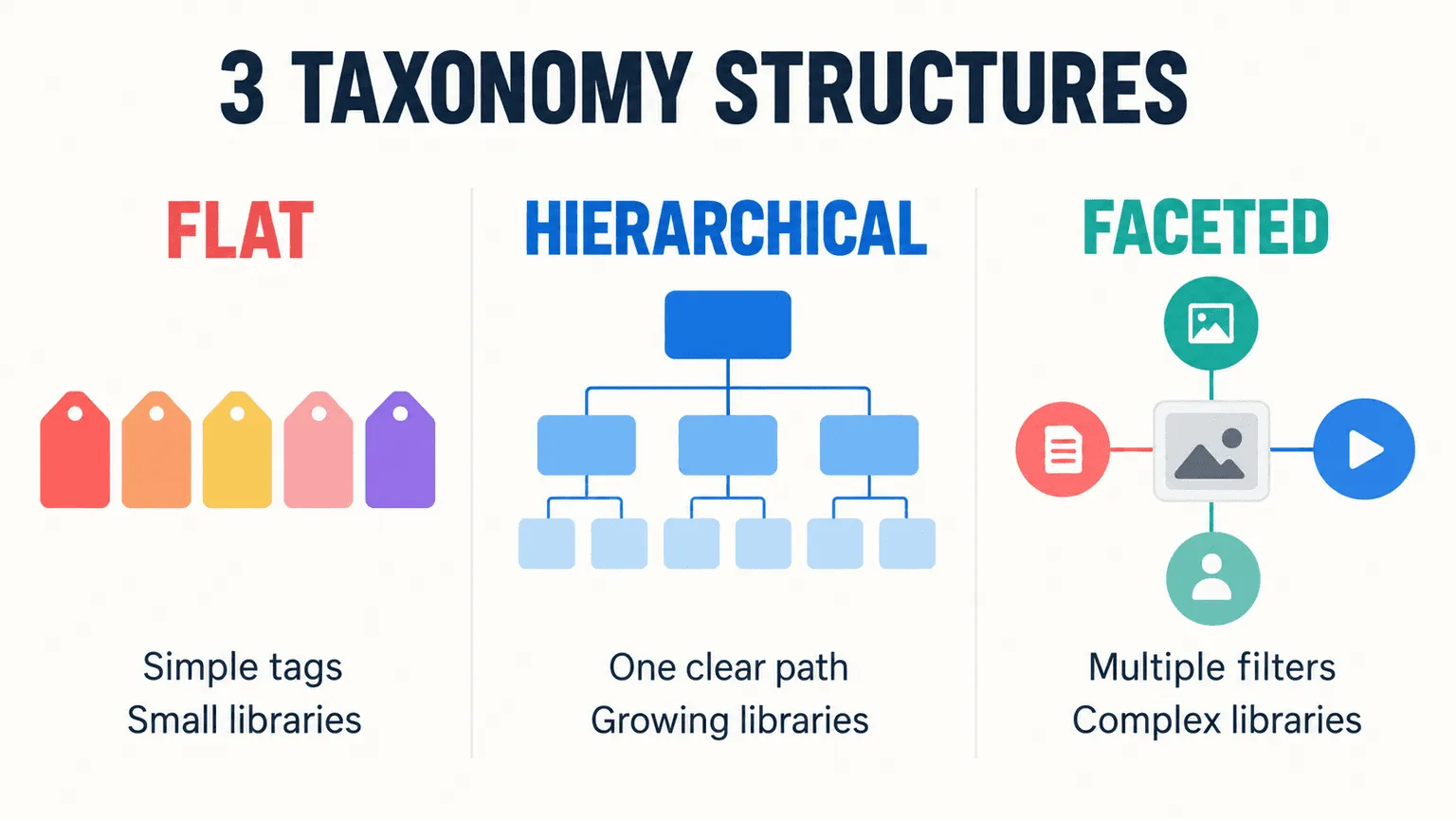
| Structure | Best Library Size | Browsing Experience | Assets That Belong in Two Places | Maintenance Overhead |
|---|---|---|---|---|
| Flat | Under a few thousand assets | Simple, single-level tag list | Handled naturally, just apply multiple tags | Low, but breaks down fast past the size ceiling |
| Hierarchical | Thousands to tens of thousands | Strong for browsing down a clear path | Brittle, an asset technically belongs in one branch | Moderate, requires discipline to keep the tree consistent |
| Faceted | High-volume, complex libraries | Strongest, filter by any combination of dimensions | Native strength, no forced single location | Higher upfront design cost, lower ongoing friction |
Flat structures work fine under a few thousand assets, where a simple tag list is enough to browse and filter. Past that ceiling, a flat structure stops scaling because there's no way to narrow a search beyond keyword matching.
Hierarchical structures use parent-child trees, strong for browsing when there's one clear path down to what you need, but brittle the moment an asset genuinely belongs in two places at once. A product demo that's also a testimonial has to pick a branch, which forces an arbitrary decision every time that overlap occurs.
Faceted structures apply independent dimensions in combination, product, campaign, format, persona, rather than forcing a single path. This suits high-volume creative libraries precisely because assets in active creative production rarely fit one category cleanly.
The decision rule is simple: library size and how many ways your team needs to slice the content. Small, single-dimension libraries can stay flat. Anything that needs to answer "show me all testimonials from this campaign in this format" needs faceted structure, because that query spans three independent dimensions at once.
The Taxonomy Problem Unique to Video Assets
Most taxonomy guides, including nearly everything published on this topic, are written for document and image libraries, where the core assumption is that one file equals one taxonomy position. A single photo lives in exactly one place in the tree, tagged once.
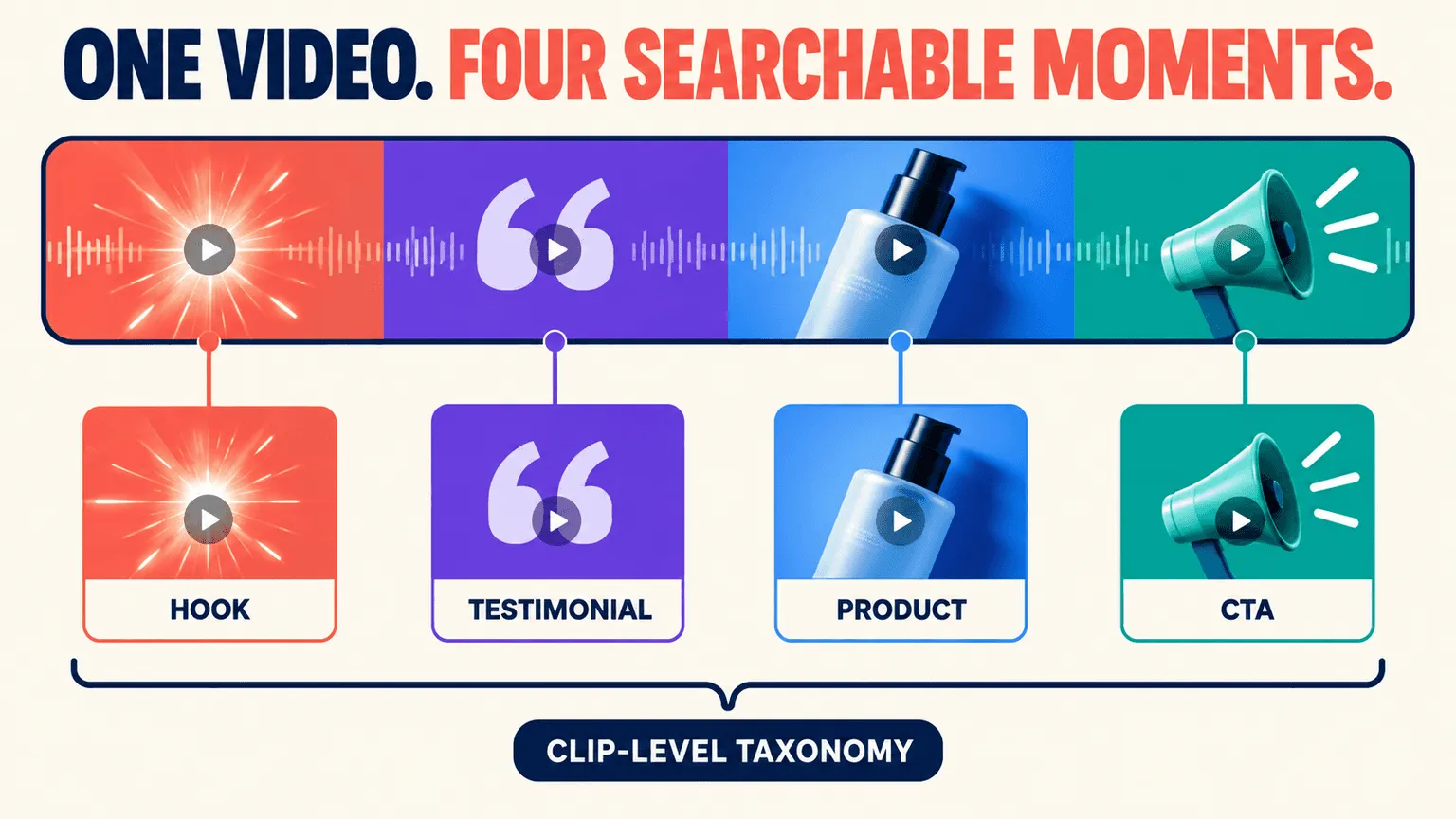
Video breaks that assumption entirely, and it's a gap most DAM taxonomy content doesn't address because most DAM platforms weren't built video-first. A single raw video file routinely contains several genuinely distinct sub-assets: a hook in the first three seconds, a testimonial in the middle, a product close-up near the end, a call-to-action at the close. Each of those sub-assets deserves its own place in the taxonomy, its own tags, its own findability, but they all live inside one physical file.
A taxonomy designed only for whole-file classification can't represent this. It treats the entire three-minute video as a single object, which means the 4-second hook buried at the 1:47 mark is functionally invisible to anyone searching the library, even though it might be the single most reusable piece of content in the file. This is where a faceted, clip-level structure matters specifically for video, where the taxonomy applies not just to files but to segments within files. Organizing an asset library this way, breaking raw footage into individually classified clips rather than tagging whole files, is what makes that hook findable and reusable on its own, separate from the video it originated in.
The Core Components of a DAM Taxonomy
Four components work together as a single connected system, not as separate checklist items.
-
Categories. The top-level buckets everything sorts into first. Keep the first level tight, between five and nine categories. More than that and people stop being able to hold the whole structure in their head, which defeats the purpose.
-
Controlled Vocabulary. A fixed, agreed term list that stops drift between "video," "vid," and "footage" across different contributors tagging the same kind of content differently. Without this, search results fragment across synonyms nobody intended to create.
-
Metadata Schema. The specific fields attached to each asset, and a clear line between which ones are mandatory and which are optional.
-
Naming Conventions. A repeatable filename pattern, applied consistently. One worked example: Campaign_AssetType_ProductLine_Date_Version, so SpringLaunch_Testimonial_Skincare_20260214_v2 tells you everything about the file before you've opened it.
How to Build a DAM Taxonomy in Six Steps
Step 1: Audit Your Assets and Existing Folder Structures
Count what actually exists: total assets, formats, and every storage location they're scattered across. Flag duplicates and orphaned files before designing anything new, since building a taxonomy around a library you haven't actually inventoried means designing for an assumption rather than reality.
Document how people organize content today, even if it's messy. The existing folder structure, however inconsistent, reveals the real mental model your team already uses, and a new taxonomy that ignores that model entirely will face resistance regardless of how logical it looks on paper.
Step 2: Map How Your End Users Actually Search
Interview the people who'll actually use the library, creative ops, editors, marketers, and ask them specifically what they type when they're trying to find something. Not what you assume they'd type. What they actually type.
This is the single biggest failure point in taxonomy design: structuring around how assets were produced (by shoot date, by production batch) rather than how they're actually retrieved (by campaign, by product, by creative angle). A taxonomy that mirrors your production process instead of your search behavior will always feel wrong to the people using it.
Step 3: Identify Your Top-Level Categories
Pick the one dimension every single asset in your library has in common, campaign, brand, product line, or asset type, and use that as your first level.
Test the coverage before committing. File twenty random assets from across your actual library into the proposed structure. If any of them genuinely resist clean classification, the categories are wrong and need revision before you scale the structure to the full library.
Step 4: Design a Metadata Schema That Supports the Taxonomy
List every field you're considering, then split it firmly into required versus optional. Keep required fields under six. Past that threshold, people start skipping fields or entering junk values just to get past the upload step, and compliance with the schema collapses.
Specify a value type for every field, free text, a controlled dropdown list, or a date picker, rather than leaving everything as open text. Free text fields are where the "video / vid / footage" drift happens, since nothing stops two people from describing the same thing two different ways.
Step 5: Document Naming Conventions and Governance Rules
Write out the filename pattern with a worked example and a fixed element order, the same one from the core components section above, and document it somewhere every contributor can find it.
Assign a named owner who approves any new taxonomy term before it goes live. Taxonomies without a clear owner fragment within months, as different teams quietly add their own terms to solve their own immediate problem without checking whether something equivalent already exists.
Step 6: Test, Launch, and Iterate
Pilot the new structure with a small group and a subset of the library before migrating everything. Watch specifically for where they fail to find something, since that failure point is exactly where the taxonomy needs revision before full rollout.
Set a review cadence from the start, quarterly works for most teams, to check which terms are actually being used, which categories have gone dead, and where the structure has started drifting from how people actually search.
Involving Stakeholders Across Teams
Who to include: creative, brand, performance marketing, legal for usage rights and licensing terms, and any agency partners who'll be working inside the library regularly.
The failure mode to avoid is design by committee. Stakeholders should inform the decision with their real search behavior and requirements, but one person needs to actually own the final structure and make the call. Consensus-built taxonomies, where every team gets its preferred category added to avoid conflict, tend to balloon past a usable size and lose the tight top-level structure that made the taxonomy work in the first place.
How AI and Auto-Tagging Apply Taxonomy at Scale
What AI does well: auto-tagging applies your controlled vocabulary across thousands of assets far faster than manual entry ever could, once that vocabulary and structure are already defined.
Where humans still matter: brand-specific terminology and precise product tagging need human accuracy that generic AI models often miss, particularly for niche products or internal naming conventions that wouldn't appear in a general training set. This is the exact gap Recharm's hybrid human and AI tagging is built to close, AI handles the volume, and human review catches what the model wouldn't know to look for on brand-specific content.
The guardrail worth stating plainly: AI applies a taxonomy that already exists. It cannot invent a working one for you from scratch. The category structure, the controlled vocabulary, the decisions about what matters to your specific team, those come first, from the six-step process above. AI scales that structure once it's built. It doesn't replace the thinking that builds it.
Keeping the Taxonomy Alive as the Business Changes
Certain events reliably force a taxonomy revision: new product lines, a rebrand, a new distribution channel, an acquisition that merges two previously separate asset libraries. None of these are edge cases. They're the normal lifecycle of a growing business, and a taxonomy that can't flex to absorb them will start accumulating workarounds instead.
Measure usage directly rather than guessing. Track search success rate and flag categories that nobody has queried in months. A category that exists but never gets used isn't neutral, it's clutter that makes the whole structure slightly harder to scan, and it should be pruned on the same quarterly cadence as everything else.
Common DAM Taxonomy Mistakes to Avoid
-
Too Many Levels. Deep trees kill adoption because nobody can hold a six-level hierarchy in their head while trying to file or find something quickly. Cap the structure at three to four levels.
-
Mirroring the Org Chart. Departments reorganize, get renamed, and merge, while the assets they created outlive all of that. Structure by content type and campaign, not by which team happened to produce something, or the taxonomy inherits every future reorg as a structural problem.
-
No Controlled Vocabulary. Free-text tagging breeds synonyms silently. "Video," "vid," and "footage" all mean the same thing to a person and three different things to a search index, fragmenting results nobody intended to split apart.
FAQs
What Is the Difference Between a Flat and a Hierarchical DAM Taxonomy?
A flat taxonomy applies tags without nested structure, which works well under a few thousand assets but breaks down past that size. A hierarchical taxonomy organizes assets into parent-child trees, which is stronger for browsing down a clear path but becomes brittle when an asset genuinely belongs in more than one branch at once.
How Is a DAM Taxonomy Different From Metadata?
Taxonomy is the structure an asset sits within, its category and position in the classification system. Metadata is the descriptive data attached to that specific asset, like creator, date, and usage rights. They work together: taxonomy determines where something lives; metadata describes what it is once you're there.
How Do You Build a DAM Taxonomy From Scratch?
Audit your existing assets and folder structures first, then map how your team actually searches rather than how content was produced. From there, define your top-level categories, design a metadata schema with clear required fields, document naming conventions with a named owner, and pilot the structure with a small group before rolling it out fully.
How Often Should a DAM Taxonomy Be Reviewed and Updated?
Quarterly works for most teams. Review which terms are actually in use, prune categories nobody has searched for, and check whether the structure still matches how the business has changed since the last review; new product lines and rebrands especially tend to force revisions outside the normal cadence.
Can AI Build or Maintain a DAM Taxonomy for You?
AI can apply an existing taxonomy at scale far faster than manual tagging, but it can't invent the underlying structure. The category decisions, the controlled vocabulary, and the choices about what actually matters to your team have to come from the people who understand the business first. AI then scales that structure once it exists.
How Many Top-Level Categories Should a DAM Taxonomy Have?
Between five and nine. Fewer than five usually means the categories are too broad to be useful for filtering. More than nine, and people stop being able to hold the full structure in their head, which quietly undermines the entire point of having one.