The brief says, "Use the testimonial from the March shoot." Simple enough, until the editor spends the afternoon searching through folders named things like March_Final_v3, looking for the one 12-second moment the strategist had in mind.
The files are stored, and the folders are organized. But finding and using the right footage is a different challenge. Most creative teams have a system for storing assets, but not necessarily for making them easy to find and reuse.
That's where a digital asset management (DAM) system fits into creative operations. It helps teams organize footage, find specific moments, and keep important asset information accessible throughout the creative process.
This guide covers where a DAM fits in your creative operations stack, how assets move through a paid-social workflow, which metadata matters, and how to measure whether your process is improving.
TL;DR
- The challenge: Storing creative assets is easy. Finding specific footage, checking its context, and reusing it across campaigns requires a more organized system.
- The role of a DAM: A DAM keeps assets and their information together, while project management, review, and editing tools handle the work around them.
- The metadata: Start with eight useful fields: creator, product, scene type, hook or angle, persona, campaign, usage rights status, and license expiry.
- The measurement: Track time spent finding footage, strategist-to-editor handoff time, asset reuse rate, and creative output. Use CPA and ROAS as supporting context rather than direct proof of DAM performance.
Why Creative Operations Needs More Than Storage
A paid-social team manages more than just finished ads. There are creative briefs, source footage, creator uploads, editing files, review comments, usage rights records, and campaign assets, often spread across multiple tools.
A shared drive can store these files, but it doesn't necessarily help teams find specific moments within a video. For example, a three-minute creator video might contain a hook at 0:04, a testimonial at 0:40, and a product close-up at 1:55. All three moments sit behind the same file name.
That's where the difference between storing assets and managing a reusable creative library becomes clear:
- Storing assets means files are saved and accessible to the team.
- Managing a reusable creative library means a strategist can find a specific moment, check its usage rights, share it with an editor, and trace it back to the original footage.
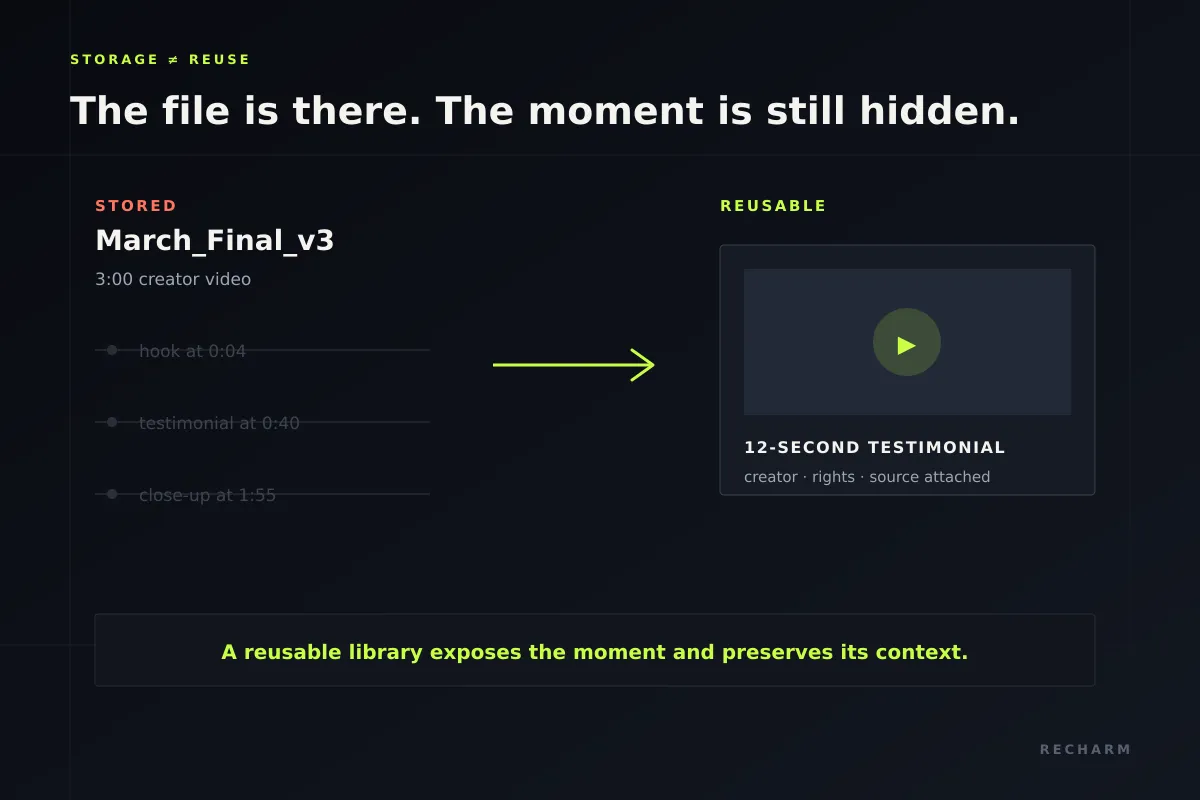
For many creative teams, the bigger challenge isn't storage capacity. It's finding the right footage and keeping its context accessible as the library grows.
Where a DAM Fits in the Creative Operations Stack
A DAM doesn't need to replace every tool in your creative operations stack. Its primary role is to keep creative assets organized, searchable, and connected to the information teams need to use them.
A useful way to understand this is the distinction between a system of record and a system of work. The DAM serves as the central reference for creative assets, while other tools handle tasks such as project management, editing, reviews, and campaign reporting.
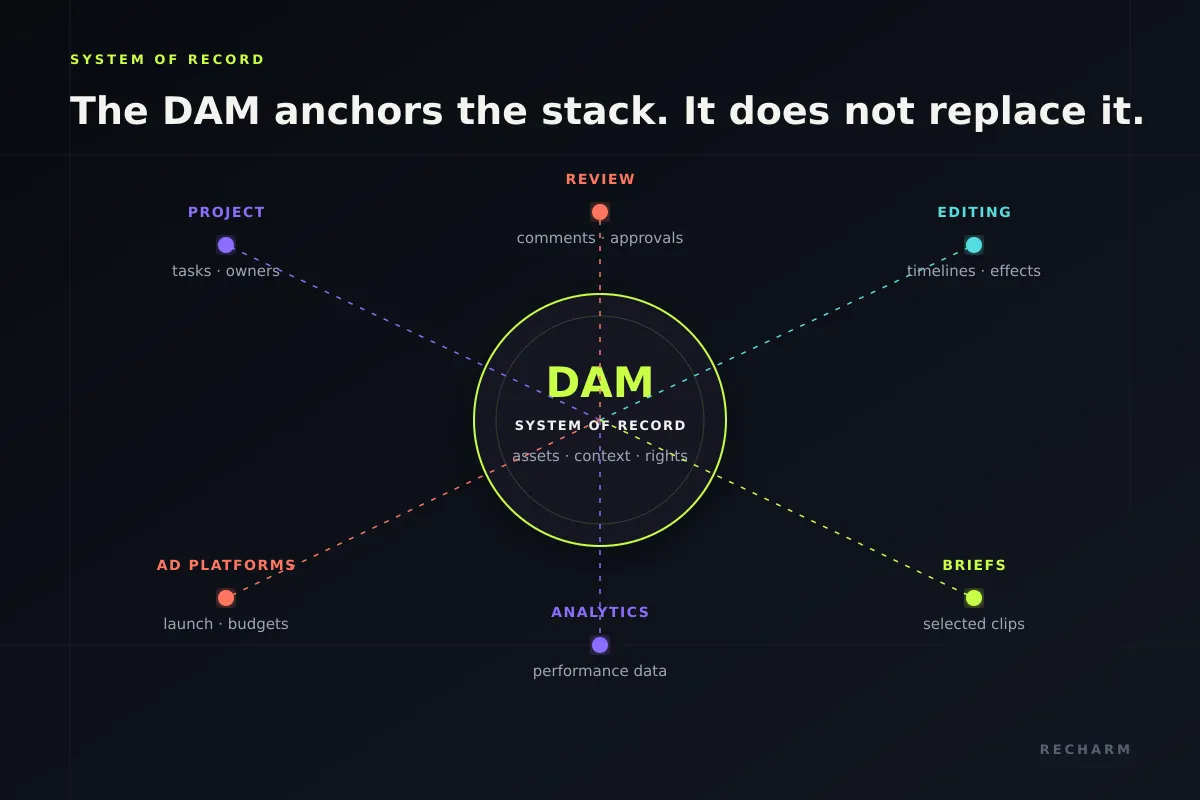
| Layer | Type | What Lives There | How It Connects to the DAM |
|---|---|---|---|
| DAM | System of record | Source footage, clips, tags, creator details, usage rights | Provides the central reference for creative assets |
| Project management | System of work | Tasks, owners, deadlines, status | Tasks can link to specific assets and briefs |
| Review and approval | System of work | Comments, versions, approvals | Approval records can reference the relevant creative assets |
| Editing tools | System of work | Timelines, effects, project files | Editors access footage from the DAM for production |
| Ad platforms | System of work | Ad accounts, placements, budgets | Finished ads are published, with source footage traceable where the workflow supports it |
| Analytics | System of work | Campaign and creative performance data | Shared asset identifiers or tags can help connect performance to creative assets |
For a broader understanding of how these tools work together, see our guide to creative operations and our list of creative operations tools.
What the DAM Should Own
A DAM keeps creative assets and their context together so teams don't have to rely on memory or search through different tools to understand what they're working with.
It should maintain four types of information:
- The assets themselves: Original footage and the clips created from it, organized in one searchable library.
- Creative context: Creator, product, scene type, hook or angle, persona, and campaign details.
- Usage rights: What the footage can be used for, including permitted channels, restrictions, and license expiration dates.
- Asset lineage: The connection between a clip and its original source, along with records linking finished ads to the footage used to create them.
Together, these details help teams find, understand, and reuse footage without rebuilding its history every time.
What the DAM Should Not Replace
A DAM doesn't need to replace the tools your team already uses to manage creative work. Its role is to make assets easier to find and use across those tools.
The following activities can remain in their dedicated systems:
- Task management: Keep deadlines, owners, and project statuses in your project management tool.
- Review and approval: Manage feedback, revisions, and sign-offs through your existing review process. Keep approval records accessible alongside the relevant final assets.
- Editing: Continue using dedicated editing software for timelines, effects, and project files.
- Ad launch and analysis: Manage placements, budgets, and campaign performance through your advertising and analytics platforms.
The goal isn't to manage everything in one tool. It's to give everyone a reliable place to find and understand the creative assets they're working with.
The Paid-Social Asset Lifecycle
A paid-social asset moves through several steps, from ingestion and tagging to discovery, editing, approval, launch, and reuse. Creator details, usage rights, and source information need to remain accessible throughout this process.
These activities can be grouped into four stages, each with its own potential breakdown.
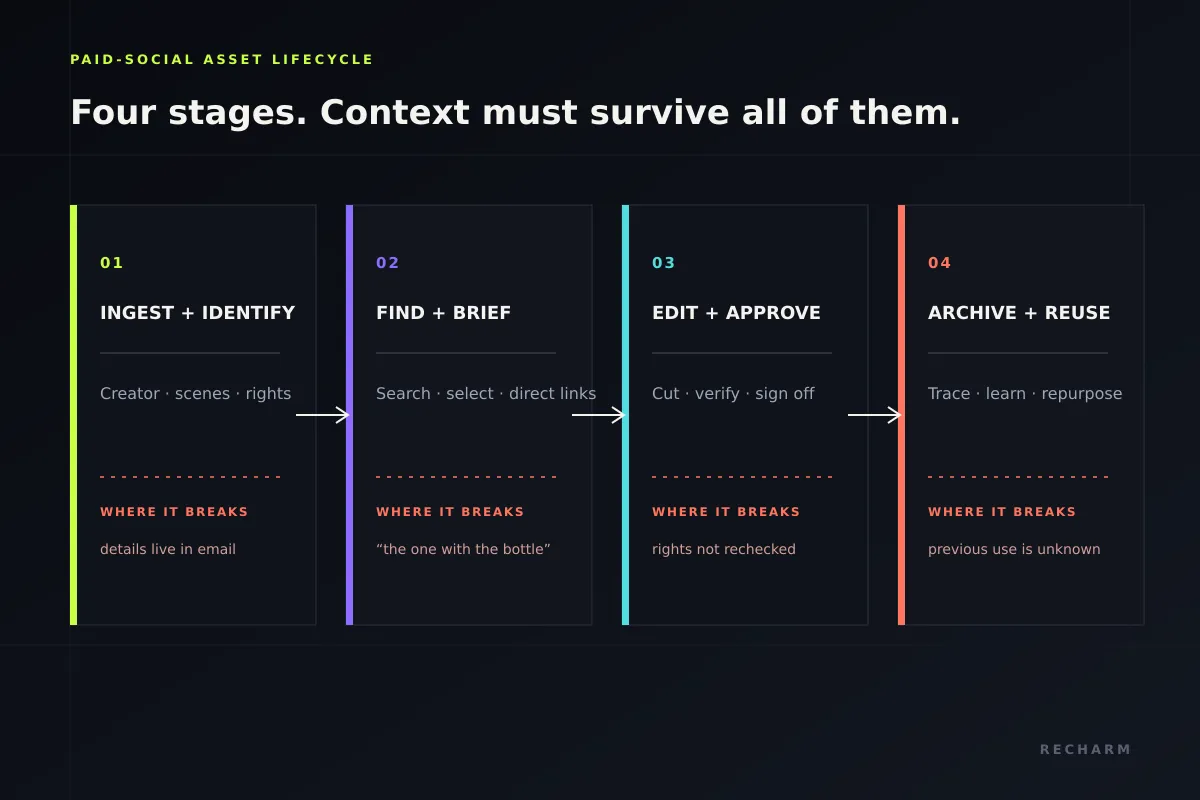
Ingest and Identify
Footage arrives from creators, studio shoots, and agencies. At this stage, teams organize the source files, identify useful scenes, and record the information needed to make the footage searchable.
Where it breaks: The creator's name is buried in an email thread, the license is stored separately, and the footage itself has no identifying information.
In Recharm, uploaded footage can be organized into modular clips and searchable scenes, including hooks, product demonstrations, testimonials, B-roll, and CTAs.
Recharm also supports importing footage from connected storage platforms, helping teams bring assets into a centralized library.
Find and Brief
A strategist searches for footage that fits the campaign concept and selects the clips an editor needs.
Where it breaks: The brief refers to footage vaguely, such as "the one where she's holding the bottle," leaving the editor to search for the intended clip.
A searchable library allows strategists to identify relevant moments and link them directly in the brief, reducing confusion during handoff.
Edit and Approve
The editor uses the selected footage to create the ad. The team reviews the final creative, confirms that all footage is cleared for the intended use, and completes the approval process before launch.
Where it breaks: Rights are checked early, but nobody verifies them again after the edit changes. Meanwhile, feedback and approvals remain scattered across messages and email threads.
Keeping rights information accessible and approval records organized helps teams avoid these issues.
Archive and Reuse
After an ad launches, teams can return to the original footage and reusable clips when planning future campaigns.
Where it breaks: Nobody records which clips were used in previous ads, making it harder to identify underused footage or avoid repeatedly selecting the same material.
Maintaining a record of source footage and its previous uses helps teams make better reuse decisions.
The purpose of this workflow is to preserve the context around every asset, from its initial upload to its use in future campaigns.
Metadata Creative Teams Will Actually Use
Metadata is only useful when teams can maintain it and use it to find footage. Instead of creating a complicated tagging system, start with the fields your strategists and editors need most often.
Here are eight useful metadata fields for a creative library:
| Field | What It Helps Answer | Example |
|---|---|---|
| Creator | Who created the footage? | Creator name or handle |
| Product | Which product appears in the clip? | Product name or product line |
| Scene type | What happens in the footage? | Hook, testimonial, demo, B-roll, CTA |
| Hook or angle | What creative approach does it use? | Question hook, problem-first, before-and-after |
| Persona | Which audience is the content intended for? | New parent, busy professional |
| Campaign | Which campaign is the footage associated with? | Spring launch |
| Usage rights status | What is the current license status? | Valid, expiring, expired |
| License expiry | When does the permission period end? | Expiration date |
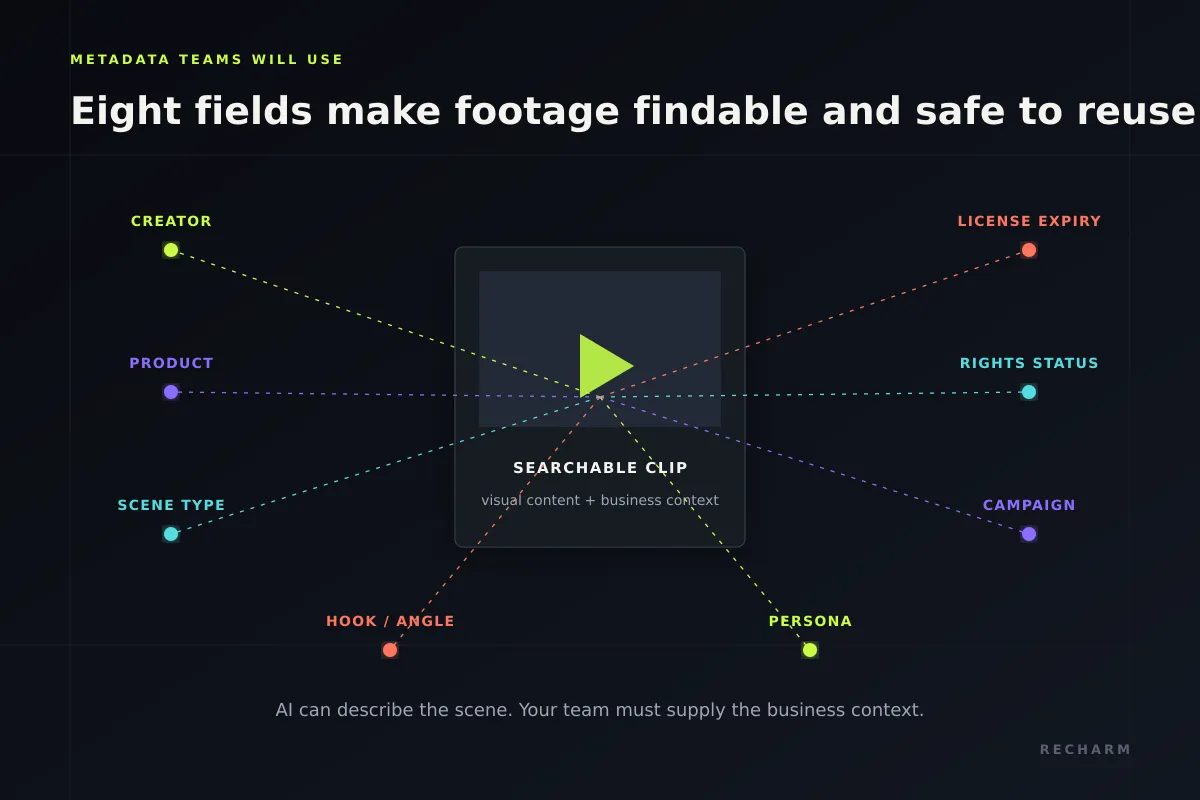
AI-generated tags can help identify visual details within footage, but they don't replace business information that teams need to record.
For example, AI can help identify a clip showing someone applying serum in a bathroom. However, it cannot reliably determine the creator's licensing agreement or the campaign the footage belongs to without that information being provided.
Recharm's AI video tagging helps teams organize and discover footage based on its visual content. Teams can also use custom tags to capture additional creative context relevant to their workflows.
For teams looking to standardize their metadata, IPTC's Video Metadata Hub provides a reference for describing video assets, including rights information. It can help establish consistent field names without requiring teams to adopt a complex metadata framework.
How DAM Improves Strategist-to-Editor Handoffs
Imagine a strategist needs three testimonial options, one product demonstration, and two hooks for a new ad concept.
Without a DAM, the brief might contain a folder path and a note saying, "See the March shoot, somewhere in the middle." The editor then searches through the footage, selects clips, and may end up choosing different moments than the strategist intended.
This can lead to unnecessary revisions before the actual editing work is complete.
With a searchable DAM, the strategist can find relevant footage, select the exact clips, and include direct links in the brief. The editor knows which moments to use and can begin editing without searching through entire folders.
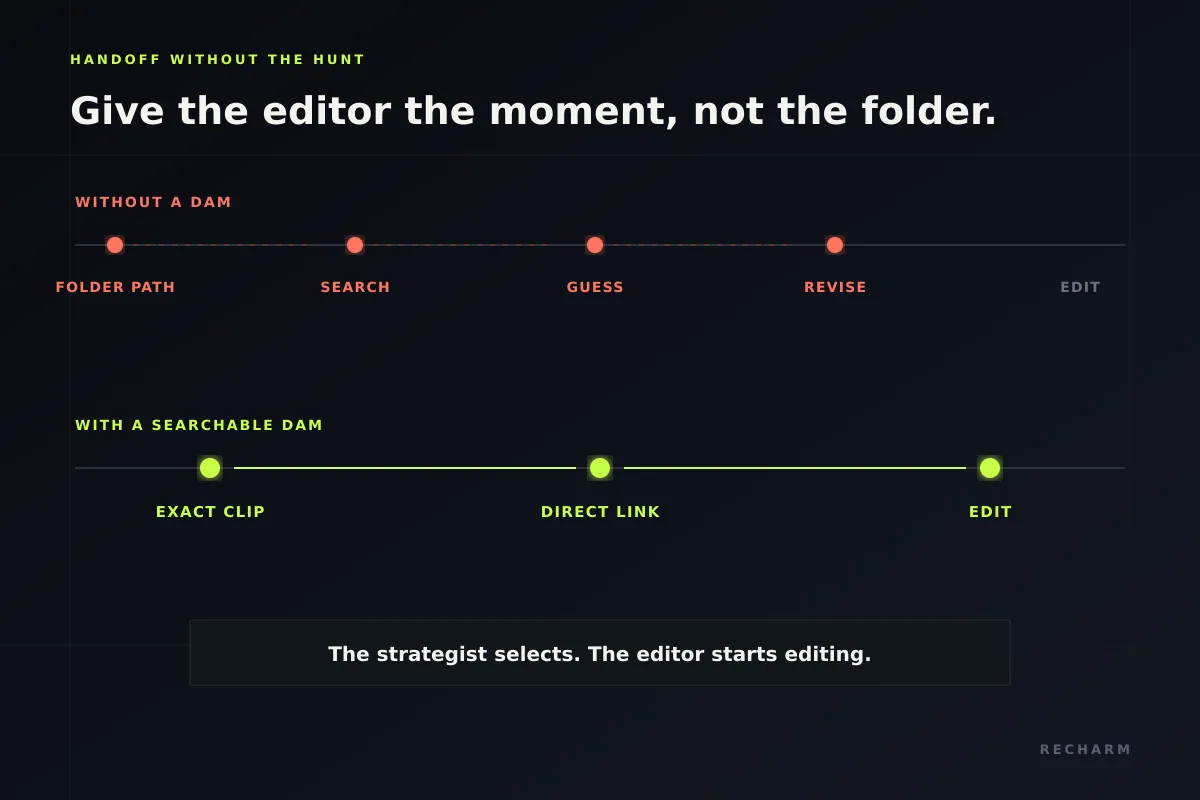
Recharm's Creative Brief Workflow supports this approach by allowing strategists to find footage and link specific clips to their briefs. Teams can also identify missing footage before the editing process begins.
The results can be significant. According to the HexClad case study:
- Finding a specific shot went from approximately 30 minutes to five minutes.
- Preparing a brief and gathering initial footage went from 30 minutes to 10 minutes.
- The team produced three times as many ad edits.
A DAM doesn't replace the need for a clear creative brief. It makes it easier for editors to locate and work with the footage the strategist intended.
For more guidance, see our article on writing a creative brief for video ad teams.
How to Manage UGC and Usage Rights Inside Creative Ops
Creator footage needs more than a file name. Teams need to know who created it, what they have permission to do with it, and whether those permissions are still valid.
For every UGC asset, keep four details accessible:
- Creator identity: The creator's name or handle.
- Permitted usage: Whether the agreement allows organic posts, paid advertising, specific platforms, or edits.
- License duration: When the usage rights begin and expire.
- Original source: The source video from which each clip was created.
Keep the original creator agreement accessible and check its terms before reusing footage. Our guide to UGC usage rights explains what brands should consider, while our UGC asset management guide covers how to organize and search creator footage.
Recharm's usage rights management helps teams keep licensing information connected to their footage and identify assets with expired or restricted rights.
However, rights information is only as reliable as the details entered into the system. Verify the agreement when footage is uploaded, and check permissions again before using clips in a new campaign.
This helps prevent footage from being reused after its license has expired or outside its permitted usage.
Metrics That Show Creative Operations Is Improving
A DAM should make creative work easier and more efficient. To understand whether it's delivering results, start by measuring how your team works before implementation.
Collect baseline data from representative searches, briefs, and editing workflows. Then measure the same activities after introducing the DAM.
| Metric | What It Measures | How to Track It |
|---|---|---|
| Median time to find footage | How quickly teams locate specific moments | Time at least 10 representative footage searches and calculate the median |
| Brief-to-editor handoff time | How long an approved brief waits before editing begins | Compare timestamps in your project management tool |
| Asset reuse rate | How often existing footage contributes to new ads | Track the percentage of clips used in more than one published ad |
| Production cycle time | How long it takes to produce a launch-ready ad | Measure the median time from brief approval to final creative approval |
| Approved edits per week | How much usable creative the team produces | Count edits that pass review and are ready for launch |
| Editor onboarding time | How quickly new editors can work independently | Track the time until an editor completes their first independent edit |
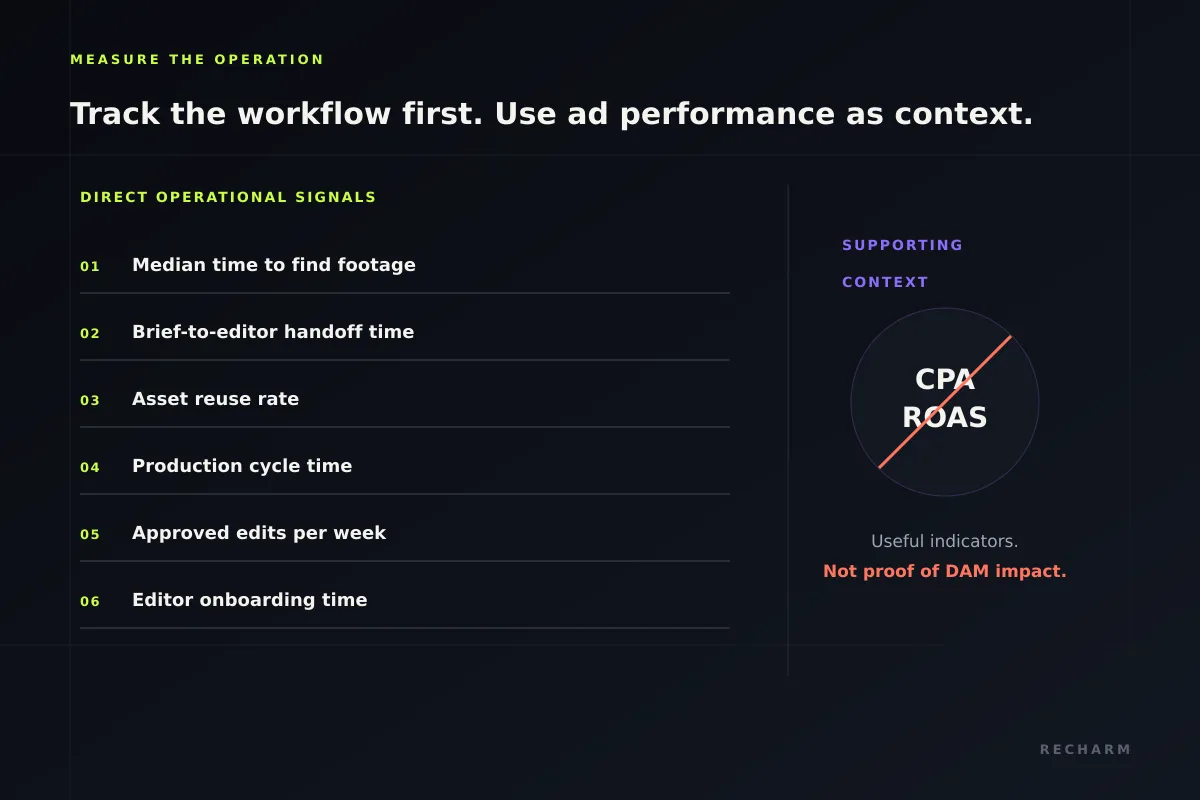
These metrics help identify where creative workflows are improving and where bottlenecks remain.
Advertising metrics such as CPA and ROAS are also important, but they are influenced by factors beyond asset management, including creative strategy, audience targeting, offers, budgets, and seasonality. Use them as supporting context rather than attributing changes directly to a DAM.
Customer results can help illustrate the potential impact. According to Recharm's case studies:
- Purdy & Figg reports saving 25 hours per week after adopting Recharm.
- FabFitFun increased production from approximately 100 to 400 videos per quarter, with its content director identifying Recharm as an important contributor to that improvement. Read the case study.
These are customer-reported outcomes, not guaranteed results. The improvements your team achieves will depend on its existing workflows and challenges.
How to Evaluate a DAM for Creative Operations
Choosing a DAM involves more than comparing feature lists. The most useful test is whether the platform supports the workflows your creative team handles every day.
Evaluate potential solutions using these criteria:
| Criterion | What to Check |
|---|---|
| Video organization | Can the platform organize and manage individual scenes or clips within longer videos? |
| Clip-level search | Can teams search footage by spoken dialogue and visual content? |
| Creator identification | Can users filter footage by creator and find their associated assets? |
| Usage rights management | Can teams track license details, restrictions, and expiration dates? |
| Metadata flexibility | Can teams add custom tags and organize assets using relevant creative information? |
| Access permissions | Can you control access for editors, agencies, and freelancers? |
| Integrations | Does the DAM connect with your existing storage and creative tools? |
| AI and agent access | Can AI tools such as Claude access and search the asset library through supported integrations, including MCP? |
| Ease of adoption | Can strategists and editors learn the essential workflows without extensive training? |
| Export capabilities | Can you export your assets and relevant metadata when needed? |
Instead of relying entirely on a vendor demonstration, test the DAM using footage from a real campaign.
Select five recent creative briefs and evaluate how easily your team can find the required footage, verify its usage rights, and share the selected clips with editors.
Record the time taken for each task and compare it with your existing process. This provides a more practical understanding of whether the DAM can improve your team's workflow.
Build a Creative Library Your Strategists and Editors Can Reuse
A creative library becomes more valuable when teams can find specific footage, understand its context, and reuse it without searching through folders or rebuilding briefs from scratch.
Recharm helps creative teams organize footage into searchable clips, find relevant scenes, manage usage rights, and connect selected assets to creative briefs.
With Recharm's Creative Brief Workflow, strategists can identify the footage they need and share specific clips with editors, helping reduce unnecessary searching and revisions.
Explore Recharm's Creative Brief Workflow to see how your team can build more efficient creative handoffs.
FAQs
What Does a DAM Do for a Creative Operations Team?
A digital asset management (DAM) system helps creative teams organize, search, and manage their assets in one place. It keeps footage, metadata, creator information, and usage rights accessible so strategists and editors can find relevant content and reuse it across campaigns.
Is DAM the Same as Creative Workflow Software?
No. A DAM primarily manages creative assets and their information, while creative workflow software manages tasks, deadlines, reviews, and approvals.
The two work together when creative teams use the DAM to find and access assets while managing production activities through their existing workflow tools.
What Metadata Should Creative Operations Track?
Start with eight useful fields: creator, product, scene type, hook or angle, persona, campaign, usage rights status, and license expiry.
AI-generated tags can help describe visual content, while teams should maintain business-specific information such as campaign details and licensing terms.
How Should Creative Teams Measure DAM ROI?
Start by measuring operational improvements such as footage search time, strategist-to-editor handoff time, asset reuse rate, production cycle time, and approved edits per week.
Teams can also estimate time savings. For example, if five editors each save 20 minutes per working day, that adds up to approximately eight hours and 20 minutes per five-day week.
CPA and ROAS can provide additional context, but changes in advertising performance should not automatically be attributed to the DAM.
When Is Google Drive or Dropbox No Longer Enough?
Cloud storage works well for storing and sharing files. However, creative teams may need a DAM when they regularly struggle to find specific moments within videos, manage creator usage rights, or share exact clips with editors.
A DAM provides specialized capabilities for organizing, searching, and reusing creative assets as footage libraries grow.