
Creative teams today don’t struggle with creating content. They struggle with managing where that content lives.
Raw footage sits in Google Drive folders. Feedback lives in Slack threads. Approved creatives get buried in Dropbox links. Editors download files from one platform, upload them into another, then repeat the process again for ad managers, CMS tools, or social platforms.
The problem is not a lack of assets. It’s a disconnected creative stack.
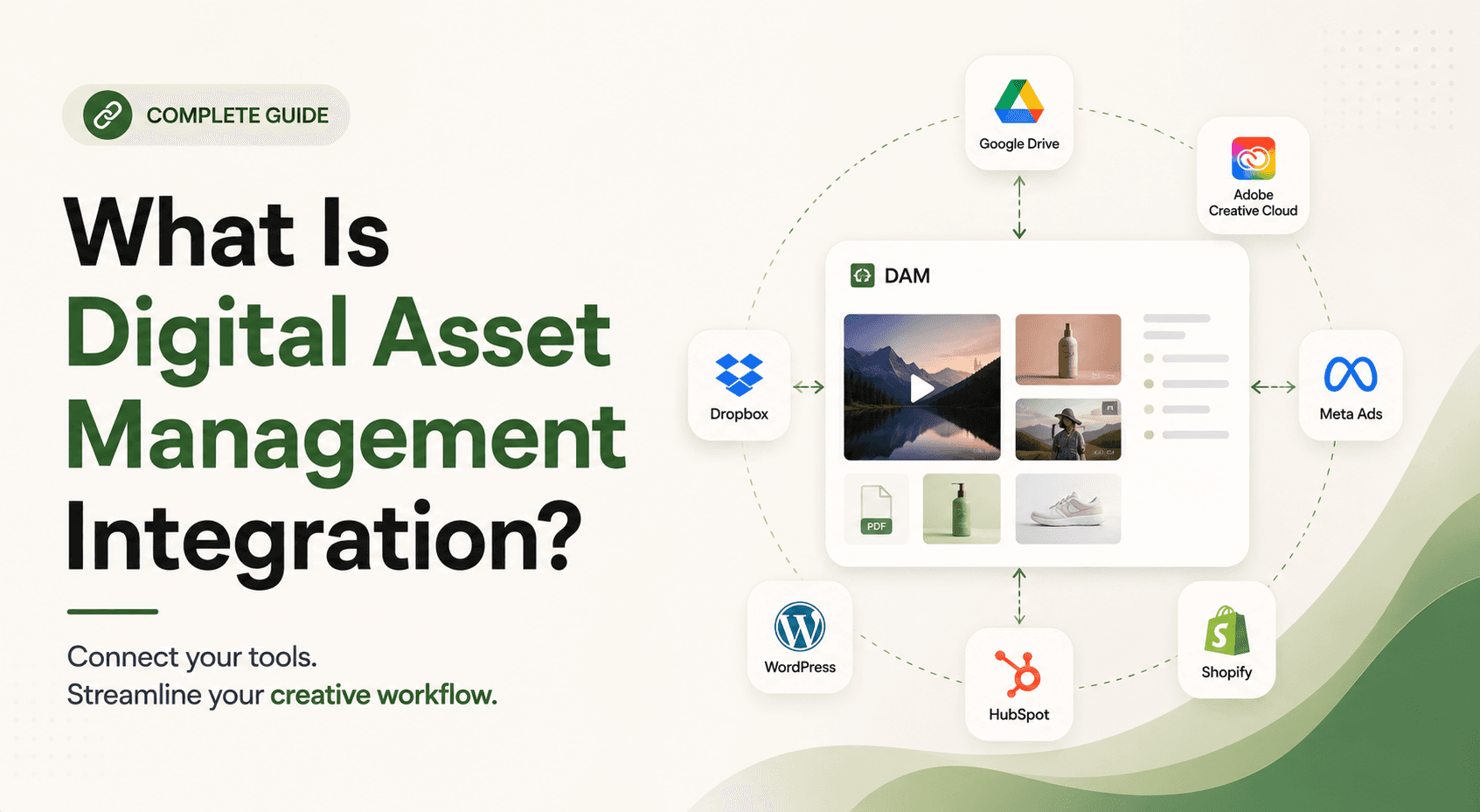
This is exactly where digital asset management (DAM) integrations become critical. Instead of treating your DAM like a standalone storage tool, integrations connect it to the rest of your workflow, including cloud storage, creative apps, CMS platforms, ad tools, and ecommerce systems.
The result is a connected workflow where assets move automatically between systems, teams always work from the latest version, and creative production becomes significantly faster.
In this guide, we’ll explain what DAM integrations are, how they work, why they matter for creative teams, and which integrations brands should prioritize in 2026.
TL;DR
Brandfolder is best suited to enterprise DAM needs, with strong brand governance, permissions, asset distribution, and broader work-management capabilities through Smartsheet.
Teams may look for Brandfolder alternatives when they need simpler pricing, lighter workflows, different video capabilities, or tools designed around specific creative use cases.
The best alternative depends on the workflow: Bynder suits enterprise governance, Canto suits traditional marketing teams, Air suits visual collaboration, Dash suits smaller ecommerce teams, and Pics.io suits teams that want more control over storage.
Video-heavy DTC brands and agencies may need more specialized workflows for searching, organizing, and reusing footage. Recharm is designed around this use case with clip-level organization and video search.
Pricing varies significantly across DAM platforms. Brandfolder, Bynder, and Canto use custom pricing, while some alternatives offer publicly available plans that make costs easier to evaluate upfront.
Don’t compare DAMs on feature lists alone. Test how each platform handles your actual assets, search workflow, collaboration needs, integrations, permissions, and migration requirements before choosing one.
Migration should include more than files. Check how metadata, tags, taxonomies, versions, permissions, and existing library structures will transfer to the new platform.
What Is Digital Asset Management Integration?
Digital asset management (DAM) integration means connecting your DAM with the other tools in your creative and marketing stack, such as CMS platforms, cloud storage, ad tools, and creative apps. This allows assets to move automatically between systems instead of relying on manual downloads and uploads.
In a connected workflow, the DAM becomes a central hub for approved videos, images, and marketing assets. Through plugins or APIs, files stay synced across tools like Google Drive, Dropbox, Adobe Creative Cloud, Shopify, WordPress, and ad platforms.
Without integrations, assets often remain scattered across folders, Slack threads, desktops, or cloud drives, making search, collaboration, and version control difficult. Teams waste hours hunting for files or figuring out which version is approved. In our own analysis of teams before and after adopting integrated DAM workflows, searchable, connected systems typically cut asset search time by 40 to 60% compared to manually navigating scattered folders.
For creative teams, integrations are what turn a DAM from a smarter folder into a true workflow engine.
Native vs. API Integrations
DAM integrations usually fall into two categories: native integrations and API integrations.
Native integrations are plug-and-play connections provided by the DAM platform, like a Google Drive sync that works without engineering support. They’re easy to set up and ideal for common workflows.
API integrations, on the other hand, use custom programming to connect systems and automate advanced workflows. They offer more flexibility but require developer support and maintenance.
Most creative teams start with native integrations for tools like cloud storage or CMS platforms, then use APIs for more customized workflows.
Why DAM Integrations Are Critical for Creative Teams
Every hour spent downloading, renaming, or emailing assets is time lost from actual creative work. With integrations, files move automatically between tools instead of through manual transfers. Editors and designers can access assets directly inside tools like Photoshop or Premiere Pro, while approved files automatically sync across CMS platforms, ad managers, and creative workflows. In short, integrations turn your DAM from a simple storage system into a centralized creative operations hub.
Integrating a DAM with your creative tools and marketing platforms delivers several concrete workflow benefits for fast-moving teams:
Why DAM Integrations Are Critical for Creative Teams
Integrating a DAM with your creative tools and marketing platforms delivers major workflow benefits for fast-moving teams:
End the Download-Edit-Upload Cycle:
Without integrations, designers waste hours downloading assets, editing them, and then re-uploading updated versions. With a DAM plugin or sync, editors can open assets directly inside tools like Premiere Pro, make edits, and save changes while the updated file automatically syncs back. This removes redundant file transfers and keeps everyone working on the latest version.Always Use the Right Version:
When a new asset version is uploaded to the DAM, connected systems like your CMS, PIM, or ad platform update automatically. You no longer have to ask, “Is this the final file?” Integrated DAMs track the full asset lifecycle so the latest approved version is always the default. This prevents costly mistakes like publishing an outdated “Final_v2_USE_THIS” video.Create a Data-Driven Creative Feedback Loop:
DAM integrations can connect creative performance data directly to the assets themselves. For example, if “Hook 3” in a video drives 50% higher click-through rates, strategists can instantly locate and reuse that exact hook inside the DAM. This turns your DAM into a creative intelligence system, not just storage.Speed Up Team Onboarding:
New hires and agencies can instantly access a centralized, searchable asset library instead of hunting through Dropbox folders or Slack threads. Teams can search by tags, transcripts, or metadata without needing prior context, reducing onboarding friction and ensuring everyone uses approved assets from day one.Reduce Collaboration Chaos:
Integrations create a single source of truth across departments. Marketers, editors, designers, and content teams can access approved assets directly within their own tools. For example, a marketer building ads in a scheduler or a writer working inside a CMS can pull the latest approved visuals directly from the DAM without switching workflows.Scale Without Scaling Headcount:
As a team adds more assets, more channels, and more people, manual file handling grows right alongside them; every new campaign means more files to download, rename, and re-upload by hand. An integrated DAM stack doesn't scale the same way. Once the connections are in place, adding a new campaign, a new platform, or a new team member doesn't add proportional manual work, because the sync layer absorbs the growth instead of a person having to.
In short, integrations transform a DAM from simple file storage into a connected creative operations hub where assets move seamlessly across tools instead of being manually transferred between people.
5 Essential DAM Integrations Every Performance Brand Needs
A modern performance brand should integrate its DAM with five key parts of the creative stack. These integrations solve the biggest workflow bottlenecks in creative operations:
1. Cloud Storage (Google Drive, Dropbox, Frame.io)
Most teams already use tools like Google Drive, Dropbox, or Frame.io for file storage and video reviews. Instead of replacing them, modern DAMs integrate directly with them.
For example, Recharm can auto-sync with Drive folders. When footage is added to a synced folder, the DAM automatically ingests, indexes, transcribes, and tags it without requiring another upload. Integrating with Frame.io also allows teams to open clips directly for review and feedback.
This “no-migration” approach adds AI tagging, transcript search, and smarter asset discovery on top of existing workflows.
2. Creative Tools (Adobe Creative Cloud, Figma)
Editors and designers should not have to leave tools like Photoshop, Illustrator, Premiere Pro, or Figma just to search for assets.
DAM integrations allow teams to browse approved brand assets directly inside creative tools using built-in plugins or panels. Teams can search by tags or keywords and drag files directly into projects.
This removes the constant cycle of searching folders, downloading assets, and re-uploading them into design files while ensuring teams only use approved creative assets.
3. CMS Platforms (WordPress, Webflow, Contentful)
Content teams constantly need updated visuals for websites, landing pages, and blogs. A DAM-CMS integration allows editors to pull approved assets directly inside the CMS.
For example, updating a product image inside the DAM can automatically update that image across connected web pages. This reduces manual uploads, improves version control, and helps brands maintain consistency across channels.
As Frontify notes, DAM integrations help web teams instantly access newly approved assets directly from the CMS environment.
4. PIM Systems for DTC & E-commerce
Brands managing large product catalogs often rely on PIM systems like Shopify or Akeneo. Integrating DAM with PIM ensures product videos, images, and UGC automatically sync with product records.
For example, when a SKU-tagged product video is uploaded to the DAM, it can instantly attach to the matching product page. Instead of manually updating hundreds of listings, teams can update assets once and push changes everywhere automatically.
This is especially critical for e-commerce brands handling large-scale product content.
5. Marketing & Sales Platforms (HubSpot, Salesforce, Hootsuite)
Marketing teams rely on approved creative assets for emails, ads, and social campaigns. DAM integrations allow marketers to insert approved visuals directly into platforms like HubSpot, Salesforce, or Hootsuite.
For example, an email builder can pull images directly from the DAM library instead of relying on manual uploads. This ensures every campaign uses the latest approved creative while reducing operational clutter across teams.
Stack State | Assets Flow | Version Accuracy | Time Spent on File Transfers | New Member Onboarding | Asset ROI Measurement |
Siloed Storage Stack | Manually via email/Drive/Slack (ad hoc copies) | Confused/duplicate versions, “which is live?” | Hours per week per person re-uploading files | Weeks: new team hunts for files or gets lost | Impossible (no single source of truth) |
Integrated DAM Stack | Automatically via sync or API (plugins, connectors) | Single source of truth; auto-updated files | Near-zero manual transfers (sync handles it) | Days: find all assets in one searchable library | Easy (track views, downloads, and performance at asset level) |
(Table: Traditional siloed stack vs. an integrated DAM-centric stack. In an integrated stack, assets “move” automatically between tools without manual uploading, versions never fall out of date, manual file handling time drops drastically, and onboarding is smoother. Integration also enables tracking asset use and ROI.)
<div style="text-align:center; margin: 30px 0;"> <a href="https://www.recharm.com/start-free" style="display:inline-block;background:#4A90E2;color:#fff;padding:15px 25px;border-radius:5px;text-decoration:none;font-weight:bold;">Start Your 14-Day Free Trial of Recharm</a> </div>
How to Set Up DAM Integrations: A Step-by-Step Approach
Audit Your Current Creative Stack
Start by mapping where your assets currently live and move through. This includes Google Drive, Dropbox, Adobe Creative Cloud, CMS platforms, PIM systems, Slack, Jira, and ad tools. Talk to editors, designers, and marketers to identify where files typically get stuck or duplicated. Documenting these workflow gaps helps pinpoint where integrations will create the biggest impact.
Identify High-Friction Handoffs
Once the workflow is mapped, identify where manual file transfers happen most often. Common bottlenecks include editors downloading footage from Drive, marketers re-uploading assets to ad platforms, or content teams relying on developers for CMS uploads. These repetitive handoffs are your top integration priorities because they consume the most operational time.
Start with Native Integrations
Before building custom workflows, activate built-in integrations first. Most DAMs already support native integrations for tools like Google Drive, Dropbox, WordPress, and Adobe Creative Cloud. These integrations are usually fast to enable and deliver immediate workflow improvements without requiring migrations or custom development.
Establish Metadata Standards Early
Integrations only work well when assets are properly organized. Before connecting systems, define consistent metadata fields such as campaign name, SKU, creator, usage rights, or content type. A DAM cannot fix a messy library automatically. Clean tagging and taxonomy ensure the right data flows across connected tools.
Train Teams on the New Workflow
Successful integrations require team alignment, not just technical setup. Editors, marketers, and designers should understand how assets now move between systems, who manages metadata, and where approved files live. Simple onboarding sessions or cross-team demos can prevent confusion and improve adoption across the organization.
The Power of Digital Asset Management API Integration
Beyond native integrations, DAM APIs unlock custom automation and scalable workflows that are essential for growing creative teams. This is often called a headless DAM approach, where the DAM backend works independently from a fixed interface.
Instead of relying only on the DAM’s dashboard, developers can use APIs to pull assets into custom environments like:
Internal portals: custom brand portals or agency partner dashboards built on tools like Retool or a company's own internal admin panel
Mobile apps: native iOS/Android apps built with React Native or Swift that need to pull product or campaign imagery on demand
Ecommerce platforms: Shopify, BigCommerce, or a custom storefront that needs product video and imagery synced automatically
Ad tools: Meta Ads Manager, TikTok Ads Manager, or Google Ads, where approved creative needs to move into campaigns without manual upload
Social publishing systems: Hootsuite, Sprout Social, or Buffer, where scheduled posts pull directly from the approved asset library
For example, an ecommerce brand can automatically push product videos from the DAM into its mobile app, while a media team can publish approved creatives directly to social channels using API workflows.
Why API Integrations Matter
Support Omnichannel Workflows:
Assets can flow into multiple platforms without requiring repeated uploads, helping brands maintain consistency across channels.Enable Trigger-Based Automation:
APIs can automate workflows based on metadata changes. For example, once a video is marked “Approved,” the system can automatically create vertical and square versions, then notify media buyers in Slack.Reduce Future Technical Debt:
A strong API framework makes it easier to connect future tools and platforms without rebuilding workflows from scratch.Turn Your DAM Into a Scalable Hub:
Instead of becoming another isolated storage system, API integrations allow your DAM to evolve with your creative stack and business needs.
In short, API-based DAM integrations give brands the flexibility to automate workflows, scale creative operations, and connect assets across virtually any platform.
Why Your “Last-Mile” Integration Matters: Connecting to Ad Managers
Many traditional DAM systems and cloud storage tools were built to organize brand assets like logos, PDFs, and website content, not for the fast-moving world of performance marketing.
For modern ad teams, the real challenge is the last mile: getting creative assets directly into platforms like Meta Ads, TikTok Ads, or Google Ads quickly and accurately.
The Two Layers of DAM Workflows
Marketing Layer (Traditional DAM Use):
Most DAMs work well for websites, catalogs, and internal brand management. They help teams organize content for CMS platforms and design workflows.Ad Layer (Performance Marketing):
Performance teams need assets to move directly from the DAM into ad platforms with minimal friction. Ideally, approved creatives should be only one click away from launching into campaigns.
Why This Matters
The manual download-upload workflow slows teams down and increases risk. A single outdated file or naming mistake can accidentally push the wrong ad live and waste budget.
With proper DAM integrations:
Updated assets automatically sync into ad managers
Teams avoid duplicate uploads
Creative workflows move faster
Version control stays accurate
For example, if a product video is updated inside the DAM, the latest version can automatically replace the outdated asset inside a Meta Ads library.
The Bigger Advantage: Performance Feedback Loops
Last-mile integrations also create a two-way workflow between creative and performance teams.
Performance data like:
CTR
Engagement
Sales lift
Winning hooks
can flow back into the DAM itself. This allows editors and strategists to instantly identify which clips or creative angles are performing best and reuse them faster.
This tight connection between the creative stack and the ad stack is what separates modern performance teams from traditional asset management workflows.
How Recharm Fits Into This
Recharm is built as an intelligence layer that sits on top of the tools teams already use, rather than requiring a full migration. It syncs directly with Google Drive, Dropbox, and Frame.io, automatically ingesting, transcribing, and tagging footage the moment it's added, so teams keep their existing storage habits while gaining AI-powered search and organization on top.
Brands using this approach have seen measurable production gains: Lume doubled winning ads and produced 800 video ads in two months, Purdy & Figg saved editors roughly 5 hours a week while scaling to 100 new ads weekly, and FabFitFun grew output from 100 videos a quarter to 400. These results came from improving the connective layer between tools, not replacing the creative stack entirely.
FAQs
What is a DAM integration and why does it matter?
A DAM integration connects your digital asset management system with tools like CMS platforms, creative apps, cloud storage, and ad managers. This turns your DAM into a centralized content hub where teams can access approved assets directly inside their existing workflows instead of manually downloading and re-uploading files.
How does DAM integration with Google Drive work?
With a Google Drive integration, the DAM automatically syncs and indexes files added to selected Drive folders. For example, if an editor uploads a video to Drive, the DAM can automatically ingest, transcribe, tag, and organize that file without requiring another upload. Teams continue using Drive normally while gaining advanced DAM search and metadata features.
Can I integrate a DAM with Meta Ads or TikTok Ads?
Yes. Many modern DAM platforms support integrations with Meta Ads, TikTok Ads, YouTube, and other ad platforms. This allows teams to pull approved creatives directly from the DAM into campaigns, reducing manual uploads and improving version control. Some advanced integrations can even send performance data back into the DAM.
Do I need to migrate all my files to use a DAM integration?
Not necessarily. Many DAM platforms integrate directly with existing storage tools like Google Drive, Dropbox, or Frame.io. Instead of migrating files, the DAM syncs with your current storage and adds features like AI tagging, transcript search, and metadata organization on top of your existing workflow.
What’s the difference between native and API DAM integrations?
Native integrations are built-in, no-code connections that are easy to set up for tools like Google Drive, Adobe Creative Cloud, or WordPress.
API integrations are custom-built connections that offer more flexibility and automation but require developer support. Most teams start with native integrations and use APIs for advanced or highly customized workflows.