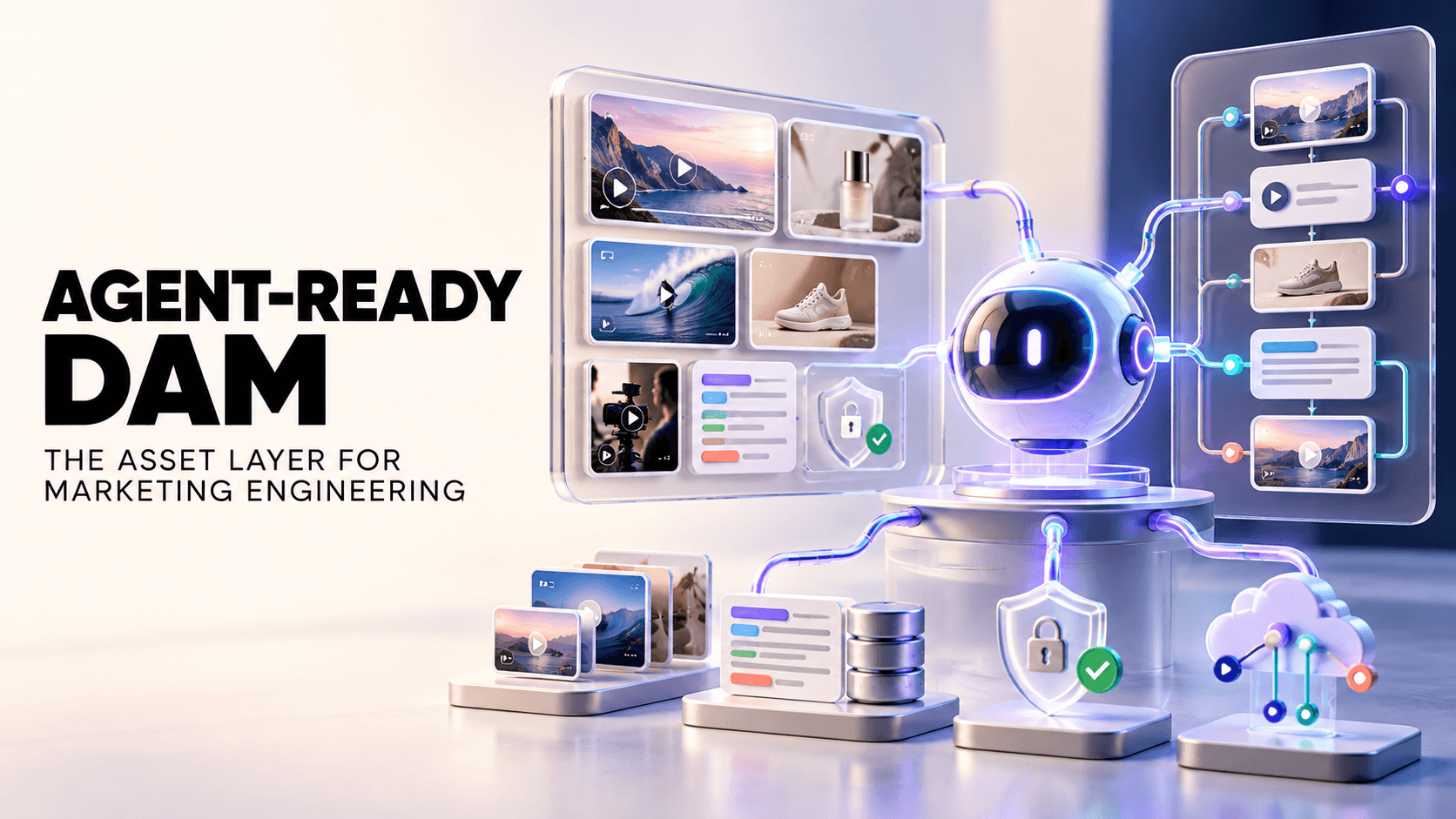
Small teams often lack a dedicated librarian for their growing library of photos, videos, logos, and design files. The result is “content chaos” – assets scattered across Google Drive, Dropbox, and email threads. A Digital Asset Management (DAM) system solves this by giving your team one searchable home for every brand asset.
Importantly for small businesses, today’s DAMs avoid heavy enterprise overhead: they’re easy to set up and use, yet still powerful. In this guide we’ll cover why a DAM can help even a two-person startup, how DAM differs from a simple brand folder, and walk through a realistic before vs after scenario showing how a lean, video-focused DAM speeds up a small DTC campaign launch.
TL;DR
Centralized Media Hub: A DAM is a secure library for all your images, videos, logos, and marketing files. It replaces digging through shared drives or chat threads with instant keyword or visual search.
Small-Team Benefits: Even without a full-time media manager, a DAM cuts wasted search time – creative teams lose ~8.3 hours/week finding files – and enforces brand consistency (only approved logos/versions are used).
AI-Powered Simplicity: Modern DAMs use AI tagging and visual search to index content automatically. There’s no manual file naming or complex setup: upload your footage, and let the system do the work.
Leaner Than Enterprise: Unlike legacy DAMs with steep learning curves, today’s solutions (especially video-first ones) are built for lean teams. They launch quickly, with minimal admin, and often include free trials. For example, one video ad agency doubled its creative output by remixing clips in an AI-powered DAM.
What Is Digital Asset Management for Small Businesses?
Digital Asset Management (DAM) is simply a dedicated system to organize, store, and retrieve all your company’s digital files. It’s a centralized library where you upload photos, videos, audio, documents, ads, and any other marketing collateral. Instead of hunting through shared folders or messenging co-workers, you search or filter the DAM for exactly what you need.
Adobe describes DAM as software that “organizes, stores, and distributes digital files using specialized software”, while OpenText notes it “enables organizations to effectively organize, store, retrieve, share, and maintain their digital assets”.
For a small business, a DAM means one searchable home for every asset: your product shots, creator videos, marketing graphics, brand logos, guidelines, and more. This is crucial for lean teams, since no one has time to manage files manually. Without a DAM, a single person might spend hours weekly hunting for the final version of an ad or locating past campaign footage.
By contrast, even a simple DAM lets a small team find assets in seconds (often by keyword or by an image search), cutting chaos and saving time. This guide focuses on affordable, low-overhead DAM options that get running quickly for growing teams – not heavy enterprise systems meant for hundreds of users.
DAM vs. Brand Asset Library: What Does Your Small Business Need?
Many small companies start with a basic brand asset library – a static collection of logos, templates, and guidelines. This might be a shared folder or portal that stores approved brand files. However, a brand library has limits: search is often manual (by filenames or glance), and it doesn’t handle dynamic content well.
By contrast, a true DAM adds layers of functionality on top of simple storage. A DAM automatically tags assets with metadata, offers full-text and visual search, controls access and versions, and supports workflows like approvals. Think of a DAM as Brand Asset Library + Search + Permissions + Workflows.
A simple rule of thumb: if you only have a handful of static brand files (e.g. a logo pack and style guide) that rarely change, a shared folder might suffice. But once you have dozens of creative files or videos that need reuse and organization, you need a DAM.
In other words, brand libraries are for compliance and consistency, while DAM is for managing all digital content. As one guide explains, Brand Asset Management (BAM) focuses on enforcing brand identity, whereas DAM covers the entire range of digital assets for efficient retrieval.
Feature | Brand Asset Library | Traditional DAM | Recharm (Modern DAM) |
Primary Use | Store core brand files (logos, guidelines, templates) | Manage all marketing assets (images, videos, docs) | Manage and repurpose video-focused content |
Search | Basic (by filename or limited tags) | Advanced (full-text, metadata, and sometimes AI search) | AI visual & keyword search across video and image content |
Setup Effort | Minimal (just share a folder) | Significant (schema/taxonomy design, admin support) | Minimal (auto-indexing, plug-and-play with no dedicated admin) |
Version Control | None or manual | Built-in versioning and history | Built-in (tracks edits & retains latest approved) |
Video Support | Generally not (just store files) | Supported (but generic upload/stream) | Video-first (auto-cut clips, scene browsing) |
Ideal For | A few static brand files | Medium to large libraries across teams | Small teams and agencies focusing on video ads |
Example | Shared Google Drive folder of logos and fonts | Corporate DAM (Bynder, Canto, etc.) | Recharm’s AI-driven clip library for video assets |
How Does DAM Work for Small Teams?
Modern DAM platforms deliver a suite of features tailored for speed and simplicity. Key elements include:
Centralized storage. All assets live in one cloud repository instead of scattered drives, inboxes, and folders. Every product photo, campaign video, and design file is uploaded to the DAM, and team members browse or search that single library instead of hunting through email attachments or asking "where is the final logo?"
Intelligent tagging. A DAM automatically applies metadata to each file, tagging assets by product, campaign, date, or even objects and people detected in a video. Instead of manually renaming folders, you get a searchable, richly labeled library from the moment files are uploaded.
Rapid search. Metadata and AI-powered search let you find assets in seconds rather than minutes. Advanced DAMs go further, letting you search within video or image content using natural language. Recharm's AI, for example, lets you type "man opening a package" and surface matching clips instantly. Industry studies show DAM search cuts asset retrieval time by 40-60%.
Secure distribution. Instead of emailing raw files, you share links or portals with built-in access controls, view or download permissions, and expiration dates. Everyone always accesses the latest approved version, and you can see exactly who downloaded what, preventing outdated or off-brand materials from slipping through.
By combining these elements, a DAM transforms your digital files from a disorganized mess into an organized, searchable inventory.
Benefits of DAM for Small Business Owners
A good DAM does more than organize files. For small businesses, it directly impacts how fast your team moves, how consistent your brand looks, and how much you can do without adding headcount.
Cost efficiency. Creative professionals lose an average of 8.3 hours per week searching for assets, according to Forrester. That's nearly a full workday gone before any real work begins. A DAM makes assets instantly searchable, reclaiming most of that time. One video studio saved ~5 hours per week just by reusing footage through an organized library instead of manually hunting. Over a year, those savings add up to thousands in recovered labor costs, on top of reduced file storage and tool overhead.
Brand integrity. With a DAM, every team member pulls from the same library of approved, up-to-date assets. Version control is automatic: when a new logo or edited video is uploaded, it becomes the default for everyone. Rigorous permission settings mean only approved assets reach partners or customers, eliminating the classic "Final_v2 vs Final_v3" confusion and cutting brand errors significantly.
Creative agility. Small businesses need to move fast. A DAM makes it easy to repurpose and remix existing assets instead of scheduling new shoots. Little Spoon doubled its TikTok creative output simply by remixing existing clips organized in Recharm. Brands that systematically repurpose video content see 2-3x more reach and engagement without extra filming.
With AI search and modular clips, editors search by keyword and find the exact segment in seconds, enabling lean teams to test more ideas and jump on trends faster.
Small Business DAM in Action: A Practical Workflow Example
Scenario: A small DTC brand (“Acme Apparel”) needs to launch a holiday campaign video one week before launch, using existing content only (no reshoot budget).
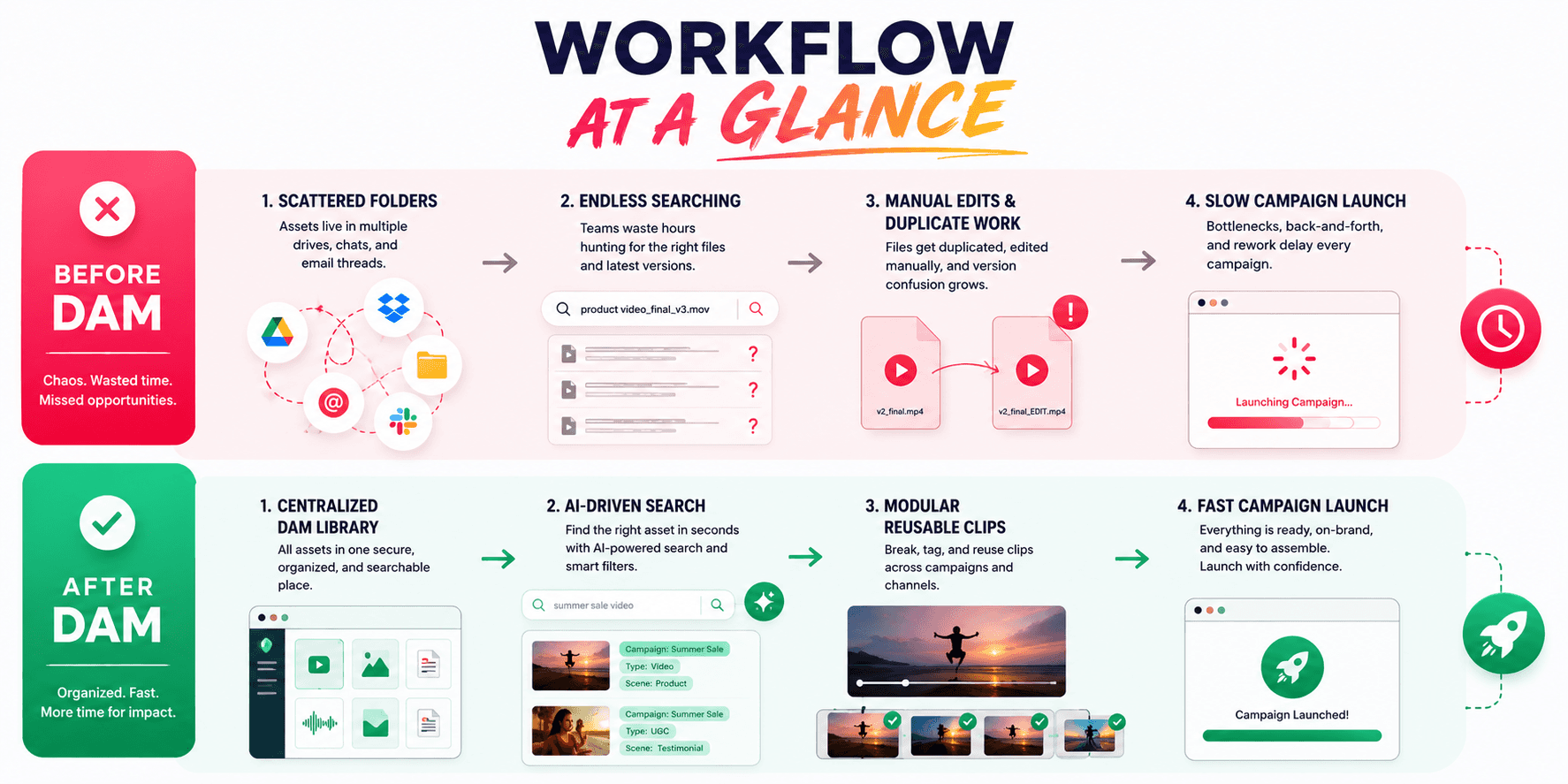
Before DAM: The marketing lead searches Google Drive for “Founder holiday video” and finds three candidate files with confusing names (“thanks2.mp4”, “finaledit.mov”). She emails the videographer, who is traveling, to identify the right clip. The videographer isn’t sure which one is the latest, so he watches them all on his phone.
Meanwhile, the designer has to cut down the chosen clip manually. Hours are lost coordinating versions via Slack. The team still misses the social deadline and ends up re-recording a quick selfie video.
After DAM: All previous campaign footage (interviews, product demos, B-roll) is already uploaded to the DAM and auto-indexed. The lead just types “founder in winter hoodie” in the search box. The system immediately returns the exact spot where the founder shot a holiday greeting in last year’s winter ad. She previews and drags the clip into a new project.
The editor (who has access to the DAM) sees the clip already tagged with scene notes and simply trims it to 30 seconds and adds captions. The campaign goes live days early – no new shoot needed.
The improvement is dramatic. In the “before” case, each piece of content required chasing down individuals and re-editing from raw footage. In the “after” case, assets were reused on demand. This workflow also prevents duplicate effort: clips are only edited or sliced once, and then shared for any campaign.
Why Traditional DAMs Often Fail Small Teams
Enterprise DAM systems can be powerful, but they often break for small businesses. Heavy DAMs assume you have full-time admins and complex taxonomies. As one analysis puts it, “If your active asset library is small (tens to a few hundred files) and changes infrequently, the overhead of metadata models, versioning layers, and governance tools can outweigh the benefits.”
In short, small teams don’t have time to build and maintain taxonomies or workflows, they need something that works out of the box.
Common pitfalls for SMBs adopting big DAMs include:
Setup Complexity: Traditional DAMs require planning metadata schemes, training staff, and sometimes even running on-premise servers. Small teams with no IT support often stall here.
Low Adoption: With one person doing everything, a cumbersome DAM can slow them down. They may revert to familiar folders or Drive, wasting the DAM investment.
Unused Features: Enterprise DAMs include branding compliance, global workflows, and audit logs that small companies simply don’t need, making the system feel over-engineered. A DAM should reduce friction, not add to it.
In practice, many small companies end up abandoning enterprise DAMs after a few months. A common SMB mistake is “buying enterprise-tier DAM for brand prestige, then abandoning it due to admin overhead”. Instead, growing businesses need an AI-native, mid-market DAM that’s built for speed and self-service.
Ready to see a better way? Try Recharm free for 14 days, experience a video-first DAM designed for small teams (no credit card required).
The Recharm Advantage: Video-First Asset Management for Growing Teams
Recharm is an example of a modern DAM built specifically for lean, video-centric teams. It combines all the above benefits in an easy-to-use package:
Visual Search Intelligence: Recharm applies AI to every uploaded video, so you can search by what’s inside the footage. Type “product demo with white background” or “customer testimonial,” and the system instantly finds the exact clip. No manual tagging is needed – the AI recognizes objects, scenes, text, and even actions. Editors can then click a result and jump right to the key moment, bypassing hours of scrubbing.
Modular Footage Organization: Instead of storing giant unedited videos, Recharm automatically cuts them into reusable “clips”. It identifies and separates scenes like A-roll talking segments (testimonials, product shots) and B-roll (lifestyle, reactions). Each clip is tagged (e.g., “smiling customer”, “hook: product on table”) and grouped in purpose-built sections.
A designer can browse an organized visual library of hooks, testimonials, B-roll, etc., and assemble ads by dragging out exactly what’s needed. This clip-based UI means small teams can quickly preview and combine footage without digging through raw long-form files.
Lean Setup & No Admin: Recharm is plug-and-play. You don’t need a taxonomist or engineer on staff. Simply upload your creative content (raw camera footage, influencer videos, existing commercials) and let Recharm’s AI index it automatically.
Small businesses benefit from this instantly: there’s minimal setup effort or learning curve, so you start finding assets on day one. Recharm’s founders understood startup constraints – you won’t spend weeks configuring it.
Designed for Scale (Without Cost Bloat): Recharm supports unlimited users and role-based permissions so the whole team (and outside editors or agencies) can safely access assets.
And because it’s SaaS, pricing starts small and scales with your usage. You get enterprise-style features like versioning and collaboration without an enterprise price tag.
In summary, Recharm delivers a video-first DAM that matches the pace of small teams. By turning every video into a searchable, modular library, it removes operational friction and lets creators do what they do best: make more content.
How to Choose the Right DAM for Your Small Business
When evaluating DAM solutions, focus on your team’s real needs, not marketing fluff. Consider these factors:
Fit to Team Size & Workflow: Think about your asset volume and how you work. If you’re a team of 3 with a few hundred files, look for DAMs tailored to SMBs. According to experts, DAM starts to make a big difference when asset counts exceed a few hundred and multiple people reuse files. Also consider how many stakeholders (marketing, sales, agencies) will use it.
For each scenario (“Who needs access?”), verify the tool can handle that scale without per-seat pricing holding you back.
Ease of Use: Prioritize systems that are cloud-based and ready-to-go. The ideal DAM should offer plug-and-play integrations (e.g. Google Drive sync, Adobe CC plugin) so that files flow into the DAM from tools you already use. Check out our guide on how to integrate your DAM with your marketing stack for best practices.
Importantly, look for intuitive UIs and AI-enabled features – if you won’t need an engineer to “turn it on,” adoption will be much easier. Many SMB DAMs promise a live system in just weeks, thanks to AI auto-tagging and templates.
Budget & Pricing Model: Small businesses should avoid large upfront licensing or per-user fees. Instead, pick a DAM with transparent, usage-based pricing. For example, some tools start with a free tier (Razuna offers 500 GB free) and add storage as needed.
Beware of solutions that multiply cost for each added user – you want a DAM that scales with your content, not per seat. In practice, many SMB-friendly DAM plans run a few hundred dollars per month for modest usage, far below enterprise contracts.
Key Features: Ensure the DAM covers essentials: advanced search (AI/metadata), clear version control, role-based access, and easy sharing/portals. As one checklist suggests, fast findability (filters, AI tags), single asset records (no duplicate copies), lightweight approvals, and integration capability are must-haves for SMBs. Skip overly complex features you don’t need initially (global governance, custom taxonomies, analytics can come later).
By matching these criteria to your team’s use case, you’ll find the right DAM without overkill. In many cases, the best approach is to trial a solution with your actual assets. A 14-day free trial can show how quickly your team adapts.
Conclusion
Digital Asset Management isn’t just for enterprises anymore. For modern small businesses and lean creative teams, the biggest advantage isn’t big budgets or mega-features, it’s instant access to the content you already own. A well-chosen DAM becomes your brand’s central library: no more lost files, no more outdated logos, and no more wasted hours on searches. Instead, every team member can quickly find, reuse, and share assets, keeping your marketing on-brand and moving fast.
The right DAM removes friction and reduces mistakes. It lets your team focus on creating new content instead of managing files. Remember: you don’t need an expensive enterprise system to get these benefits. Even a small video-first DAM can put your existing footage to work at scale. By choosing a lean, easy-to-use DAM, your small business can produce more campaigns, stay consistent, and grow, using exactly the same resources you have today.
FAQs
Is digital asset management worth it for a small business?
Yes, once you have more assets than one person can track. Key signs you need a DAM: duplicated work, version confusion, or time wasted searching for files. If more than one team member reuses assets, or you work with agencies and vendors, a DAM pays for itself quickly. It is worth it when it saves more time than it takes to set up.
What's the difference between a brand asset library and a DAM?
A brand asset library is a static repository for core brand materials like logos, fonts, and style guides. A DAM covers all your digital content and adds search, tagging, versioning, and distribution across any file type. In short, a DAM includes everything a brand library does, but extends to videos, photos, and campaign files across projects.
How much does DAM software cost for a small team?
Costs vary widely. SMB-focused DAMs typically start at a few hundred dollars per month, and basic plans for small teams can often be found for under $5,000 per year. Look for pay-as-you-grow pricing rather than large upfront contracts, and watch for models that scale with storage or active users to avoid surprise fees.
Can a small business manage a DAM without a dedicated admin?
Yes. Modern DAMs are built for non-technical users. Assigning one team member as the asset owner is usually enough; they do not need to work on it full-time. AI-powered DAMs auto-tag uploads and offer simple interfaces that require no coding or complex taxonomy management.
What's the easiest DAM system to set up for a growing team?
Look for cloud-based, AI-native platforms with quick setup and minimal manual configuration. The easiest options share a few qualities: intuitive UI, built-in integrations with tools like Google Drive and Adobe CC, and automatic AI tagging. Before committing, run a trial with your own files to see which platform works without complex onboarding.