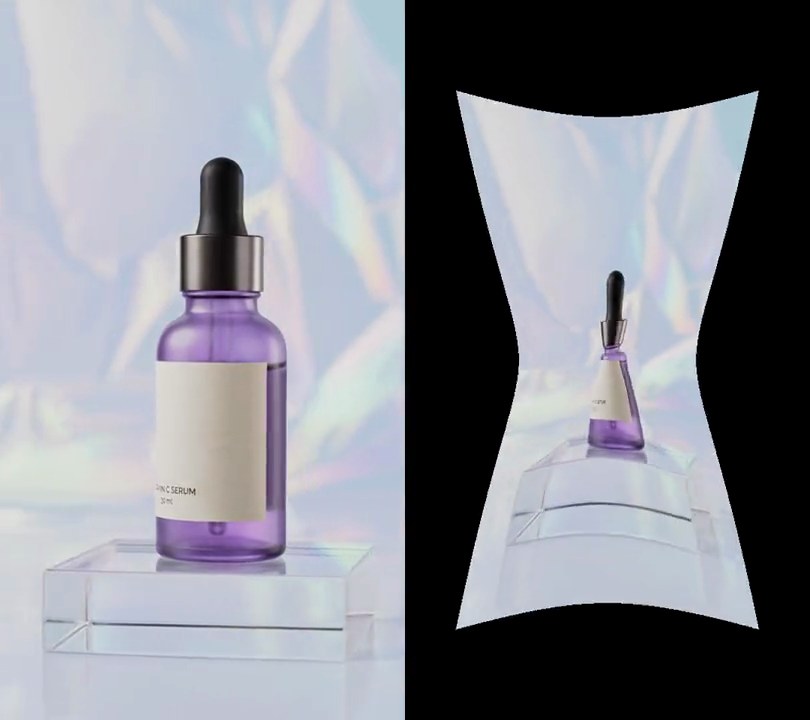
Get this effect
Switch to Code in your Claude Desktop App
Install the skill (once)
Show the prompt
Install the Recharm video effects skill: download https://recharm-growth-staging.s3.us-east-2.amazonaws.com/website/downloads/recharm-video-effects.zip and unzip it into ~/.claude/skillsAsk for the effect
Add reeded glass to input.mp4
Second the glass starts to slide in: 1.0
Seconds it takes to cover the frame: 0.8

Several videos, several effects, one ask
Put your clips in the folder, mention them with @, and ask for everything at once. Claude runs one tested script after another on each clip, then joins them.
Add reeded glass to @clip1.mp4, put a sale badge on @clip2.mp4, give @clip3.mp4 a VHS look, then join all three with crossfades.
Settings you can change
Ask Claude to change any of these, or edit them at the top of the script.
| Setting | Default | What it does |
|---|---|---|
START | 1.0 | Second the glass starts to slide in. |
SLIDE | 0.8 | Seconds it takes to cover the frame. |
REED | 36 | Width of one ridge in pixels. |
MAG | 0.4 | Share of each ridge's width it shows, stretched to fill it. Lower is more stretched. |
SHADE | 0.22 | How much darker each ridge gets toward its edges. |
GLINT | 28 | Brightness of the light line down the left side of each ridge. |
Without the skill
Don’t want to install the skill? Paste this prompt into Claude Code and Claude writes the script itself.
Show the prompt
Add a reeded (fluted) glass effect to input.mp4. Leave the first 1.0 seconds untouched. From 1.0 seconds a pane of glass slides in from the left edge over 0.8 seconds (smoothstep: its right edge is at x = width × p²(3 − 2p), p = (t − 1.0) / 0.8 clamped to 0-1) and then covers the whole frame to the end. Only pixels left of the pane's edge are changed. The pane has vertical ridges 36 pixels wide that move with it, counted from the pane's left edge, so once it is in place they run from x = 0. Inside each ridge, with u going from -0.5 at its left side to 0.5 at its right, the pixel shows the input at the same row and at x = ridge center + u × 36 × 0.4, so each ridge stretches the middle 40% of what lies behind it across its whole width (bilinear sampling, OpenCV remap). Shade each ridge like a cylinder: multiply its color by 1 − 0.22 × (2u)² and add a highlight of 28 × exp(−((u + 0.22) / 0.07)²) brightness levels down its left side, clipped to 0-255. Don't otherwise tint or blur the picture. Use Python with numpy and OpenCV for the pixels and ffmpeg to decode and encode (there is no text; any text would be drawn with Pillow, not ffmpeg's drawtext filter). Keep the size, 30fps and the audio, and save it as output.mp4.Run it without Claude
This is the exact script we tested. Save it as reeded-glass.py and run:
python3 reeded-glass.py input.mp4 output.mp4Show the script
#!/usr/bin/env python3
"""Reeded glass: at 1 second a pane of fluted glass slides in from the left, its vertical ridges slicing the shot into stretched strips.

Usage: python3 reeded-glass.py input.mp4 output.mp4
Needs ffmpeg, numpy and OpenCV (pip install numpy opencv-python-headless).
"""
import json
import subprocess
import sys

import cv2
import numpy as np

START = 1.0      # second the glass starts to slide in
SLIDE = 0.8      # seconds it takes to cover the frame
FPS = 30         # output frame rate
REED = 36        # width of one ridge in pixels
MAG = 0.4        # share of each ridge's width it shows, stretched to fill it (lower = more stretched)
SHADE = 0.22     # how much darker each ridge gets toward its edges
GLINT = 28       # brightness of the light line down the left side of each ridge


def probe(path):
    info = json.loads(subprocess.check_output(["ffprobe", "-v", "error", "-select_streams", "v:0", "-show_entries",
                                               "stream=width,height", "-of", "json", path]))
    return info["streams"][0]["width"], info["streams"][0]["height"]


def frames(path):
    """Decode a clip as RGB frames at FPS."""
    ff = subprocess.Popen(["ffmpeg", "-v", "error", "-i", path, "-vf", f"fps={FPS}",
                           "-f", "rawvideo", "-pix_fmt", "rgb24", "-"], stdout=subprocess.PIPE)
    while True:
        data = ff.stdout.read(w * h * 3)
        if len(data) < w * h * 3:
            return
        yield np.frombuffer(data, np.uint8).reshape(h, w, 3)


def glass(frame, edge):
    """Put the pane over everything left of `edge` (in pixels). The ridges move with the pane; each one samples
    a narrow slice of the scene behind its own middle and stretches it across its width, like a cylinder lens."""
    local = xs - edge + w                            # position across the pane, which ends at `edge`
    u = (local % REED) / REED - 0.5                  # -0.5 to 0.5 across each ridge
    src_x = xs - u * REED + u * REED * MAG           # ridge middle, plus a squeezed offset
    bent = cv2.remap(frame, np.tile(src_x, (h, 1)), ys, cv2.INTER_LINEAR, borderMode=cv2.BORDER_REFLECT)
    light = 1 - SHADE * (2 * u) ** 2
    glint = GLINT * np.exp(-((u + 0.22) / 0.07) ** 2)
    lit = np.clip(bent * light[None, :, None] + glint[None, :, None], 0, 255).astype(np.uint8)
    out = frame.copy()
    cover = xs < edge
    out[:, cover] = lit[:, cover]
    return out


src, out = sys.argv[1:3]
w, h = probe(src)
xs = np.arange(w, dtype=np.float32)
ys = np.repeat(np.arange(h, dtype=np.float32)[:, None], w, axis=1)

enc = subprocess.Popen(["ffmpeg", "-y", "-v", "error", "-f", "rawvideo", "-pix_fmt", "rgb24", "-s", f"{w}x{h}",
                        "-r", str(FPS), "-i", "-", "-i", src, "-map", "0:v", "-map", "1:a?",
                        "-c:v", "libx264", "-crf", "18", "-pix_fmt", "yuv420p", "-c:a", "copy", "-shortest", out],
                       stdin=subprocess.PIPE)
for i, frame in enumerate(frames(src)):
    p = min(max((i / FPS - START) / SLIDE, 0), 1)
    edge = w * p * p * (3 - 2 * p)                   # eased slide from the left edge to the right
    enc.stdin.write((glass(frame, edge) if p > 0 else frame).tobytes())
enc.stdin.close()
if enc.wait():
    sys.exit("ffmpeg failed")