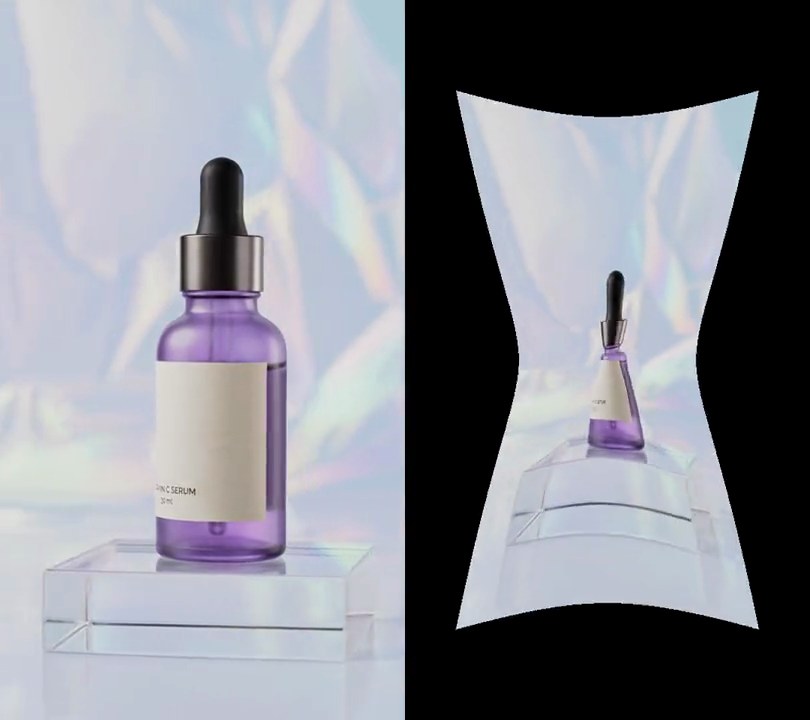
Get this effect
Switch to Code in your Claude Desktop App
Install the skill (once)
Show the prompt
Install the Recharm video effects skill: download https://recharm-growth-staging.s3.us-east-2.amazonaws.com/website/downloads/recharm-video-effects.zip and unzip it into ~/.claude/skillsAsk for the effect
Add a melting effect to input.mp4
Second the melt begins: 1.0
Second it reaches full strength; it stays melted after: 4.0

Several videos, several effects, one ask
Put your clips in the folder, mention them with @, and ask for everything at once. Claude runs one tested script after another on each clip, then joins them.
Add a melting effect to @clip1.mp4, put a sale badge on @clip2.mp4, give @clip3.mp4 a VHS look, then join all three with crossfades.
Settings you can change
Ask Claude to change any of these, or edit them at the top of the script.
| Setting | Default | What it does |
|---|---|---|
START | 1.0 | Second the melt begins. |
END | 4.0 | Second it reaches full strength; it stays melted after. |
DEPTH | 0.4 | How far the picture runs down at full strength, as a share of the frame height. |
DRIPS | 9 | Number of long drips across the frame. |
SMEAR | 0.35 | How much of each pixel's fall becomes a streak behind it (0 is sharp). |
SEED | 4 | Random seed for the drip pattern. |
Without the skill
Don’t want to install the skill? Paste this prompt into Claude Code and Claude writes the script itself.
Show the prompt
Make input.mp4 melt. Leave the first 1 second untouched, then from 1 to 4 seconds (smoothstep easing) ramp up a downward displacement and keep it at full strength until the end. Each output pixel at row y, column x shows the input pixel from higher up the same column, at y minus a fall distance of 0.4 x frame height x column profile x (y / frame height)^0.6, so the top edge stays put and the bottom runs the most. The column profile is between 0 and 1: a gentle wavy sag between 0.25 and 0.45 (11 random values spread evenly across the 540-pixel width, linearly interpolated), plus 9 narrow drips (Gaussian bumps 12 to 28 pixels wide reaching 0.6 to 1.0) at random positions, taking the larger of the two, then smoothed with a 31-pixel Hann window so drips have rounded shoulders. Use a fixed random seed. Smear the fall: average 6 samples taken at 65% to 100% of the fall distance, so pixels leave streaks behind them. Rows above the top of the frame repeat the top row. The video keeps playing underneath. Use Python with numpy for the pixels and ffmpeg to decode and encode, keep the size, 30fps and the audio, and save it as output.mp4.Run it without Claude
This is the exact script we tested. Save it as melting-effect.py and run:
python3 melting-effect.py input.mp4 output.mp4Show the script
#!/usr/bin/env python3
"""Melting effect: from 1 second the picture sags and runs down the frame in uneven drips, smearing as it goes, until it's fully melted at 4 seconds.

Usage: python3 melting-effect.py input.mp4 output.mp4
Needs ffmpeg and numpy (pip install numpy).
"""
import json
import subprocess
import sys

import numpy as np

START = 1.0       # second the melt begins
END = 4.0         # second it reaches full strength (it stays melted after)
FPS = 30          # output frame rate
DEPTH = 0.4       # how far the picture runs down at full strength, as a share of the frame height
DRIPS = 9         # number of long drips across the frame
SMEAR = 0.35      # how much of each pixel's fall is smeared into a streak behind it (0 = sharp)
SEED = 4          # change for a different (but repeatable) drip pattern


def probe(path):
    info = json.loads(subprocess.check_output(["ffprobe", "-v", "error", "-select_streams", "v:0", "-show_entries",
                                               "stream=width,height:format=duration", "-of", "json", path]))
    return info["streams"][0]["width"], info["streams"][0]["height"], float(info["format"]["duration"])


def frames(path):
    """Decode a clip as RGB frames at FPS."""
    ff = subprocess.Popen(["ffmpeg", "-v", "error", "-i", path, "-vf", f"fps={FPS}",
                           "-f", "rawvideo", "-pix_fmt", "rgb24", "-"], stdout=subprocess.PIPE)
    while True:
        data = ff.stdout.read(w * h * 3)
        if len(data) < w * h * 3:
            return
        yield np.frombuffer(data, np.uint8).reshape(h, w, 3)


def drip_profile():
    """How far each column runs (0-1): a gently wavy sag everywhere, plus narrow drips that run much further."""
    rng = np.random.default_rng(SEED)
    x = np.arange(w)
    knots = rng.uniform(0.25, 0.45, w // 60 + 2)
    profile = np.interp(x, np.linspace(0, w - 1, len(knots)), knots)
    for cx, width, reach in zip(rng.uniform(0, w, DRIPS), rng.uniform(12, 28, DRIPS), rng.uniform(0.6, 1.0, DRIPS)):
        profile = np.maximum(profile, reach * np.exp(-((x - cx) / width) ** 2))
    kernel = np.hanning(31) / np.hanning(31).sum()   # round off the corners so drips have soft shoulders
    return np.convolve(np.pad(profile, 15, mode="edge"), kernel, mode="valid")


def melt(frame, p):
    """One frame at melt strength p (0-1): each pixel shows the picture from higher up its column, by more
    lower down the frame and in the drips, averaged along the way so the fall leaves a streak."""
    ease = p * p * (3 - 2 * p)
    rows = np.arange(h)[:, None]
    fall = ease * DEPTH * h * profile[None, :] * (rows / h) ** 0.6
    out = np.zeros((h, w, 3), np.float32)
    for k in np.linspace(1 - SMEAR, 1, 6):
        src_rows = np.clip(np.round(rows - fall * k), 0, h - 1).astype(int)
        out += frame[src_rows, cols]
    return (out / 6).astype(np.uint8)


src, out = sys.argv[1:3]
w, h, duration = probe(src)
profile = drip_profile()
cols = np.arange(w)[None, :]

enc = subprocess.Popen(["ffmpeg", "-y", "-v", "error", "-f", "rawvideo", "-pix_fmt", "rgb24", "-s", f"{w}x{h}",
                        "-r", str(FPS), "-i", "-", "-i", src, "-map", "0:v", "-map", "1:a?",
                        "-c:v", "libx264", "-crf", "18", "-pix_fmt", "yuv420p", "-c:a", "copy", "-shortest", out],
                       stdin=subprocess.PIPE)
for i, frame in enumerate(frames(src)):
    p = min(max((i / FPS - START) / (END - START), 0), 1)
    enc.stdin.write((melt(frame, p) if p > 0 else frame).tobytes())
enc.stdin.close()
if enc.wait():
    sys.exit("ffmpeg failed")