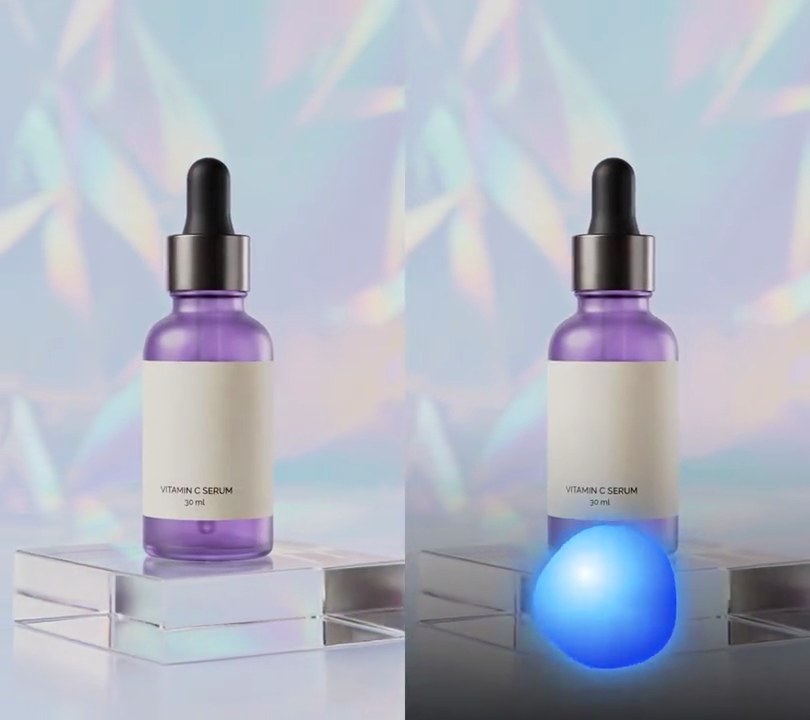
Get this effect
Switch to Code in your Claude Desktop App
Install the skill (once)
Show the prompt
Install the Recharm video effects skill: download https://recharm-growth-staging.s3.us-east-2.amazonaws.com/website/downloads/recharm-video-effects.zip and unzip it into ~/.claude/skillsAsk for the effect
Add a shockwave rings on beat to input.mp4
Where the rings start, 0-1 across and down the frame: 0.5, 0.5
Seconds a ring takes to reach full size and fade out: 0.45

Several videos, several effects, one ask
Put your clips in the folder, mention them with @, and ask for everything at once. Claude runs one tested script after another on each clip, then joins them.
Add a shockwave rings on beat to @clip1.mp4, put a sale badge on @clip2.mp4, give @clip3.mp4 a VHS look, then join all three with crossfades.
Settings you can change
Ask Claude to change any of these, or edit them at the top of the script.
| Setting | Default | What it does |
|---|---|---|
X, Y | 0.5, 0.5 | Where the rings start, 0-1 across and down the frame. |
LIFE | 0.45 | Seconds a ring takes to reach full size and fade out. Keep it under the time between kicks for clean gaps. |
START_SIZE | 0.06 | Ring radius at the kick, as a share of the frame width. |
REACH | 0.95 | Ring radius when it fades out, as a share of the frame width. |
THICK | 9, 3 | Ring line width in pixels, at the kick and when it fades out. |
COLOR | (255, 255, 255) | Ring color. |
GLOW | (70, 170, 255) | Color of the soft glow around the ring. |
GLOW_BLUR | 9 | Glow blur radius in pixels. |
BEND | 12 | Furthest the ring pushes the picture outward, in pixels. 0 turns the ripple off. |
KICK_HZ | 150 | The bass band, in Hz, that tells a kick from a snare or hi-hat. |
THRESHOLD | 0.5 | An onset counts as a kick when the bass reaches this share of its loudest. |
Without the skill
Don’t want to install the skill? Paste this prompt into Claude Code and Claude writes the script itself.
Show the prompt
Add shockwave rings on the beat to input.mp4 (the music is its own audio track). Find the kick drums with librosa: load the audio mono at 22050 Hz, put 0.1 seconds of silence in front so a kick at 0 seconds is found too, run librosa.onset.onset_detect with hop_length 256 and backtrack=True, and keep only the onsets where the bass (the STFT magnitude summed at 150 Hz and below, divided by its loudest value) reaches 0.5 within the next 8 hops; subtract the 0.1 seconds again. On each kick a ring starts at the center of the frame (50% across, 50% down) and lives 0.45 seconds. With p = seconds since the kick / 0.45, its radius is the frame width times 0.06 + 0.89 * (1 - (1 - p)^3) (so it bursts out and eases), its line width goes from 9 pixels to 3 pixels, and its opacity is (1 - p)^1.5. Draw each ring with Pillow as a white (255, 255, 255) circle outline over a glow: a (70, 170, 255) outline three times as wide, blurred with a 9-pixel Gaussian blur. Before drawing the rings, bend the picture with OpenCV (cv2.remap, reflect at the borders): for each pixel at distance r from the center, let d = (r - radius) / (4 * line width) and move the picture outward by 12 * opacity * 2.33 * d * exp(-d^2) pixels, summed over the rings alive in that frame. Frames with no ring alive stay untouched, so the picture is clean just before every kick. Work frame by frame at 30fps, keep the size and the audio, and save it as output.mp4 (H.264, yuv420p).Run it without Claude
This is the exact script we tested. Save it as shockwave-rings-on-beat.py and run:
python3 shockwave-rings-on-beat.py input.mp4 output.mp4Show the script
#!/usr/bin/env python3
"""Shockwave rings on beat: librosa finds every kick drum, and on each one a thin white ring bursts out of the bottle, bending the picture as it races outward and fades.

Usage: python3 shockwave-rings-on-beat.py input.mp4 output.mp4  (the music is the input's audio track)
Needs ffmpeg, librosa to find the kicks, Pillow to draw the rings and OpenCV to bend the picture
(pip install librosa pillow opencv-python-headless numpy).
"""
import json
import subprocess
import sys
import tempfile

import cv2
import librosa
import numpy as np
from PIL import Image, ImageDraw, ImageFilter

X, Y = 0.5, 0.5             # where the rings start (0-1 across and down the frame)
LIFE = 0.45                 # seconds a ring takes to reach full size and fade out
START_SIZE = 0.06           # ring radius at the kick, as a share of the frame width
REACH = 0.95                # ring radius when it fades out, as a share of the frame width
THICK = 9, 3                # ring line width in pixels, at the kick and when it fades out
COLOR = (255, 255, 255)     # ring color
GLOW = (70, 170, 255)       # color of the soft glow around the ring
GLOW_BLUR = 9               # glow blur radius in pixels
BEND = 12                   # furthest the ring pushes the picture outward, in pixels
KICK_HZ = 150               # the bass band, in Hz, that tells a kick from a snare or hi-hat
THRESHOLD = 0.5             # an onset counts as a kick when the bass reaches this share of its loudest
FPS = 30


def probe(path):
    info = json.loads(subprocess.check_output(["ffprobe", "-v", "error", "-select_streams", "v:0", "-show_entries",
                                               "stream=width,height", "-of", "json", path]))
    return info["streams"][0]["width"], info["streams"][0]["height"]


def kick_times(path):
    """Seconds of each kick drum: every onset librosa finds in the music where the bass then hits hard."""
    with tempfile.NamedTemporaryFile(suffix=".wav") as wav:
        subprocess.run(["ffmpeg", "-y", "-v", "error", "-i", path, "-vn", "-ac", "1", "-ar", "22050", wav.name], check=True)
        y, sr = librosa.load(wav.name, sr=None)
    hop, lead = 256, 0.1  # analysis step in samples (about 12ms); silence added in front so a kick at 0s is found too
    y = np.concatenate([np.zeros(round(lead * sr), np.float32), y])
    spec = np.abs(librosa.stft(y, hop_length=hop))
    bass = spec[librosa.fft_frequencies(sr=sr) <= KICK_HZ].sum(axis=0)
    bass /= bass.max()
    onsets = librosa.onset.onset_detect(y=y, sr=sr, hop_length=hop, backtrack=True)
    kicks = [f for f in onsets if bass[f:f + 8].max() >= THRESHOLD]   # loud bass within 0.1s of the onset
    return librosa.frames_to_time(kicks, sr=sr, hop_length=hop) - lead


def frames(path):
    """Every frame of the clip at 30fps as an RGB array."""
    ff = subprocess.Popen(["ffmpeg", "-v", "error", "-i", path, "-vf", f"fps={FPS}", "-f", "rawvideo", "-pix_fmt", "rgb24", "-"],
                          stdout=subprocess.PIPE)
    while True:
        chunk = ff.stdout.read(w * h * 3)
        if len(chunk) < w * h * 3:
            return
        yield np.frombuffer(chunk, np.uint8).reshape(h, w, 3)


def rings_at(t):
    """(radius, line width, strength) of every ring alive at t: each eases out fast and fades as it grows."""
    live = []
    for kick in kicks:
        p = (t - kick) / LIFE
        if 0 <= p < 1:
            grow = 1 - (1 - p) ** 3
            radius = w * (START_SIZE + (REACH - START_SIZE) * grow)
            live.append((radius, THICK[0] + (THICK[1] - THICK[0]) * p, (1 - p) ** 1.5))
    return live


def bend(img, rings):
    """Push the picture outward in a narrow band around each ring, like a pressure wave passing through."""
    push = np.zeros_like(r)
    for radius, width, fade in rings:
        d = (r - radius) / (width * 4)
        push += BEND * fade * 2.33 * d * np.exp(-d ** 2)   # 2.33 makes the largest push exactly BEND
    return cv2.remap(img, xs - push * ux, ys - push * uy, cv2.INTER_LINEAR, borderMode=cv2.BORDER_REFLECT)


def draw_rings(rings):
    """The rings as an RGBA layer: a thin bright line over a blurred, tinted glow."""
    glow, line = Image.new("RGBA", (w, h), GLOW + (0,)), Image.new("RGBA", (w, h))
    gd, ld = ImageDraw.Draw(glow), ImageDraw.Draw(line)
    for radius, width, fade in rings:
        box = [cx - radius, cy - radius, cx + radius, cy + radius]
        gd.ellipse(box, outline=GLOW + (round(255 * fade),), width=round(width * 3))
        ld.ellipse(box, outline=COLOR + (round(255 * fade),), width=round(width))
    layer = glow.filter(ImageFilter.GaussianBlur(GLOW_BLUR))
    layer.alpha_composite(line)
    return layer


src, out = sys.argv[1:3]
w, h = probe(src)
kicks = kick_times(src)
cx, cy = X * w, Y * h
ys, xs = np.mgrid[0:h, 0:w].astype(np.float32)
r = np.hypot(xs - cx, ys - cy)
ux, uy = (xs - cx) / np.maximum(r, 1), (ys - cy) / np.maximum(r, 1)
ff = subprocess.Popen(["ffmpeg", "-y", "-v", "error", "-f", "rawvideo", "-pix_fmt", "rgb24", "-s", f"{w}x{h}",
                       "-r", str(FPS), "-i", "-", "-i", src, "-map", "0:v", "-map", "1:a?",
                       "-c:v", "libx264", "-crf", "18", "-pix_fmt", "yuv420p", "-c:a", "copy", "-shortest", out],
                      stdin=subprocess.PIPE)
for i, img in enumerate(frames(src)):
    rings = rings_at(i / FPS)
    if rings:
        frame = Image.fromarray(bend(img, rings)).convert("RGBA")
        frame.alpha_composite(draw_rings(rings))
        img = np.asarray(frame.convert("RGB"))
    ff.stdin.write(img.tobytes())
ff.stdin.close()
if ff.wait():
    sys.exit("ffmpeg failed")