Get this effect
Switch to Code in your Claude Desktop App
Install the skill (once)
Show the prompt
Install the Recharm video effects skill: download https://recharm-growth-staging.s3.us-east-2.amazonaws.com/website/downloads/recharm-video-effects.zip and unzip it into ~/.claude/skillsAsk for the effect
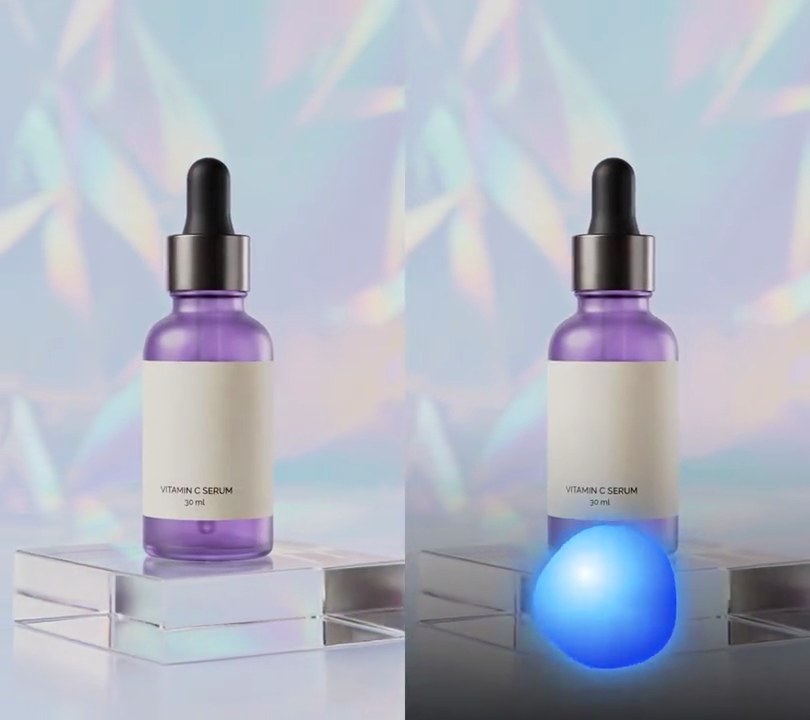
Add an audio-reactive blob to input.mp4
Blob center (0-1 across and down the frame): 0.5, 0.86
Resting blob radius as a share of the frame width: 0.17

Several videos, several effects, one ask
Put your clips in the folder, mention them with @, and ask for everything at once. Claude runs one tested script after another on each clip, then joins them.
Add an audio-reactive blob to @clip1.mp4, put a sale badge on @clip2.mp4, give @clip3.mp4 a VHS look, then join all three with crossfades.
Settings you can change
Ask Claude to change any of these, or edit them at the top of the script.
| Setting | Default | What it does |
|---|---|---|
X, Y | 0.5, 0.86 | Blob center (0-1 across and down the frame). |
SIZE | 0.17 | Resting blob radius as a share of the frame width. |
LOBES | 5 | Metaballs circling the core that make the liquid edge. |
STRETCH | 0.45 | Extra width on a full-strength bass hit (0.45 = 45% wider). |
SPREAD | 0.6 | How far the lobes fling out on a bass hit, in resting radii. |
COLOR_A, COLOR_B | (255, 40, 150), (255, 150, 30) | Gradient colors, top left (pink) to bottom right (orange). |
CORE | (255, 225, 235) | Pale highlight color, brighter on the mids. |
GLOW | 0.40 | Halo blur as a share of the blob radius. |
GLOW_MIDS | 0.9 | Halo strength added at full mids. |
BASS_HZ, MIDS_HZ | (30, 150), (300, 2000) | The bands that stretch the blob and make it glow. |
FALL | 0.82 | How fast the blob settles: levels fall to no less than this share of the last frame's. |
Without the skill
Don’t want to install the skill? Paste this prompt into Claude Code and Claude writes the script itself.
Show the prompt
Add an audio-reactive liquid blob to input.mp4 (540x960, 30fps, it has a drum loop). For each video frame, take a Hann-windowed 2048-sample FFT of the mono audio at 48 kHz centered on that frame and sum two bands: bass 30-150 Hz and mids 300-2000 Hz. Divide each band by its loudest frame so it runs 0 to 1, and let each fall by at most 18% per frame (level = max(new, previous * 0.82)). Build the blob as a metaball field centered 50% across and 86% down the frame, with a resting radius r of 17% of the frame width. Measure from the center with dx = (x - cx) / (1 + 0.45 * bass) and dy = (y - cy) * (1 + 0.2 * bass), so it stretches sideways and flattens on the bass. The field is (0.65r)^2 / (dx^2 + dy^2) for a core ball plus 5 lobes: lobe k sits at angle 2*pi*k/5 + t * (0.7 for odd k, -0.5 for even k), at distance r * (0.55 + 0.12 * sin(2.1t + k) + 0.6 * bass) (vertical offset times 0.75), with radius r * (0.42 + 0.06 * sin(1.7t + 2k)); each adds radius^2 / squared distance. The blob's opacity is (field - 1) / 0.25 clamped to 0-1. Color it with a diagonal gradient from hot pink (255, 40, 150) at the top left to orange (255, 150, 30) at the bottom right: u = ((x - cx) + (y - cy)) / (2.4r) + 0.5 + 0.15 * sin(t), clamped to 0-1. Mix in a pale highlight (255, 225, 235) centered 0.3r left and 0.3r above the center, with weight exp(-(distance / 0.8r)^2) * (0.3 + 0.6 * mids). Under the blob, tint the video toward the pink by 0.8 times a halo: the blob's opacity Gaussian-blurred with a sigma of 40% of r, times (0.25 + 0.9 * mids), clamped to 1. Use Python with numpy for the FFT and OpenCV for the blur, and ffmpeg to read and write the video (don't rely on ffmpeg's drawtext filter), keep the audio, and save it as output.mp4.Run it without Claude
This is the exact script we tested. Save it as audio-reactive-blob.py and run:
python3 audio-reactive-blob.py input.mp4 output.mp4Show the script
#!/usr/bin/env python3
"""Audio-reactive blob: a soft pink-to-orange liquid blob under the product stretches wide on every bass hit and glows on the mids.

Usage: python3 audio-reactive-blob.py input.mp4 output.mp4  (the input needs an audio track)
Needs ffmpeg, numpy and OpenCV (pip install numpy opencv-python-headless).
"""
import json
import math
import subprocess
import sys

import cv2
import numpy as np

X, Y = 0.5, 0.86                  # blob center (0-1 across and down the frame)
SIZE = 0.17                       # resting blob radius as a share of the frame width
LOBES = 5                         # metaballs circling the core that make the liquid edge
STRETCH = 0.45                    # extra width on a full-strength bass hit (0.45 = 45% wider)
SPREAD = 0.6                      # how far the lobes fling out on a bass hit, in resting radii
COLOR_A = (255, 40, 150)          # hot pink, top left of the blob
COLOR_B = (255, 150, 30)          # orange, bottom right of the blob
CORE = (255, 225, 235)            # pale highlight, brighter on the mids
GLOW = 0.40                       # halo blur as a share of the blob radius
GLOW_MIDS = 0.9                   # halo strength added at full mids (0.25 at rest)
BASS_HZ = (30, 150)               # band that stretches the blob
MIDS_HZ = (300, 2000)             # band that makes it glow
FALL = 0.82                       # each frame the levels fall to no less than this share of the last
RATE = 48000                      # audio sample rate the analysis uses


def probe(path):
    info = json.loads(subprocess.check_output(["ffprobe", "-v", "error", "-select_streams", "v:0", "-show_entries",
                                               "stream=width,height,r_frame_rate:format=duration", "-of", "json", path]))
    s = info["streams"][0]
    num, den = s["r_frame_rate"].split("/")
    return s["width"], s["height"], s["r_frame_rate"], float(num) / float(den), float(info["format"]["duration"])


def band_levels(src, bands):
    """Loudness (0-1) of each band at each video frame, from an FFT of the audio around it, with a soft fall."""
    pcm = subprocess.check_output(["ffmpeg", "-v", "error", "-i", src, "-ac", "1", "-ar", str(RATE), "-f", "f32le", "-"])
    audio = np.frombuffer(pcm, np.float32)
    n = 2048
    freqs = np.fft.rfftfreq(n, 1 / RATE)
    spectra = []
    for i in range(frames):
        center = round(i / fps * RATE)
        chunk = audio[max(0, center - n // 2):center + n // 2]
        spectra.append(np.abs(np.fft.rfft(np.pad(chunk, (0, n - len(chunk))) * np.hanning(n))))
    spectra = np.array(spectra)
    levels = []
    for lo, hi in bands:
        raw = spectra[:, (freqs >= lo) & (freqs <= hi)].sum(axis=1)
        raw /= max(raw.max(), 1e-9)
        for i in range(1, frames):
            raw[i] = max(raw[i], raw[i - 1] * FALL)
        levels.append(raw)
    return levels


def blob(i):
    """The blob's color (RGB, 0-255) and opacity (0-1) for frame i, full frame size."""
    t, b, m = i / fps, bass[i], mids[i]
    r = SIZE * w
    cx, cy = X * w, Y * h
    dx = (xx - cx) / (1 + STRETCH * b)              # stretch sideways on the bass
    dy = (yy - cy) * (1 + 0.2 * b)                  # and flatten a little
    field = (0.65 * r) ** 2 / (dx ** 2 + dy ** 2 + 1)
    for k in range(LOBES):
        angle = 2 * math.pi * k / LOBES + t * (0.7 if k % 2 else -0.5)
        dist = r * (0.55 + 0.12 * math.sin(2.1 * t + k) + SPREAD * b)
        lr = r * (0.42 + 0.06 * math.sin(1.7 * t + 2 * k))
        field += lr ** 2 / ((dx - dist * math.cos(angle)) ** 2 + (dy - 0.75 * dist * math.sin(angle)) ** 2 + 1)
    alpha = np.clip((field - 1) / 0.25, 0, 1)    # soft edge where the metaballs meet the threshold
    u = np.clip(((xx - cx) + (yy - cy)) / (2.4 * r) + 0.5 + 0.15 * math.sin(t), 0, 1)[..., None]
    rgb = (1 - u) * np.array(COLOR_A) + u * np.array(COLOR_B)
    shine = np.hypot(dx + 0.3 * r, dy + 0.3 * r) / (0.8 * r)    # soft highlight up and left of center
    core = (np.exp(-shine ** 2) * (0.3 + 0.6 * m))[..., None]
    rgb = rgb * (1 - core) + np.array(CORE) * core
    return rgb, alpha


def frame_with_blob(img, i):
    rgb, alpha = blob(i)
    halo = cv2.GaussianBlur(alpha.astype(np.float32), (0, 0), GLOW * SIZE * w)
    glow = np.clip(halo * (0.25 + GLOW_MIDS * mids[i]), 0, 1)[..., None]
    base = img.astype(np.float32)
    base = base + glow * (np.array(COLOR_A) - base) * 0.8      # pink light spilling around the blob
    a = alpha[..., None]
    return (base * (1 - a) + rgb * a).astype(np.uint8)


def render(src, out):
    """Read src frame by frame, draw the blob, and save to out, keeping the audio."""
    reader = subprocess.Popen(["ffmpeg", "-v", "error", "-i", src, "-f", "rawvideo", "-pix_fmt", "rgb24", "-"],
                              stdout=subprocess.PIPE)
    writer = subprocess.Popen(["ffmpeg", "-y", "-v", "error", "-f", "rawvideo", "-pix_fmt", "rgb24", "-s", f"{w}x{h}",
                               "-r", rate, "-i", "-", "-i", src, "-map", "0:v", "-map", "1:a?", "-c:v", "libx264",
                               "-crf", "18", "-pix_fmt", "yuv420p", "-c:a", "copy", "-shortest", out],
                              stdin=subprocess.PIPE)
    for i in range(frames):
        raw = reader.stdout.read(w * h * 3)
        if len(raw) < w * h * 3:
            break
        img = np.frombuffer(raw, np.uint8).reshape(h, w, 3)
        writer.stdin.write(frame_with_blob(img, i).tobytes())
    writer.stdin.close()
    reader.wait()
    if writer.wait():
        sys.exit("ffmpeg failed")


src, out = sys.argv[1:3]
w, h, rate, fps, duration = probe(src)
frames = math.ceil(duration * fps)
yy, xx = np.mgrid[0:h, 0:w].astype(np.float32)
bass, mids = band_levels(src, [BASS_HZ, MIDS_HZ])
render(src, out)