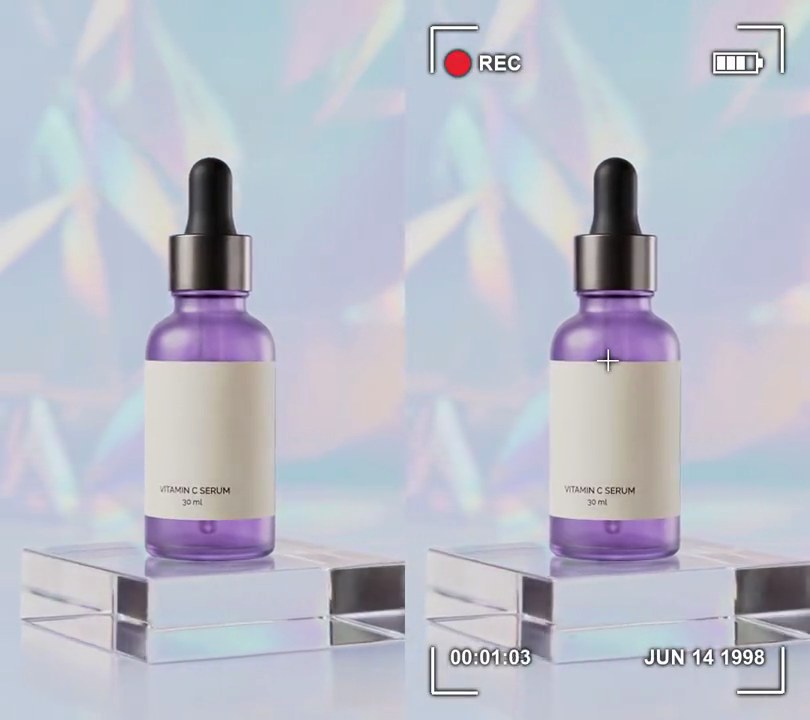
Get this effect
Switch to Code in your Claude Desktop App
Install the skill (once)
Show the prompt
Install the Recharm video effects skill: download https://recharm-growth-staging.s3.us-east-2.amazonaws.com/website/downloads/recharm-video-effects.zip and unzip it into ~/.claude/skillsAsk for the effect
Add a miniDV camcorder look to input.mp4
Share of the resolution kept before scaling back up (lower is softer): 0.5
Brightness (0-1) at which highlights clip to pure white: 0.85

Several videos, several effects, one ask
Put your clips in the folder, mention them with @, and ask for everything at once. Claude runs one tested script after another on each clip, then joins them.
Add a minidv camcorder look to @clip1.mp4, put a sale badge on @clip2.mp4, give @clip3.mp4 a VHS look, then join all three with crossfades.
Settings you can change
Ask Claude to change any of these, or edit them at the top of the command.
| Setting | Default | What it does |
|---|---|---|
SOFT | 0.5 | Share of the resolution kept before scaling back up (lower is softer). |
KNEE | 0.85 | Brightness (0-1) at which highlights clip to pure white. |
LINES | 0.1 | How much every other row is darkened, for interlace lines (0 turns them off). |
GRAIN | 8 | Sensor noise strength (0 turns it off). |
Without the skill
Don’t want to install the skill? Paste this prompt into Claude Code and Claude writes the command itself.
Show the prompt
Give input.mp4 (540x960, 30fps, 6 seconds) an early-2000s MiniDV camcorder look from the first frame to the last, using ffmpeg. (1) Crop the centered 4:3 area: the full 540-pixel width and the middle 404 rows (rows 278-681). (2) Soften it: scale that picture down to half size (270 pixels wide) and back up to 540 wide with bilinear scaling. (3) Blow out the highlights with a brightness curve through (0, 0), (0.5, 0.56), (0.85, 1) and (1, 1) on all channels, so everything above about 217 of 255 clips to pure white (255, 255, 255). (4) Interlace lines: multiply the brightness of every odd row of the picture by 0.9, leaving the even rows as they are. (5) Add moving grain (ffmpeg's noise filter, strength 8, temporal). (6) Pad it back to 540x960 with the picture centered and pure black (0, 0, 0) bars above and below, 278 pixels each; the bars get no grain. No text or overlay is drawn (if you add any, draw it with Pillow, not ffmpeg's drawtext). Keep the 540x960 size, 30fps, 6-second length and the audio, H.264 yuv420p. Save it as output.mp4.Run it without Claude
This is the exact command we tested. Save it as minidv-camcorder.sh and run:
sh minidv-camcorder.sh input.mp4 output.mp4Show the command
#!/bin/sh
# MiniDV camcorder look: a soft, noisy 4:3 picture with blown highlights and faint interlace lines, boxed in black.
# Usage: sh minidv-camcorder.sh input.mp4 output.mp4
# Needs ffmpeg.
set -e
IN="$1"; OUT="$2"
SOFT=0.5        # share of the resolution kept before scaling back up (lower is softer)
KNEE=0.85       # brightness (0-1) at which highlights clip to pure white
LINES=0.1       # how much every other row is darkened, for interlace lines (0 turns them off)
GRAIN=8         # sensor noise strength (0 turns it off)

SIZE=$(ffprobe -v error -select_streams v:0 -show_entries stream=width,height -of csv=s=x:p=0 "$IN")
W=${SIZE%x*}; H=${SIZE#*x}
PW=$(( W < H * 4 / 3 ? W : H * 4 / 3 ))   # the largest 4:3 picture that fits
PH=$(( PW * 3 / 8 * 2 ))
ffmpeg -y -v error -i "$IN" -vf "\
crop=$PW:$PH,\
scale='trunc(iw*$SOFT/2)*2':-2,scale=$PW:$PH:flags=bilinear,\
curves=all='0/0 0.5/0.56 $KNEE/1 1/1',\
geq=lum='lum(X,Y)*(1-$LINES*mod(Y,2))':cb='cb(X,Y)':cr='cr(X,Y)',\
noise=alls=$GRAIN:allf=t,\
pad=$W:$H:(ow-iw)/2:(oh-ih)/2:black,fps=30,format=yuv420p" \
  -c:v libx264 -crf 18 -c:a copy "$OUT"