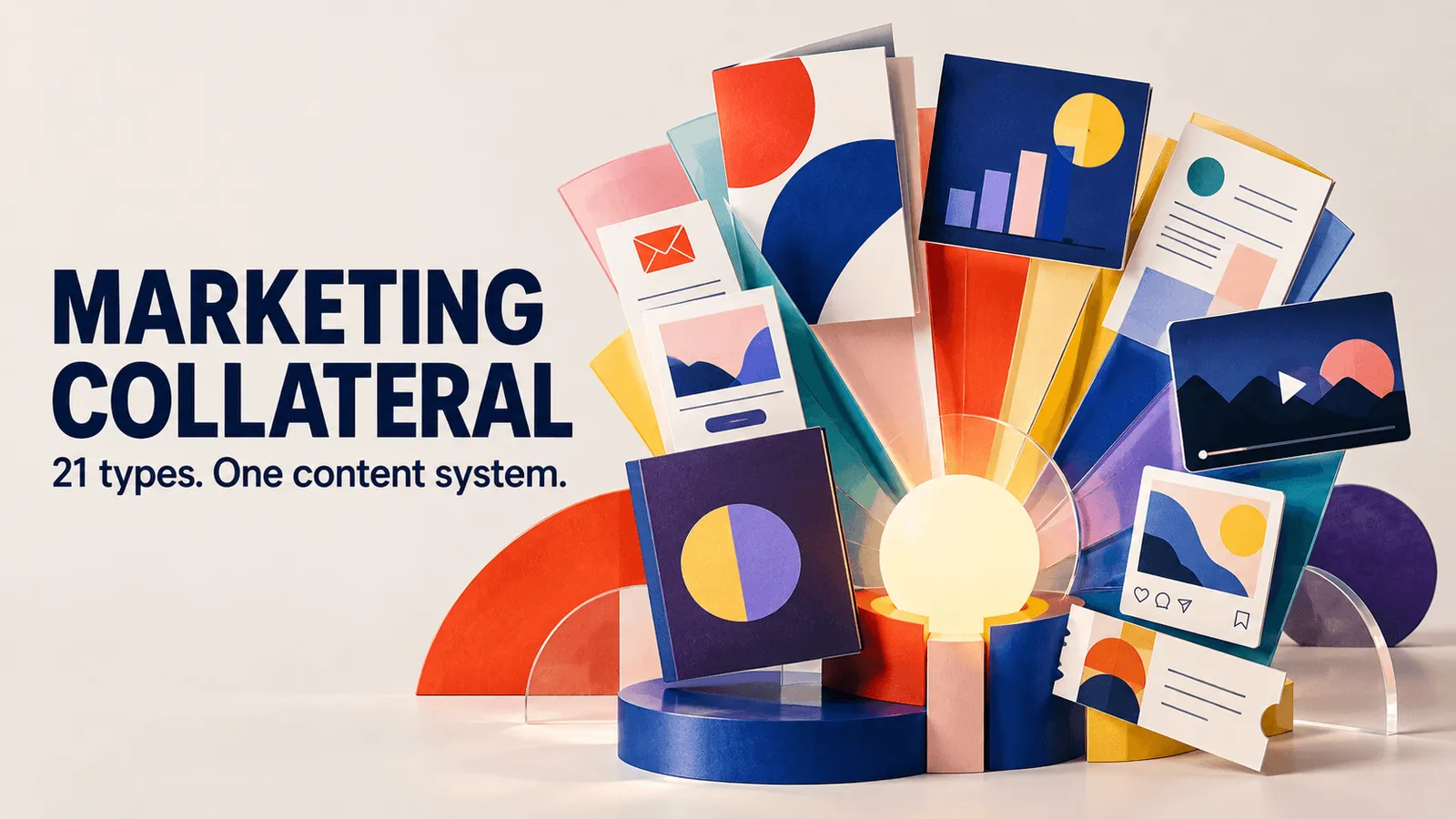
Marketing collateral includes the content and materials brands use to communicate with prospects and customers across the buyer journey. This can range from case studies, sales decks, and one-pagers to videos, brochures, ebooks, and social graphics.
Different types of collateral serve different purposes. Some introduce a brand or educate an audience, while others help sales teams answer questions, build credibility, or support a purchase decision.
This guide covers the main types of marketing collateral, how to match them to different stages of the buyer journey, and how to create, organize, maintain, and reuse them at scale.
TL;DR
-
Marketing collateral is branded, customer-facing content used to communicate a company's message and support buying decisions. Common examples include case studies, sales decks, ebooks, infographics, brochures, and social media graphics.
-
Collateral generally falls into three categories: Digital, Print, and Sales Enablement.
-
Match collateral to the buyer's journey: blogs and social content for awareness, ebooks and webinars for consideration, and case studies, testimonials, and demos for decision-making.
-
Keep collateral current and easy to find by using a centralized repository such as a Digital Asset Management (DAM) system, with clear ownership, version control, and metadata.
-
Search before creating. Existing collateral can often be adapted or repurposed instead of producing something from scratch. This helps teams scale content while reducing redundant production.
What Is Marketing Collateral?
Marketing collateral is digital or physical content that communicates a brand's message and supports a prospect's or customer's buying decision. It can include brochures, webpages, emails, slide decks, infographics, and more.
The key distinction is that collateral is finished material used to inform or persuade a buyer or internal stakeholder. In simple terms, it's the sales- and marketing-ready content that makes your brand feel recognizable across different touchpoints.
Historically, "collateral material" mainly referred to printed sales and advertising pieces, such as brochures, flyers, and catalogs, that supported broader campaigns.
Today, collateral also includes digital formats such as PDFs, ebooks, videos, and interactive microsites. The purpose remains the same: communicate a consistent brand message and guide people toward a specific action or understanding.
Marketing Collateral vs. Marketing Materials vs. Marketing Assets
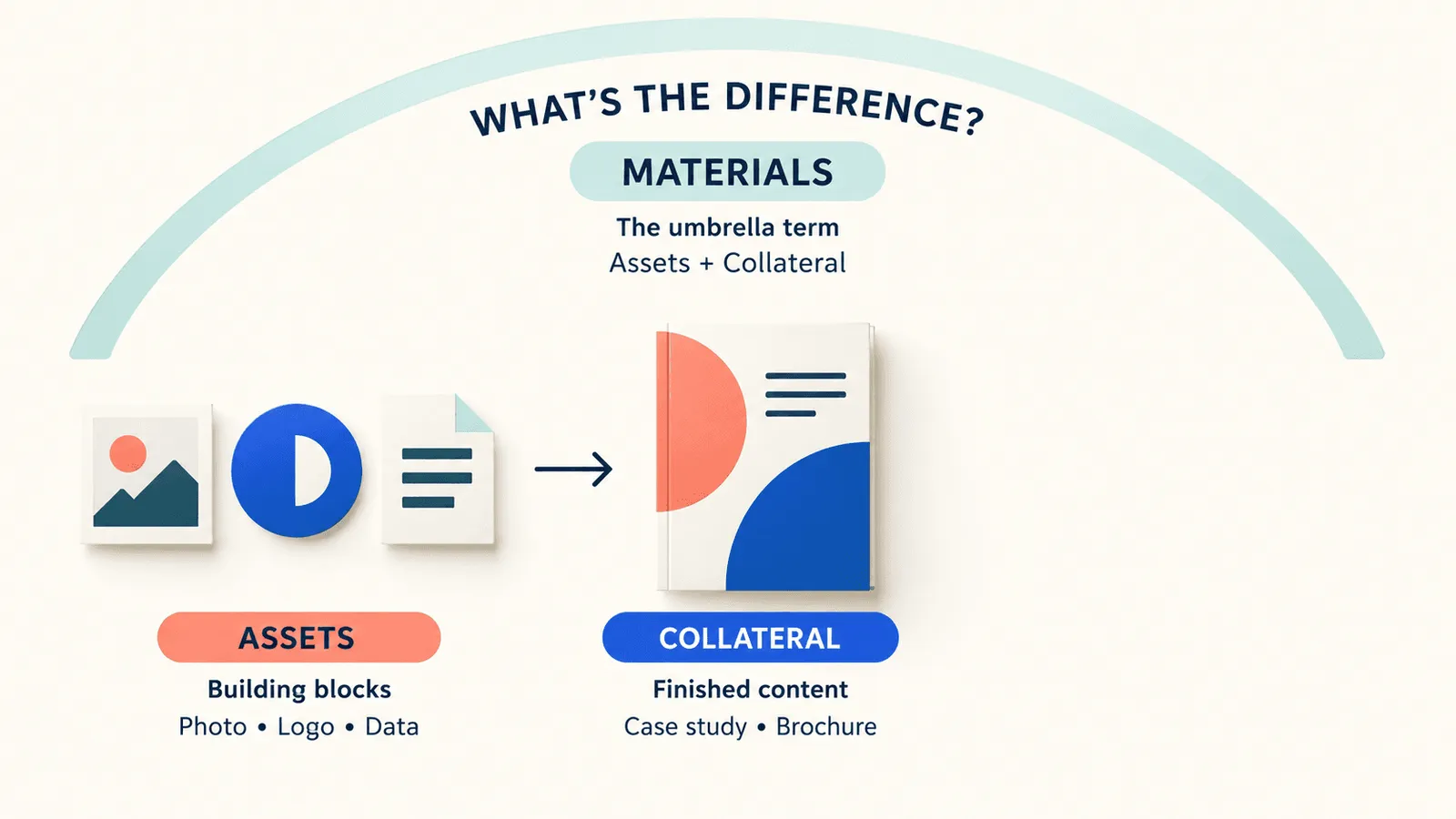
Companies often use terms like "marketing materials," "collateral," and "assets" interchangeably, but it's useful to distinguish them operationally:
| Term | Meaning | Example |
|---|---|---|
| Marketing collateral | Completed, customer-facing content and design used in marketing and sales efforts | A case study PDF, a printed brochure |
| Marketing materials | The broad umbrella of all materials used in marketing, including digital and print content | Campaign content across channels |
| Marketing assets | The underlying components or raw elements used to build collateral | A product photo, logo file, chart data |
In practice, the lines can blur. A case study PDF is collateral shared with prospects, while the customer logo, product screenshots, charts, and source design files used to create it are assets.
Keeping this distinction clear helps teams organize their libraries and workflows more effectively. Collateral is the finished content, while assets are the building blocks used to create it.
Why Marketing Collateral Still Matters
Collateral isn't just old-school print. It continues to play an important role across marketing and sales for several reasons.
Brand recognition and consistency. Every piece reinforces your visual identity and messaging. Repeating logos, colors, taglines, and key points across brochures, banners, emails, and videos builds recognition. Consistent fonts, tone, and visuals can also make your brand more memorable and trustworthy over time.
Sales enablement. Collateral gives sales teams ready-to-use proof and answers. If a prospect asks, "How did Company X solve a similar problem?", a rep can immediately share a relevant case study or one-pager. Having these materials ready helps sales respond with concrete value stories instead of explaining everything verbally or creating something from scratch. This can speed up deals and help convince buyers.
Longer shelf life. Some collateral is evergreen. A well-crafted case study or whitepaper can remain useful for months or years, as long as its facts stay current. In contrast, a campaign email or ad creative may run for only days or weeks. Evergreen collateral can build value over time, though it still needs review when facts or branding change.
The Three Categories: Digital, Print, and Sales Enablement Collateral
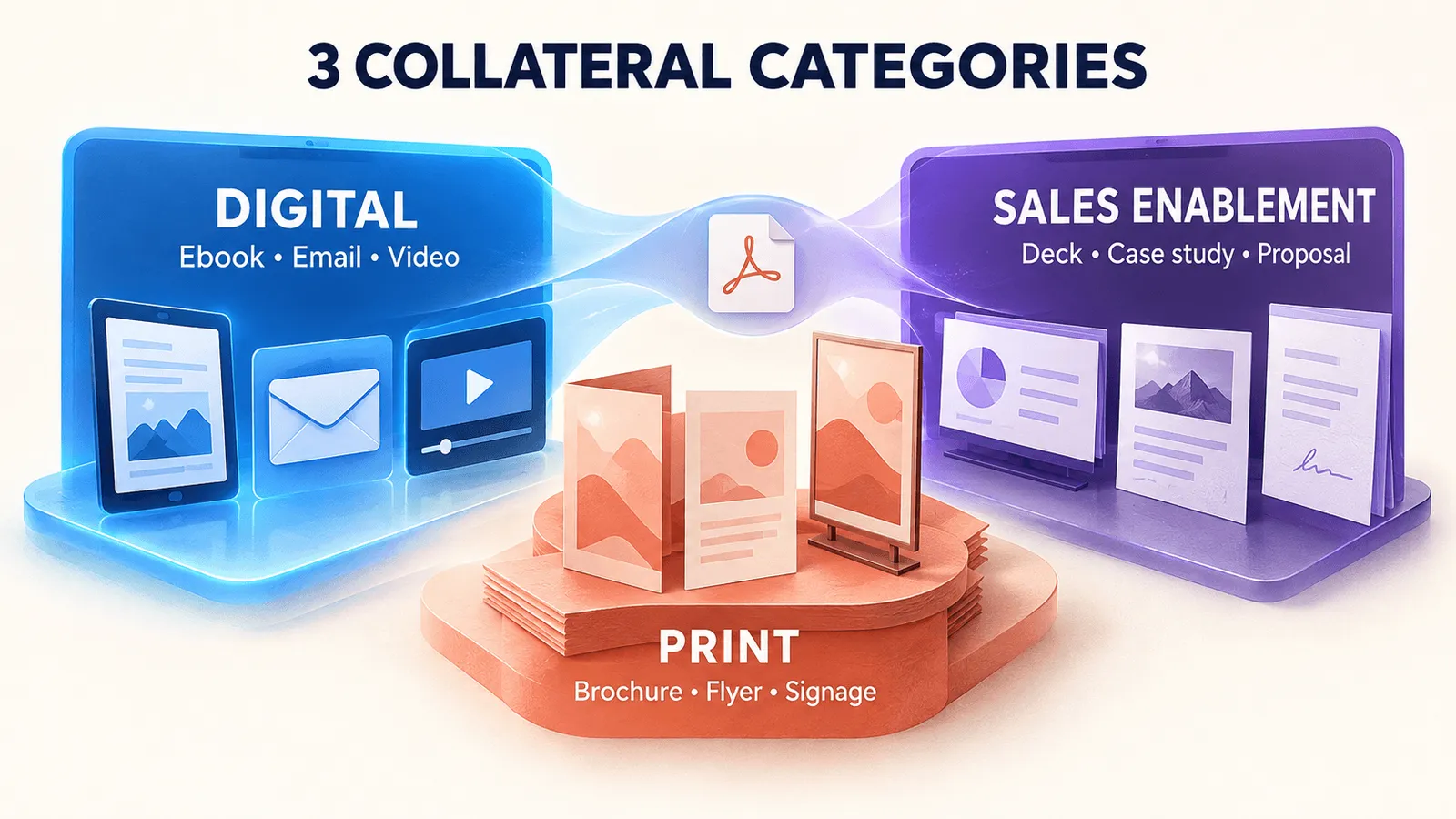
Marketing collateral can broadly be grouped into three functional categories. These categories can overlap, but the main difference is how the content is distributed and what role it plays in the marketing or sales process.
-
Digital collateral: Shareable web-based content such as ebooks, blog posts, landing pages, marketing emails, videos, webinars, infographics, and social media assets. These are designed for online distribution and can be easily updated and measured.
-
Print collateral: Physical materials such as brochures, flyers, posters, business cards, direct-mail postcards, packaging inserts, and event signage. These are often used at in-person events or mailed to customers and prospects.
-
Sales enablement collateral: Content created specifically for the sales process, including one-pagers, pitch decks, case studies, customer testimonials, competitor battlecards, custom proposals, and product sell sheets. Some may be digital or print, but their primary purpose is to support one-on-one or live selling.
These categories can overlap. For example, a case study may be delivered as a digital PDF or web page, but it falls under sales enablement because it is primarily used in sales conversations.
The key distinction is simple: digital collateral is generally public or campaign-focused, print collateral is physical and often event-driven, while sales collateral is tactical content designed to support and close deals.
Inside this framework, the categories can be compared:
| Factor | Digital Collateral | Print Collateral | Sales Enablement Collateral |
|---|---|---|---|
| Typical production cost | Varies (emails cost little per copy; videos or interactive content can range from low to high) | Moderate (design plus per-unit printing; economies of scale apply) | Moderate to high (often customized content) |
| Shelf life | Medium to long (easy to update, but can become obsolete if not maintained) | Shorter (fixed once printed; requires reprinting for updates) | Medium (depends on product changes) |
| Distribution speed | Instant global distribution | Slower (requires printing, shipping, or in-person handout) | Varies (digital decks go fast; printed packets depend on shipping) |
| Measurability | High (views, downloads, clicks, completions) | Low (hard to know how many people read a flyer) | Moderate (digital tools record opens or views; often measured by sales feedback) |
| Best-fit funnel stage | Awareness and Consideration | Awareness and initial Engagement | Decision |
Types of Marketing Collateral
There are many forms of marketing collateral, and the right format depends on the audience, channel, and stage of the buyer journey. Below are 21 common collateral types, along with when to use them, an example, and their best-fit buyer stage.
1. Ebooks
What It Is: Long-form downloadable guides or reports, usually in PDF or digital flipbook format, that explore a topic in depth.
Use It: To educate prospects, generate leads, or establish thought leadership.
Example: A cloud services company publishes "Migrating to Hybrid Cloud: Best Practices" for IT managers.
Best-Fit Stage: Awareness / Consideration
2. Blog Content
What It Is: Articles published on a website or blog.
Use It: To capture early-stage interest, improve SEO, and explain topics broadly.
Example: A fintech startup publishes "How AI Is Changing Banking" to attract finance professionals.
Best-Fit Stage: Awareness
3. Infographics
What It Is: Visual content that presents data or concepts in an engaging, easy-to-digest format.
Use It: To explain statistics or processes that benefit from visuals and social sharing.
Example: A marketing agency creates an infographic on "2025 Digital Marketing Trends."
Best-Fit Stage: Awareness / Consideration
4. Email
What It Is: Marketing emails, newsletters, or drip campaigns sent to subscribers or prospects.
Use It: To nurture leads, announce content or campaigns, and promote events.
Example: A software company sends a product update newsletter to its user list.
Best-Fit Stage: Consideration / Retention
5. Landing Pages
What It Is: Standalone web pages built around a campaign or offer and optimized for lead capture.
Use It: When promoting an ebook, webinar, demo, or other offer that requires conversion.
Example: A SaaS vendor creates a landing page for a new feature with a free demo offer.
Best-Fit Stage: Consideration
6. Video
What It Is: Online content such as explainers, demos, interviews, and ads, shared on websites or platforms like YouTube.
Use It: To demonstrate products, share customer stories, or engage audiences visually.
Example: An animated explainer shows how a time-tracking app works.
Best-Fit Stage: Awareness / Consideration
7. Webinars
What It Is: Live or recorded online seminars, often featuring slides and Q&A.
Use It: To provide in-depth education and capture leads through registration.
Example: A cybersecurity firm hosts "Securing Remote Workforces" with a Q&A.
Best-Fit Stage: Consideration
8. Social Assets
What It Is: Graphics, videos, and posts created for channels such as Facebook, LinkedIn, and Instagram.
Use It: To engage audiences, drive traffic, or promote events and campaigns.
Example: A LinkedIn carousel highlights "5 Ways Our CRM Boosts Sales."
Best-Fit Stage: Awareness
9. Brochures
What It Is: Multi-page printed or PDF booklets summarizing products, services, or a company.
Use It: To provide a concise, professional overview at events or meetings.
Example: A company hands out a brochure about its latest product line at a trade show.
Best-Fit Stage: Awareness / Consideration
10. Flyers
What It Is: One-sheet printed handouts, usually single- or double-sided, containing key information or offers.
Use It: To quickly promote an event, sale, or announcement.
Example: A networking event distributes flyers with schedule highlights.
Best-Fit Stage: Awareness
11. Business Cards
What It Is: Contact cards containing personal and company information.
Use It: At in-person meetings and networking opportunities.
Example: A sales rep gives a branded business card to someone after a conference conversation.
Best-Fit Stage: Awareness
12. Direct Mail
What It Is: Physical mailers such as postcards, letters, or catalogs sent through the postal service.
Use It: For targeted outreach or high-value leads, often through precision B2B mailing.
Example: A software firm mails IT leaders a postcard inviting them to a private webinar.
Best-Fit Stage: Awareness / Consideration
13. Packaging Inserts
What It Is: Printed materials included with shipped products, such as brochures, product information, or coupons.
Use It: To provide product information, cross-sell, or encourage repeat purchases.
Example: An ecommerce box includes a flyer with a discount code for the next purchase.
Best-Fit Stage: Retention
14. Event Signage
What It Is: Banners, posters, booth graphics, and other signage used at conferences, trade shows, and other live events.
Use It: To reinforce branding and communicate key messages at live events.
Example: A retractable booth banner displays key product benefits.
Best-Fit Stage: Awareness
15. One-Pagers
What It Is: Concise, single-page PDFs or print sheets focused on one product, solution, or use case.
Use It: To provide quick information, often as a leave-behind or email attachment.
Example: A one-page product sheet highlights the benefits of a new subscription plan.
Best-Fit Stage: Consideration / Decision
16. Pitch Decks
What It Is: PowerPoint or PDF slide decks used by sales reps during presentations or after calls.
Use It: For proposals and sales meetings, typically covering the problem, solution, case study, and CTA.
Example: A sales team customizes its master enterprise software deck for each prospect.
Best-Fit Stage: Decision
17. Case Studies
What It Is: Narrative documents, usually PDFs or web pages, that detail a customer's successful experience.
Use It: To provide proof and social proof that your product works in a similar situation.
Example: A case study shows how Company X saved 30% on costs using your platform.
Best-Fit Stage: Consideration / Decision
18. Testimonials
What It Is: Short quotes or video clips from satisfied customers, often featured on websites, landing pages, or one-pagers.
Use It: To build credibility and reduce buyer uncertainty through real customer experiences.
Example: A homepage features the quote, "Product Y cut our project time in half!" from Customer Z.
Best-Fit Stage: Consideration / Decision
19. Battlecards
What It Is: Competitive comparison sheets that help sales teams understand strengths and weaknesses against competitors.
Use It: To prepare reps for objections and help position your offering.
Example: A quick-reference card lists competitor features and suggested rebuttals.
Best-Fit Stage: Decision
20. Proposals
What It Is: Customized digital or print documents created for individual prospects, often including pricing, scope, and other details of the proposed solution.
Use It: During formal deal processes when a buyer is ready for an official quote or agreement.
Example: A multi-page RFP response prepared for a prospect.
Best-Fit Stage: Decision
21. Sell Sheets
What It Is: Feature-focused one- or two-page documents that compare products or provide detailed specifications, often used in retail or B2B sales.
Use It: When buyers need detailed specifications or product comparisons.
Example: A spec sheet compares the technical details of different hardware models.
Best-Fit Stage: Consideration / Decision
Matching Collateral to the Buyer's Journey
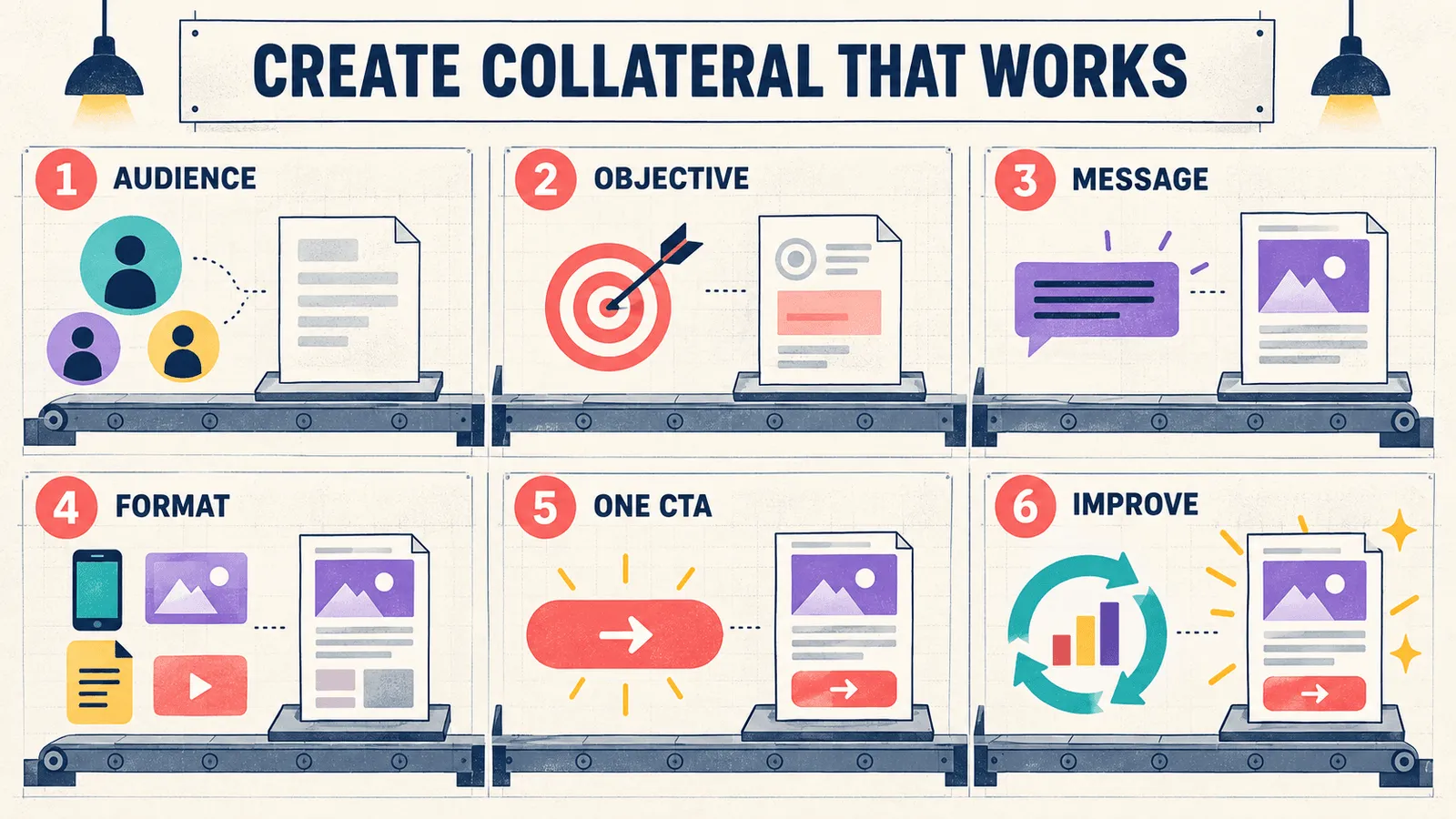
Different types of collateral serve different buyer needs. The right content depends on where someone is in their journey and what they need to move forward.
| Buyer Stage | Buyer Need | Useful Collateral | Primary Job |
|---|---|---|---|
| Awareness | Becoming aware of a problem or goal and exploring possible solutions | Blogs, infographics, social media posts, short videos, introductory ebooks or checklists | Build recognition, introduce the brand or topic, and spark interest |
| Consideration | Evaluating options and learning more about possible solutions | In-depth ebooks and whitepapers, webinars, comparison guides, demo videos, case study teasers | Educate, build credibility, and show how you solve the problem |
| Decision | Finalizing a purchase and reducing uncertainty | Detailed case studies, testimonials, ROI calculators, proposals, one-pagers, live demos | Reduce perceived risk and provide proof and specifics |
| Retention | Onboarding, using the product effectively, and considering renewal or expansion | Onboarding guides, training materials, newsletters, customer success stories, usage tips | Support adoption, customer success, loyalty, and expansion |
Real-world buyers do not always move through these stages in a straight line. They may revisit earlier content or move between stages. Generally, though, awareness content builds recognition, consideration content provides deeper education, decision-stage collateral addresses objections, and retention content supports ongoing customer relationships.
How to Create Marketing Collateral That Works
Effective collateral starts with a clear understanding of the audience, the goal, and where the content will be used. These practices can help teams create content that is useful, focused, and easier to act on.
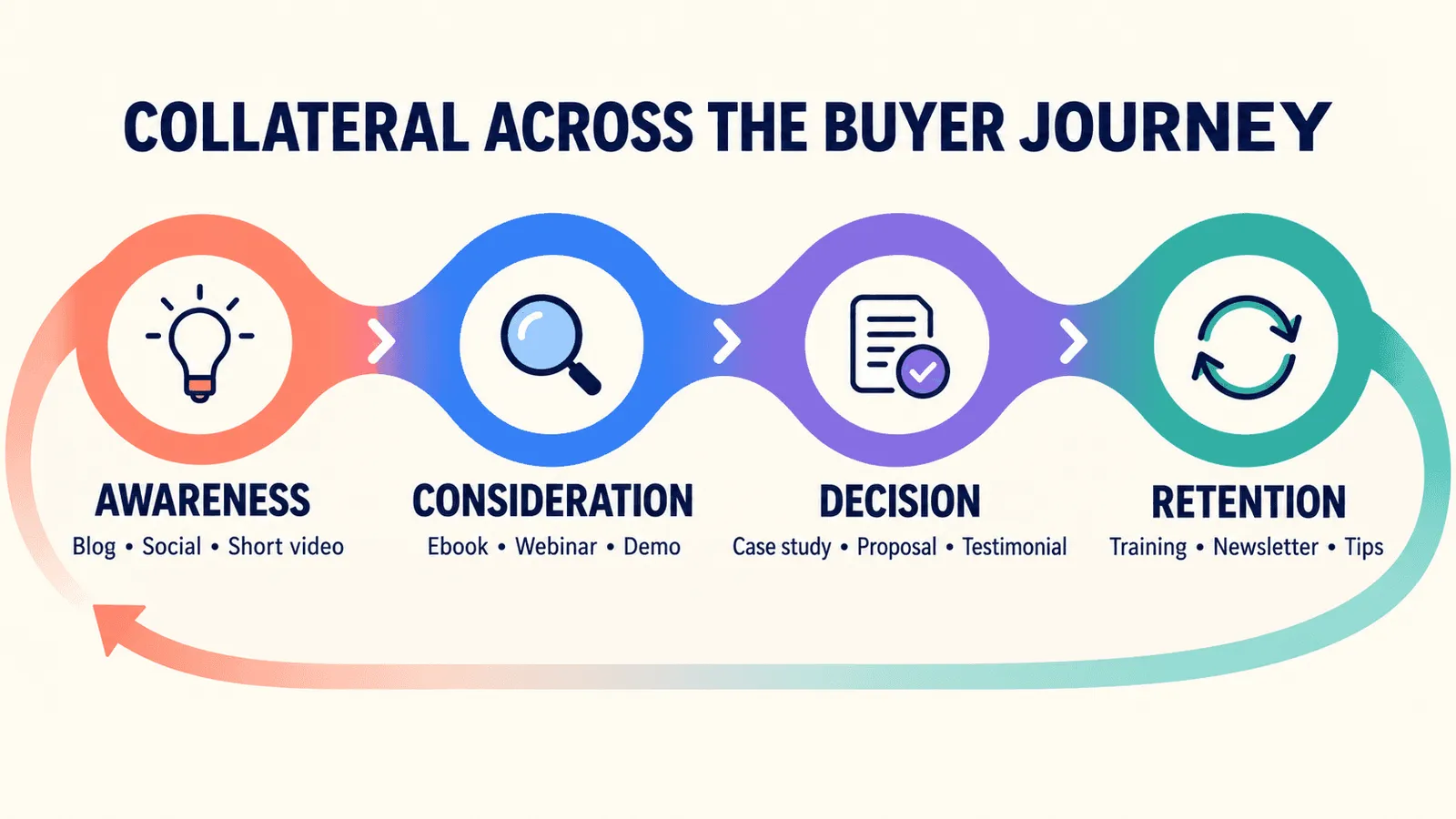
Research your audience. Identify who will use or read the collateral, what questions they need answered, and where they are in their journey. IT, finance, and end users may have different needs, as will buyers at the awareness and decision stages. Tailor the message and tone accordingly.
Set one clear objective. Give each piece one primary goal, such as generating leads, proving credibility, or explaining pricing. Trying to answer too many questions can reduce clarity. For example, a one-pager should focus on highlighting features or sharing a success story rather than trying to do both equally.
Write the message before designing. Start with the key message, proof points such as data, quotes, and benefits, and a strong CTA. Polish the design only after the content is solid. This keeps the focus on effective communication before visuals.
Match the format to the distribution channel. Design for how and where the collateral will be consumed. A trade-show handout may need bold headlines and large images, while a LinkedIn carousel needs concise text and a format suited to the platform. Emails should be mobile-friendly and scannable, while printed brochures can assume closer reading.
Include one clear primary CTA. Give readers one main action, such as download, sign up, request a demo, or contact sales. Avoid multiple competing CTAs. For an ebook, for example, the primary CTA might be "Get our free template" at the end rather than numerous scattered links.
Test and improve. Measure performance after publishing and iterate. Depending on the format, track page views, downloads, email click-through rates, video views or completions, and leads generated. For sales collateral, gather rep feedback: Are prospects responding well? Is the one-pager being used or ignored? Use these insights to improve the content and design.
Keeping Collateral On-Brand Across Teams and Regions
Marketing collateral often extends beyond the creative team. Agencies, regional offices, sales partners, and local branches may copy or modify materials for their needs.
Without strong governance, retired logos, outdated claims, incorrect pricing, and inconsistent messaging can enter circulation and gradually erode brand trust.
To prevent this, establish clear standards and ownership:
Use templates and brand guidelines. Provide approved, editable templates and a style guide covering fonts, colors, logo placement, and approved copy. Templates only work when people can find and recognize the official version.
Keep a single source of truth. Maintain one official repository, such as a DAM, for source files and current versions. Assign owners or custodians to major collateral. When pricing or product features change, the owner is responsible for updating the asset centrally.
Control permissions and approvals. Limit who can publish or edit official collateral. Use an approval workflow so new or updated materials can be reviewed by brand managers or legal when needed.
Track changes. Use version control or audit trails in a DAM or collaboration tool to record when an asset was updated and by whom. This makes it easier to identify the latest version.
Enforce branding centrally. If teams repeatedly create their own versions, reinforce the central source of truth. Without a shared content source, regional teams can create their own versions, increasing brand inconsistency over time.
The bottom line: ownership is critical. Every piece of collateral needs a "home," with a person or team responsible for its accuracy and currency. Templates, guidelines, and brand libraries provide the tools, but clear ownership and centralized control keep collateral up to date.
How to Organize and Store Your Collateral Library
As collateral libraries grow, keeping files organized becomes increasingly important. A shared drive or simple folder structure may work for a small library, but it becomes harder to manage as asset counts, teams, campaigns, languages, and markets increase.
Common signs that a folder-based system is no longer working well include:
-
Duplicate files and confusing names: People create copies or rename files "Final_v7," leaving multiple versions with no clear final file.
-
Scattered copies: The same deck or flyer exists across marketing, sales, regional, and other folders, with none guaranteed to be current.
-
Poor searchability: Without content- or tag-based search, users waste time browsing folders or asking colleagues to find files.
-
Stale collateral: Outdated brochures or statistics remain in old folders and continue to be used because nobody knows they are obsolete.
-
Unknown ownership: If nobody owns the sales deck, it may never be updated and eventually fall out of sync with current messaging.
-
Wasted effort: Teams recreate existing collateral because finding the original is harder than starting over.
These issues become more common as product lines, campaigns, languages, and markets multiply, making traditional folder hierarchies increasingly difficult to manage.
What a DAM Changes
A Digital Asset Management (DAM) system or similar centralized asset library can provide more structure and control as a collateral library grows.
A DAM provides a structured, centralized repository for collateral and underlying assets. Every file has a defined location, making it easier to find the most current version. Advanced search using metadata, keywords, tags, or image content can reduce the need for manual folder browsing.
Built-in version control and access permissions can also help teams use approved files and prevent outdated versions from circulating.
DAM for Marketing Teams
Marketing-focused DAM solutions can include campaign and brand templates, approval workflows, and structured asset management designed for creative operations.
These tools treat collateral as content that can be maintained and updated over time rather than as static files sitting in folders. This makes it easier for marketing teams to manage changes and keep materials aligned across campaigns and channels.
Tagging That Survives Real-World Use
Collateral is only useful if people can find it, which makes good metadata essential. The most useful tags and fields should reflect how teams actually search for and use content.
Useful metadata can include:
-
Campaign name
-
Product name
-
Region or language
-
Channel, such as email, social, or event
-
Customer segment
-
Content type, such as video, PDF, or deck
-
Funnel stage
-
Approval status
-
Usage rights
-
Dates and versions
For example, an asset might be tagged "Q3 2026 campaign," "EMEA," "Sales Deck," and "Approved 2026 pricing." These tags allow marketers to filter the library and quickly find the right asset.
AI-Assisted Tagging
Many modern DAMs also use AI-assisted tagging. Some systems can extract text from images or scanned documents and generate metadata, while image recognition can identify objects, scenes, or brand logos.
This can speed up cataloging large libraries, but automation can miss context. Industry jargon, campaign nicknames, and nuanced branding terms may still require human input.
AI-generated tags should therefore be reviewed periodically to make sure they remain accurate and aligned with the brand's vocabulary. A hybrid approach, where AI suggests tags and a human curator approves or refines them, can combine automation with human oversight. Recharm's tagging, for instance, follows this same hybrid model for video-based collateral, pairing automated tagging with human review rather than relying on automation alone.
Overall, moving from folders to a DAM or similar content management system can give large collateral libraries the structure, searchability, and control they need.
Producing More Collateral Without More Production
Scaling content output doesn't always require more headcount. A more efficient approach is to repurpose and adapt what you already have.
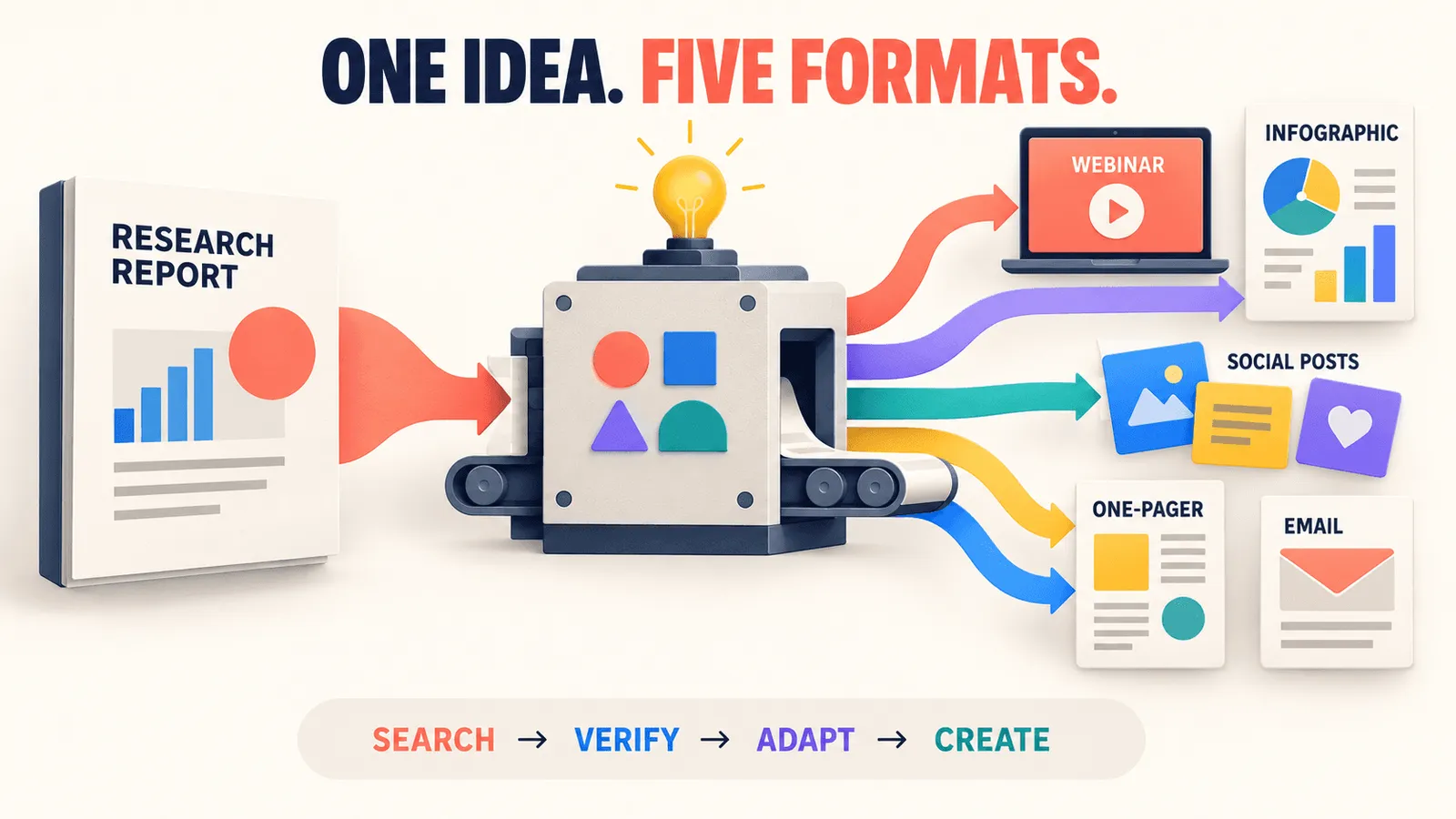
Several practices can help teams get more value from existing content while reducing unnecessary production.
Repurpose existing assets. A single research report can become a webinar, infographic, social posts, one-page summary, and email highlights. A customer webinar could become a case study with quotes, a blog Q&A, and video snippets. The goal isn't to copy and paste. Adapt the core content to each format and audience. An infographic needs brevity and visuals, while an ebook can support longer explanations.
Search before you commission. When someone requests a new one-pager, first search your collateral library or DAM. You may already have a similar one-pager, deck section, or product slide that can be updated rather than rebuilt. A simple workflow is: Search → Verify it's current → Reuse or adapt → Create new only if needed.
Leverage templates and modules. Create reusable templates for newsletters, social carousels, decks, and other recurring formats. A social template might only require new text or images, while a slide library can provide standard layouts. This "clip-and-go" approach reuses design and structure even when the content changes.
Think systematically. Treat your collateral library as a content ecosystem. Tag reusable materials so creators can quickly find them. If someone needs an image of your cloud platform, it should be easy to locate in the DAM. The same applies to customer quotes, testimonials, and other reusable content.
For example:
-
A research report can become webinar slides, social quote cards, blog excerpts, and a short ebook.
-
A product launch email can become a landing page, social ad campaign, and sales newsletter.
-
A customer success video can become short testimonials and a case study article, an approach organized video libraries are built specifically to support.
Each variation can reach a different audience without starting from scratch. The easier assets are to discover, the less likely teams are to recreate them. Smart reuse can multiply the value of existing content without proportionally increasing production effort.
Marketing Collateral Mistakes to Avoid
Creating more collateral does not automatically make marketing more effective. The way content is organized, owned, and designed can have just as much impact as the volume produced.
Volume over findability. Producing large amounts of collateral is pointless if people can't find or trust it. Dozens of brochures, PDFs, and decks add little value when they are scattered across drives or outdated. Before creating something new, ask: How will people find and use it? Without a searchable, curated library, new collateral simply adds to the pile.
No clear owner. Every major piece of collateral needs a person or team responsible for keeping it current. Owners should update facts, branding, pricing, and approvals when needed. Without clear ownership, outdated content can quietly circulate and damage credibility.
Designing for the brand instead of the buyer. Collateral can easily become too focused on product features, jargon, and company priorities. But the buyer cares about solving their problem. Use language they understand, address their needs, and guide them toward the answer they need. For example, don't fill a one-pager with every feature. Focus on the specific benefit or feature that solves a real user problem.
If your collateral library is becoming difficult to manage, a DAM or content operations platform can make collateral easier to find, maintain, and reuse. This helps teams spend less time searching and more time putting their content to work.
FAQs
What Exactly Counts as Marketing Collateral?
Marketing collateral is branded, finished content used to support marketing and sales, including brochures, one-pagers, case studies, sales decks, ebooks, infographics, and videos. Marketing assets, by contrast, are the building blocks used to create it, such as logos, photos, or raw data charts.
How Is Marketing Collateral Different From Marketing Assets or Materials?
Assets are the raw ingredients, like logos, images, and design source files. Collateral is the finished piece shared with customers, such as a PDF or webpage. "Marketing materials" is simply the broader umbrella term covering both.
What Is the Best Way to Organize All Our Collateral?
A shared drive works for small volumes, but a DAM or centralized content library offers more structure as you scale. Keep one source of truth, tag files with metadata like product and campaign, archive outdated versions, and assign an owner to each major piece of collateral.
How Often Should We Review or Update Marketing Collateral?
Audit major collateral at least once a year, and immediately whenever pricing, branding, or product details change. High-touch materials like sales decks and pricing sheets often need more frequent review, ideally quarterly for your most-used pieces.
How Do We Avoid Having Too Many Outdated Files in Our Library?
Assign an owner to each content area who monitors changes and updates or archives affected collateral. Set expiration or review dates where your DAM supports it, and discourage local file storage so teams default to searching the central library first.
Should We Stick to Our Own Templates or Let Teams Customize?
Keep core design elements like the slide master and logo placement fixed, while allowing flexibility in content details. Templates only work if people can actually find them, so keep the current version clearly identifiable in your central library.