Get this effect
Switch to Code in your Claude Desktop App
Install the skill (once)
Show the prompt
Install the Recharm video effects skill: download https://recharm-growth-staging.s3.us-east-2.amazonaws.com/website/downloads/recharm-video-effects.zip and unzip it into ~/.claude/skillsAsk for the effect
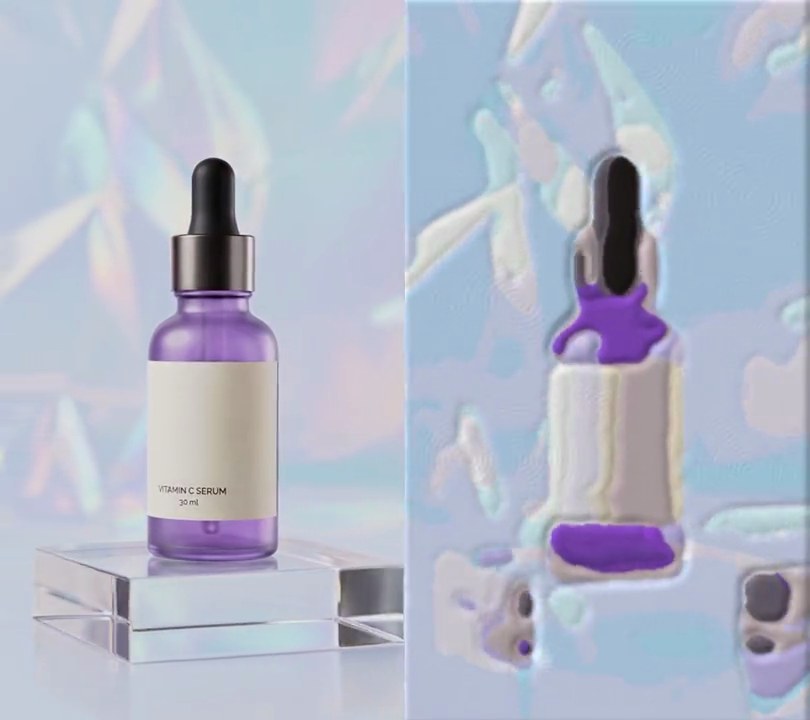
Add an oil painting to input.mp4
Second the picture turns into paint: 1.0
Brush size in pixels: 9

Several videos, several effects, one ask
Put your clips in the folder, mention them with @, and ask for everything at once. Claude runs one tested script after another on each clip, then joins them.
Add an oil painting to @clip1.mp4, put a sale badge on @clip2.mp4, give @clip3.mp4 a VHS look, then join all three with crossfades.
Settings you can change
Ask Claude to change any of these, or edit them at the top of the script.
| Setting | Default | What it does |
|---|---|---|
START | 1.0 | Second the picture turns into paint. |
BRUSH | 9 | Brush size in pixels. Bigger gives broader daubs and loses more detail. |
LEVELS | 2 | How finely colors are told apart inside a daub. 1 merges them into big flat patches; higher keeps more shades. |
SATURATION | 1.4 | Color boost for richer paint. 1 keeps the original colors. |
RIDGES | 1.8 | Strength of the lit brush ridges (impasto). 0 leaves the paint flat. |
SMOOTHING | 0.3 | Share of the previous painted frame mixed in, which calms flicker. Higher is calmer but trails on fast motion. |
Without the skill
Don’t want to install the skill? Paste this prompt into Claude Code and Claude writes the script itself.
Show the prompt
Give input.mp4 (540x960) an oil painting look from 1.0 seconds to the end; before 1.0 seconds leave every frame untouched. For each frame from 1.0 s: run OpenCV's cv2.xphoto.oilPainting on the full-size RGB frame with size 9 and dynRatio 2 (pass cv2.COLOR_RGB2GRAY as the conversion code), then raise the color saturation by 1.4x (Pillow's ImageEnhance.Color). For the raised brush ridges, take that painted frame's grayscale, add its horizontal and vertical 3x3 Sobel gradients together, blur the sum with a 0.8 pixel Gaussian and subtract 1.8/8 of it from every color channel, so daub edges facing the top left catch a highlight and the far edges a shadow. To calm flicker, mix 30% of the previous painted frame into each painted frame (from the second painted frame on). Use Python with OpenCV (opencv-python-headless), numpy and Pillow for the frames and ffmpeg to read and write the video (don't use ffmpeg's drawtext if you add any text), keep the size, 30fps, the 6 second length and the audio, and save it as output.mp4.Run it without Claude
This is the exact script we tested. Save it as oil-painting.py and run:
python3 oil-painting.py input.mp4 output.mp4Show the script
#!/usr/bin/env python3
"""Oil painting: at one second the shot turns into thick daubs of oil paint, with raised, lit brush ridges.

Usage: python3 oil-painting.py input.mp4 output.mp4
Needs ffmpeg, OpenCV (with its xphoto module), Pillow and numpy (pip install opencv-python-headless pillow numpy).
"""
import json
import subprocess
import sys

import cv2
import numpy as np
from PIL import Image, ImageEnhance

START = 1.0          # second the picture turns into paint
BRUSH = 9            # brush size in pixels (OpenCV oilPainting neighborhood); bigger gives broader daubs
LEVELS = 2           # dynRatio: 1 merges colors into big flat patches, higher keeps more shades
SATURATION = 1.4     # color boost, for richer paint; 1 keeps the original colors
RIDGES = 1.8         # strength of the lit brush ridges (impasto); 0 leaves the paint flat
SMOOTHING = 0.3      # share of the previous painted frame mixed in, which calms flicker between frames


def paint(img):
    """Repaint one RGB frame (numpy array) as oil paint with raised, lit brush ridges."""
    painted = cv2.xphoto.oilPainting(img, BRUSH, LEVELS, cv2.COLOR_RGB2GRAY)
    painted = np.asarray(ImageEnhance.Color(Image.fromarray(painted)).enhance(SATURATION), np.float32)
    gray = cv2.cvtColor(painted.astype(np.uint8), cv2.COLOR_RGB2GRAY).astype(np.float32)
    # light from the top left: edges of each daub facing it catch a highlight, the far edges a shadow
    relief = cv2.Sobel(gray, cv2.CV_32F, 1, 0, ksize=3) + cv2.Sobel(gray, cv2.CV_32F, 0, 1, ksize=3)
    relief = cv2.GaussianBlur(relief, (0, 0), 0.8)
    return painted - RIDGES * relief[..., None] / 8


def probe(path):
    info = json.loads(subprocess.check_output(["ffprobe", "-v", "error", "-select_streams", "v:0", "-show_entries",
                                               "stream=width,height,r_frame_rate", "-of", "json", path]))
    s = info["streams"][0]
    num, den = s["r_frame_rate"].split("/")
    return s["width"], s["height"], s["r_frame_rate"], float(num) / float(den)


src, out = sys.argv[1:3]
w, h, rate, fps = probe(src)
reader = subprocess.Popen(["ffmpeg", "-v", "error", "-i", src, "-f", "rawvideo", "-pix_fmt", "rgb24", "-"],
                          stdout=subprocess.PIPE)
writer = subprocess.Popen(["ffmpeg", "-y", "-v", "error", "-f", "rawvideo", "-pix_fmt", "rgb24", "-s", f"{w}x{h}",
                           "-r", rate, "-i", "-", "-i", src, "-map", "0:v", "-map", "1:a?",
                           "-c:v", "libx264", "-crf", "18", "-pix_fmt", "yuv420p", "-c:a", "copy", "-shortest", out],
                          stdin=subprocess.PIPE)
i, previous = 0, None
while raw := reader.stdout.read(w * h * 3):
    if i / fps >= START:
        frame = paint(np.frombuffer(raw, np.uint8).reshape(h, w, 3))
        if previous is not None:
            frame = (1 - SMOOTHING) * frame + SMOOTHING * previous
        previous = frame
        raw = np.clip(frame, 0, 255).astype(np.uint8).tobytes()
    writer.stdin.write(raw)
    i += 1
writer.stdin.close()
if reader.wait() or writer.wait():
    sys.exit("ffmpeg failed")