

A retail brand launches its spring collection. Two hundred new SKUs, one photoshoot per line, and within a week the same footage needs to become PDP images, email banners, TikTok ads, Amazon listings, and in-store displays. Then the summer line starts.
This is the pace that breaks shared drives. Retail turns over content faster than any other vertical, and the difference between brands that keep up and brands that drown is usually one system: a DAM built for retail's volume and video demands.
This guide compares nine leading DAM platforms against the criteria that actually matter for retail teams in 2026, with published pricing where it exists and honest notes on where each tool fits.
TL;DR
Retailers launching hundreds of SKUs per season need a DAM with best-in-class search and video support. In 2026, the top criterion is whether a platform can index inside video content and images: AI tagging, transcripts, visual search.
For brand governance: Frontify and Bynder suit global enterprises. Mid-market and DTC: Canto and Brandfolder offer quicker setup. Creative-first teams: Air brings visual workflows.
For performance video: teams running paid video ads need a video-first platform like Recharm, which turns finished shoots into searchable clips and hooks. HexClad produced 3× more ad edits after switching.
The single biggest selection factor is search quality and workflow fit, not feature count. A DAM that syncs with your existing tools gets adopted; one that's just storage sits idle.
Why Trust This Guide
We evaluated each DAM against fixed criteria set before scoring: search quality, video handling, governance, integrations, and pricing transparency, using vendor documentation, published pricing, and user reviews on G2 and GetApp as of 2026. Recharm publishes this guide, and where Recharm appears, we say plainly what it does and does not do.
Research methodology and selection criteria
We compared 9 leading DAM systems across five criteria that matter to retail teams:
Search quality: Can the system find assets by what's inside them, through AI tagging, transcripts, and visual search?
Video handling and modularity: Does it support many formats, break videos into clips and hooks, and offer solid transcription and preview?
Integration with existing tools: Can it sync with Google Drive, Dropbox, Adobe CC, and Shopify, avoiding a painful mass migration?
Governance and rights: Does it enforce version control, permissions, and portals, and track usage rights and model releases, critical for influencer and UGC content?
Pricing transparency: Is pricing published or "contact us", and how do costs scale with users, storage, and AI add-ons?
We excluded generic file-sharing tools like Google Drive and Dropbox because they lack DAM essentials: metadata-driven search, versioning, and rights management.
What Makes the Best DAM Software (for Retail)?
A DAM is more than a shared drive. It is a governed media library that layers searchable metadata, version control, and rights management on top of storage.
For retail, the bar is higher than any other vertical. Retailers juggle thousands of SKUs, dozens of sales channels, and rapid seasonal turns, which creates massive asset velocity and variation. A retail DAM must index inside every image and video, and enforce brand consistency across catalogs, ads, and displays.
In practice, that means modern retail DAMs are AI-driven by default. Auto-tagging and video transcripts are now baseline features, not premium extras. Look for platforms with AI image analysis, visual search, and text-in-video indexing; Recharm's AI tagging and AI visual search show what these look like in practice.
Key insight: The best DAM isn't the one with the longest feature list. It's the one that fits your workflow. For retailers, searchability and creative ops support trump raw storage capacity.
Why Do Retailers Need a DAM?
Retail marketing runs in fast-forward. New products, seasonal lines, and promotions launch weekly, and one apparel brand added 1,000 new SKUs per season on top of its existing 3,000. Each shoot spawns a dozen assets: hero images, PLP thumbnails, email banners, social videos, in-store graphics. Without a DAM, chaos multiplies.
Content velocity: Retail's content library turns over faster than any other vertical. Without a DAM, teams land on the reshoot treadmill, paying twice for footage they already own but can't find.
Channel multiplication: A single shoot serves PDP and PLP images, email, Meta ads, TikTok ads, Amazon listings, and billboards. A modern DAM turns one shoot into a modular media kit.
Brand consistency: Without a central system, outdated packaging and retired logos slip into active campaigns. A DAM enforces a single source of truth so fresh assets actually reach every channel.
In short, retail needs a DAM to keep up with massive SKU catalogs, omnichannel demands, and content reuse across campaigns.
Top DAM Systems to Consider
Here's how the major vendors compare. Pricing reflects publicly available information as of mid-2026; confirm current figures with each vendor. Recharm, a video-focused creative asset platform, is covered in its own section since it plays a complementary role.
Platform | Best For | Video Search | Modular Clips | Human Tagging | Entry Price |
Frontify | Global enterprises wanting brand governance (guidelines + DAM) | Limited (tags, not inside-video) | No | No | Custom (enterprise) |
Bynder | Large brands needing enterprise DAM with deep integrations | Limited (AI tags) | No | No | ≈$450+/mo (base 500GB) |
Aprimo | Enterprise-scale content ops (DAM + planning) | Limited (part of bigger suite) | No | No | Custom (enterprise) |
MediaValet | Video-heavy teams (enterprise security) | Yes (auto transcription) | No | No | Custom (quote) |
Acquia DAM (Widen) | Brands on Drupal/Acquia stack; strong product catalog support | No | No | No | ~$250K+/yr (with portal) |
Brandfolder | Creative teams and multi-brand usage (UI friendly) | Limited | No | No | ≈$1,600+/mo |
Canto | Mid-market teams and agencies (easy rollout, PIM optional) | Limited (AI visual search) | No | No | ≈$600+/mo |
Air | Creative ops / small marketing teams (visual workspace) | Limited (tags, reviews) | No | No | ≈$500+/mo |
Frontify: A combined brand portal and DAM, ideal for strict brand guidelines. Offers AI auto-tagging, natural-language search, and unified brand templates. Limitation: custom enterprise pricing, and heavier to implement if you don't need the full brand-management suite.
Bynder: A long-time enterprise leader with robust version control, brand portals, 140+ integrations, and AI-powered metadata. Limitation: built for big teams and budgets. Base plans start around $450/month, and additional users, storage, and AI modules raise costs quickly. Implementation typically takes 3 to 6 months.
Aprimo: A full content operations platform with DAM bundled in, strong at workflow orchestration, budgeting, and planning. Limitation: a heavyweight. AI tagging and smarter search are often paid add-ons, pushing the effective cost high. Best only if you need enterprise marketing resource management plus DAM.
MediaValet: Built on Azure, known for security and scalability, with auto transcription and Adobe integrations. Limitation: user reviews frequently critique search quality, reporting many irrelevant hits that require manual filtering.
Acquia DAM (Widen): Tightly integrated with the Acquia and Drupal ecosystem, with strong product catalog support. Limitation: very expensive, reportedly starting around $250K per year with portal features. Unless you already run Acquia, look elsewhere.
Brandfolder: Clean, user-friendly UI and solid organization for creative teams. Limitation: advanced video intelligence costs extra, video support is basic, and multi-brand usage requires custom development work.
Canto: A quick-start DAM popular with mid-market retailers, with an optional PIM add-on and roughly 2-month implementations per G2 reviews. Limitation: some users find the interface dated with large libraries.
Air: A visual collaboration workspace rather than a full DAM, with content boards, annotation, and AI-assisted tagging. Limitation: focused on workflow, not governance. Plans start around $500/month, and advanced AI features require the $900/month tier.
Each platform fits a different profile. Choose for your organization's size, workflow, and content mix, not the longest feature list.
Key Features to Look For in a Retail DAM
Skip the generic feature lists. These five capabilities are what actually separate retail-ready platforms:
Search inside video and images
Many DAMs only search filenames or tags. The best retail DAMs index the content of your assets: visual search, AI transcripts, and object recognition.
Recharm's AI visual search understands queries like "person opening packaging" and jumps to that exact moment. Your team searches "customer testimonial" or "blue shirt" and gets the clip immediately, no scrubbing.
Modular asset structure
Retail ads run on 2-to-3-second hooks, product demos, testimonials, and B-roll, not entire videos. Check whether the DAM treats videos as collections of clips: can you retrieve a 3-second hook from a 90-second master?
Many DAMs store the full file only. Without scene-level breakdown, your editors keep manually cutting footage, which negates the DAM's value.
Integration, not rip-and-replace
A hard truth: most DAM projects die at migration. Dump 10+ years of shared-drive media into a new system and teams freeze.
Choose a DAM that pulls new assets automatically from Google Drive or Dropbox and pushes to your CMS or PIM, rather than forcing manual re-uploads. Prefer sync over migration, and test-drive any candidate with your real asset flow.
Rights and usage tracking
Retail media now includes influencer content, UGC, licensed music, and partner assets, each with usage terms. A good DAM attaches license expirations, model releases, and usage scopes to every asset and alerts you when permissions lapse.
The legal stakes are real: statutory damages for copyright violations can reach $150,000 per work in the US. Your DAM should be able to block an expired influencer video before it runs.
Performance marketing support
Does the DAM enable rapid creative iteration? Look for campaign tagging, the ability to flag tested winners, and easy delivery to Meta and TikTok. If paid social is your engine, tagging clips by hook or punchline and reusing the best-performing segments is the workflow you're buying.
Whenever possible, link to feature documentation or best-practice guides. For example, Recharm’s AI Tagging, Image Tagging, and Visual Search pages illustrate these points with examples.
Pricing Overview / Comparison
DAM pricing is notoriously opaque, and enterprise players typically require a sales call. Here is what's publicly available as of mid-2026:
Frontify: Custom, enterprise-level.
Bynder: Entry around $450/month (500 GB), with AI features, storage, and users adding up quickly.
Canto: Plans from around $600/month.
Brandfolder: Around $1,600/month for core features.
Air: From around $500/month, with advanced AI tools requiring the $900/month tier.
Acquia DAM (Widen): Reportedly around $250,000/year, essentially custom.
MediaValet and Aprimo: Not published; expect enterprise-level quotes.
Recharm: $299/month with unlimited users and AI search and tagging included.
What drives cost: user count, storage volume, and feature bundles, with AI tools often sold separately. Budget an extra 10 to 20% for AI add-ons on enterprise platforms, and ask about hidden fees like APIs, implementation services, and overages.
Pricing tip: A low entry price often scales up fast. Always clarify what's in the base package: are AI tags bundled, how many admin seats, how much video transcoding?
The Recharm Advantage: Creative Asset Management for Retail Video Teams
Recharm is not a general-purpose DAM. It is a video-first creative asset management platform that complements your DAM for performance marketing. Traditional DAMs handle storage and governance; Recharm sits on top to help teams discover, reuse, remix, and activate video clips.
A creative layer above storage
Where a traditional DAM stores the finished file, Recharm treats it as a raw creative library. AI segments footage into hooks, testimonials, and B-roll and tags everything: people, products, actions. Editors and media buyers pull exactly the pieces they need without a new shoot.
AI visual search
Describe what you want, like "person opening package" or "creator smiling", and Recharm finds the exact second it appears across your entire library. Hours of scrubbing become one search.
Modular clip repository
Videos break automatically into usable units: a short hook, a problem statement, a demo clip. Little Spoon doubled its TikTok ad content simply by remixing clips already sitting in Recharm.
Human plus AI tagging
Recharm's distinctive advantage is done-for-you human tagging on top of AI. Every clip gets richly labeled, including subtle creative context that pure automation misses, so nothing in your library stays invisible.
Performance proof
HexClad now drafts briefs in half the time, finds clips 83% faster (30 minutes down to 5), and produces 3× more ad edits per month. These gains came without extra ad spend; the team simply unlocked value from footage they already owned. See the case studies for the full stories.
Recharm starts at $299/month with unlimited users and all AI features included. Start your 14-day free trial and feel the difference in search speed within a day.
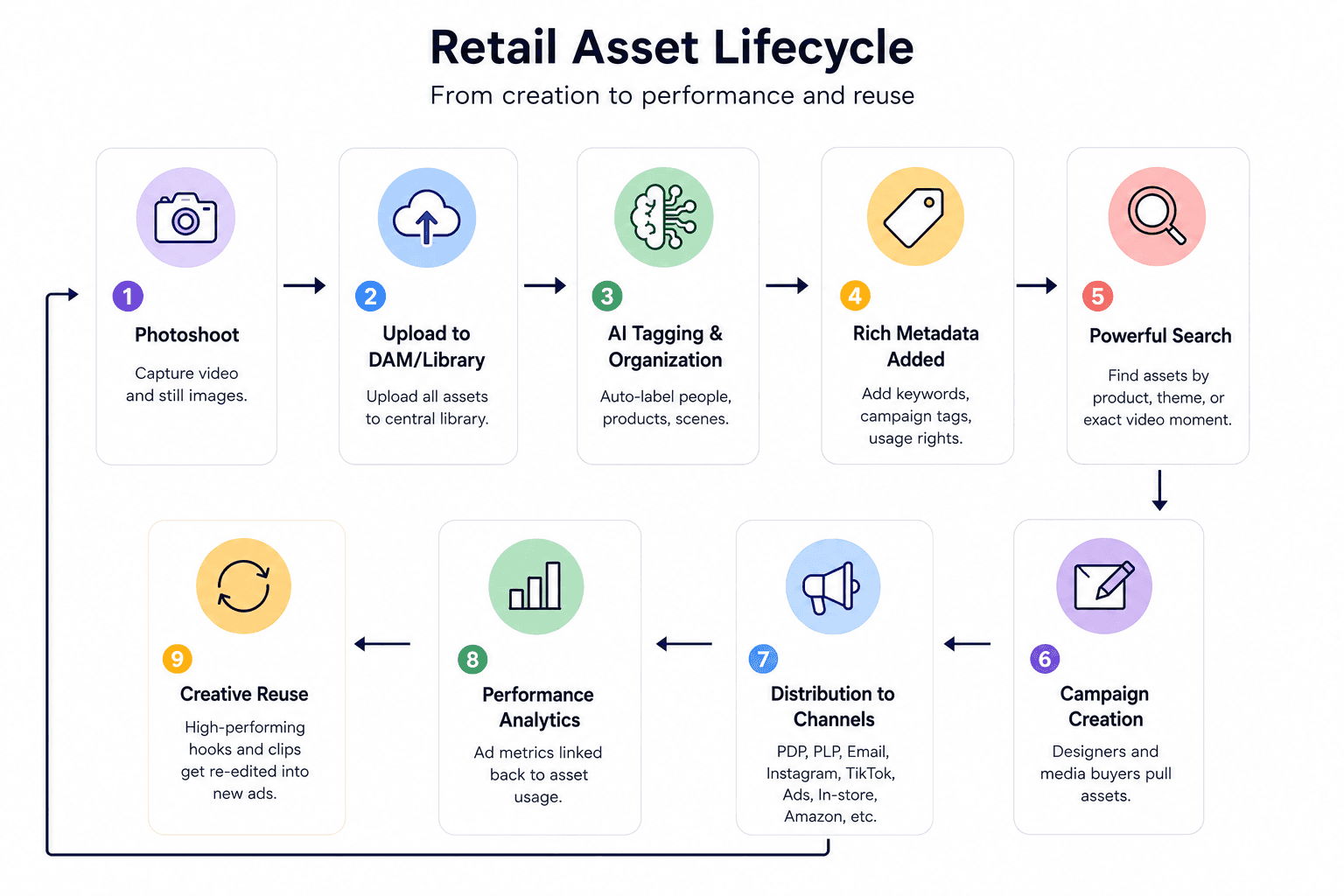
Retail Asset Lifecycle (Workflow Illustration)
Imagine a typical retail workflow for a new product launch:
Omnichannel Asset Distribution (Workflow)
One product shoot often feeds many channels. For example:
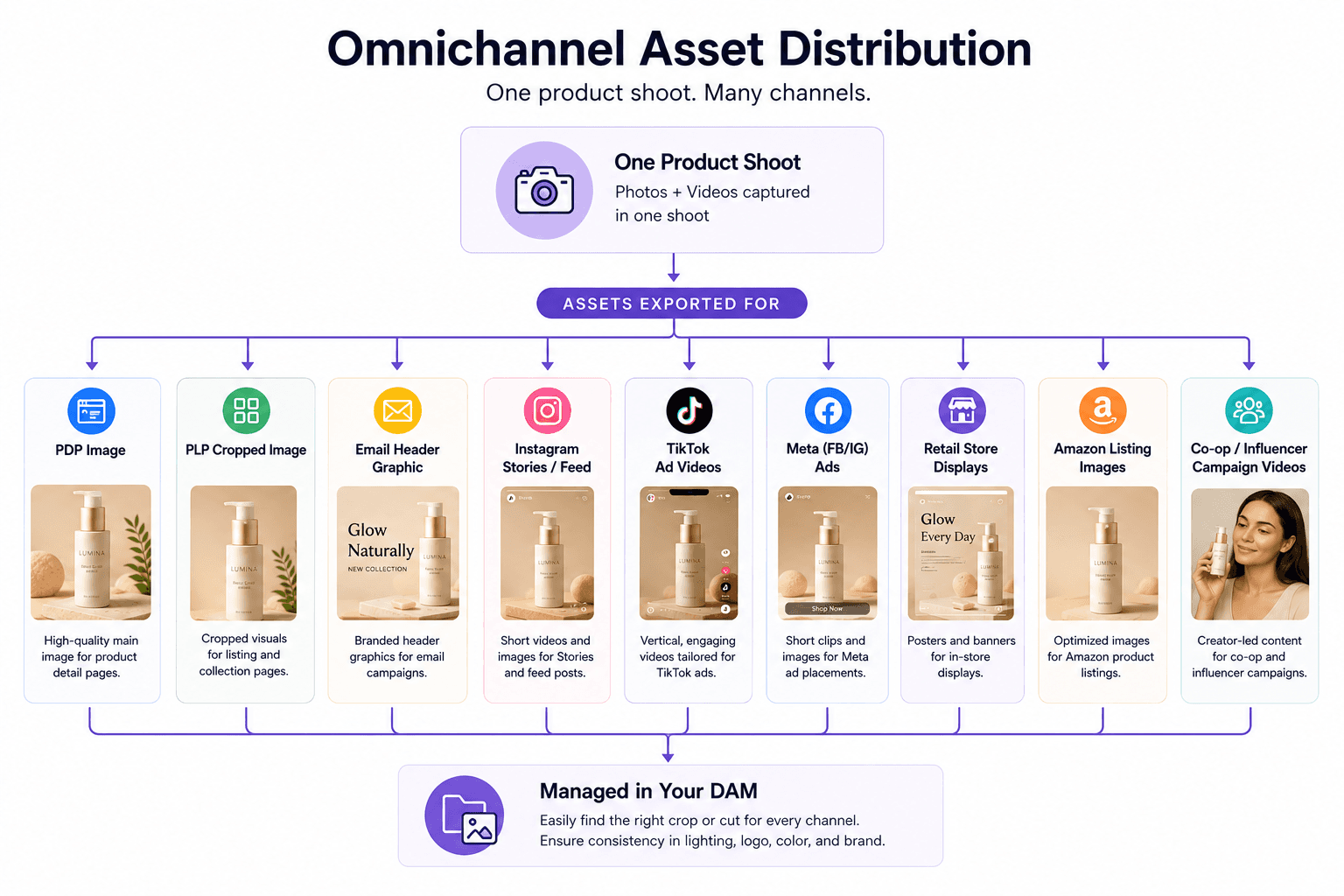
A DAM should make it easy to locate the right crop or cut for each channel and ensure consistency (same lighting, logo, etc.).
Does Your Retail Brand Need a DAM?
Run through four quick checks before evaluating vendors:
Workflow pain: Creative teams spend hours searching drives, or every campaign starts from scratch instead of reusing clips.
Volume: You manage hundreds of assets, especially videos, across 3 or more channels. A single cloud folder won't scale to that.
Reshoot symptoms: You're paying for new shoots because old footage is "lost" in unsearchable folders.
Future plans: You're using or planning UGC and influencer content, which requires rights tracking to avoid legal risk.
If any of these hold true, even a small brand has outgrown Dropbox chaos, and it's time to evaluate.
Questions to Ask Every DAM Vendor
Bring these eight questions to every demo:
Search: Can it search inside videos and images, or only file names? Demo it live with specific objects and spoken phrases.
Video support: Does it transcode automatically, and can it trim and export specific clips from a file?
AI features: Which are included and which cost extra? Is auto-tagging in the base package or a paid add-on?
Integrations: Does it natively sync with cloud storage, Adobe CC, and Shopify, and can you trial the integration before buying?
User access: Per-seat pricing or unlimited users? What about guest accounts for agencies?
Rights and security: Does it alert on expiring licenses and prevent use of expired UGC?
Implementation: How long did similar brands take to go live? Ask for retail references.
Pricing: Get clear terms on storage limits, user fees, and add-ons, and model how costs scale as your library grows.
Signs Your Current DAM (or Storage) Is Holding You Back
The problems rarely announce themselves as "we need a DAM". They show up as small daily frictions that everyone has learned to live with. If more than two of these sound familiar, your setup is the bottleneck:
Teams still ask IT for help finding images, and editors browse folders for hours.
You keep shooting "new" content because old footage can't be found, killing your content ROI.
Outdated logos or product shots appear in live campaigns.
Your DAM treats every video as a black box, and your editors are frustrated.
Marketing and agencies quietly prefer Dropbox over the DAM, which means it isn't meeting needs.
You've pulled ads offline over copyright claims or missed model releases, or you track rights in spreadsheets.
Choosing the Right DAM for Your Team Size
Team size changes the math completely. A platform that feels effortless for five people can collapse under fifty, and an enterprise system that governs a global brand will bury a small team in admin work. Here is how the options map:
Small brands (under 10 users): Consider lightweight, cloud-first solutions with published pricing. If your focus is video ads, Recharm fits from day one at $299/month with no per-user fees.
Mid-market (10 to 50 users): Canto and Brandfolder often hit the sweet spot of setup speed and governance. Frontify adds structure if brand control is the priority, and Air offers a simpler visual-first interface for creative teams.
Large enterprises: Bynder, Aprimo, and Acquia DAM handle complex workflows, global teams, and heavy analytics. Expect 6 to 12 month deployments and dedicated admin staff, and still pick the one your team will actually use.
Focus on what your team does every day. If 60% of your assets are video, prioritize video search. If you run dozens of product catalogs, ensure PIM integration.
Pick the DAM your Team will Actually Use
The best DAM for your retail brand isn't the one with the longest feature list. It's the one that fits your workflow and content mix. Evaluate on search quality, video support, integrations, governance, and total cost of ownership.
Traditional DAMs excel at storage and brand governance but often fall short on video reuse. A video-first platform like Recharm builds on that foundation to make every clip actionable: searchable, remixable, and ready for the next campaign.
For broad catalog management, pick a proven DAM with retail customers. For scaling creative ads, add the tool that unlocks every clip you already own. Start your 14-day free trial of Recharm and see the difference in your first search.
FAQ
What is the difference between a DAM and a PIM for retail brands?
A DAM stores and governs media assets: photos, videos, graphics. A PIM stores structured product data: descriptions, SKUs, prices. They complement each other. The PIM feeds consistent product details to listings while the DAM holds the related media. Some vendors offer PIM add-ons, but in general, use a DAM for creative assets and a PIM for catalog data.
How much does DAM software cost for a retail brand?
It varies widely. Mid-market DAMs range from a few hundred to a couple thousand dollars per month, like Bynder, around $450/month, Canto, around $600/month, and Brandfolder, around $1,600/month as of mid-2026. Enterprise platforms typically require custom quotes. Recharm is $299/month with unlimited users. Cost drivers are seats, storage, and AI modules, plus implementation fees.
Can a DAM replace Google Drive or Dropbox?
Not directly, and it shouldn't need to. Drives are generic file stores; a DAM indexes what's inside assets so you can search by content. The best setups integrate: the DAM syncs with your existing Drive or Dropbox, so teams keep familiar tools while gaining search, tagging, and governance on top.
Does a retail brand need a separate tool for video asset management?
Often, yes. Traditional DAMs treat video as a single downloadable file, which kills creative reuse. If video ads drive your strategy, a video-first platform breaks footage into searchable clips with transcript search. A hybrid approach works well: a traditional DAM for broad governance, with a VAM layer like Recharm for production workflows.
How long does it take to implement a DAM?
Small brands can be live in weeks, mid-sized rollouts typically take 3 to 6 months, and large enterprises with global taxonomies may need 6 to 12 months or more. The biggest factors: metadata schema setup, migration (or integration to skip it), and training. Pro tip: run a pilot with a subset of teams first, then expand. It beats a big-bang migration.
What is the best DAM for a small or mid-market retail brand?
For smaller teams, prioritize ease of use and self-service. Canto is popular mid-market, and Brandfolder and Air offer simpler UX. The best choice depends on your content mix: if video is minimal, any intuitive DAM works; if video ads are central, starting with Recharm at $299/month handles that creative process from day one.

