

Every e-commerce brand has the same two libraries. The product images are neat, templated, and linked to SKUs. The marketing content is chaos: shoot footage, influencer clips, ad variants, and UGC scattered across drives, email threads, and ad accounts.
The first library is a solved problem. The second one is where campaigns slow down, and it is exactly what digital asset management (DAM) exists to fix.
This guide covers what a DAM does for e-commerce, the features that matter for retail teams, how brands actually use one, and how to choose the right platform for your content mix.
TL;DR
A DAM is a central library for product images, videos, and marketing creatives with rich metadata (SKU, campaign, rights) and real search, not a glorified file server.
The ecommerce workflow: ingest content, AI-tag by product, scene, sentiment, and transcript, search by content, assemble campaign assets, push to channels, analyze performance, and reuse winners.
Key features: visual and transcript search inside videos, modular clip management, automated tagging, usage-rights tracking for influencer content, and integrations with Shopify, Adobe, Canva, and ad platforms.
Audit your content mix before choosing: 80% video ads means a video-centric platform; mostly images means a traditional image DAM may suffice.
During trials, test real tasks, like finding the 3-second moment where someone says "it changed my life" in a 90-second video.
Tools that sync with Google Drive or Dropbox instead of forcing migration see higher adoption. Match the tool to team size: enterprise DAMs carry heavy admin overhead, while leaner tools like Recharm onboard faster.
The best DAM is not the one with the longest feature list. It is the one that helps your team find, reuse, govern, and activate every asset, cutting reshoots and speeding up launches.
What Is Digital Asset Management for E-commerce?
A Digital Asset Management system is a centralized library for all marketing assets (images, videos, graphics, documents), enriched with metadata and built-in search. It goes far beyond Dropbox or Google Drive: a DAM tags each asset with product SKUs, campaign names, and usage rights, and version-controls every change.
For an ecommerce retailer, DAM bridges the gap between product information and marketing. PIM systems store product data like descriptions, SKUs, and specs, while a DAM stores the media associated with those products: PDP photos, lifestyle images, and unboxing videos.
Many brands think that Google Drive or Dropbox is enough. It works until you hit thousands of assets and a team of five or more, then folders and filenames break down. One study found 83% of staff had to recreate an asset because they couldn't find the original, while DAM users save up to 1,000 hours per year by cutting manual searches.
For e-commerce, there are two main asset classes:
Product imagery (PDP and PLP images, in-store graphics) is a mostly solved problem. These assets follow strict templates and link to SKU data via PIM, so mature DAMs handle them easily.
Marketing and video content (product videos, influencer clips, ad variants) is the hard problem. As TikTok, Reels, and shoppable video explode, brands struggle to keep fresh creative live.
This second class often lives outside PIM workflows entirely, coming from photoshoots and UGC. A modern DAM must make it instantly retrievable and remixable, not just stored. True DAMs use AI to index inside assets, so you can search "red dress on model" or "person smiling" even for clips.
In short, cloud storage is a temporary fix. If your assets are spread across drives, emails, and ad accounts with no structure, or you spend more time managing files than marketing, it's time for a DAM.
Key Features to Look For
Not all DAM features matter equally for retail. These five solve the problems ecommerce teams actually have:
Video-native search
Many DAMs only index filenames or basic tags. For video-centric teams, search inside the video is critical: visual search finds an object or scene in a frame, and transcript search finds where a word is spoken.
Recharm, for example, identifies products, faces, and text within each frame and indexes spoken audio, so you can query "red shoes" or the phrase "I love this" and jump straight to that moment. With AI tagging and search, one company found its editors could locate clips 75% faster.
Modular clip structure
Ask whether the DAM can break a long video into reusable clips. If you can only download the entire 90-second file, you lose agility.
A modern video DAM auto-segments footage into scenes, hooks, demos, and testimonials, so you grab a 3-second logo reveal or 5-second product demo at will. Recharm "cuts long videos into a library of reusable, bite-sized assets", meaning editors work with pre-extracted clips, not monolithic files.
Sync over migration
DAM rollouts fail when they force a big migration. Leading platforms connect to your existing storage instead: files stay where they are while the DAM organizes them.
Recharm works alongside Google Drive and Dropbox. Footage remains in your folders, and Recharm layers indexing and tags on top. The easier the ingestion, the higher your adoption.
Usage-rights tracking
With influencers and UGC, every clip carries license terms: paid-use windows, geography, and allowed edits. A DAM should store this metadata and alert you when rights expire, or you risk legal trouble and wasted ad spend.
Recharm treats license info as a first-class field. You record start and end dates, platforms, and notes per clip, and the system warns on any content past its license date.
E-commerce and creative integrations
A DAM must fit your stack. Key connectors for retail and DTC: e-commerce platforms like Shopify to link images to SKUs, design tools like Adobe Creative Cloud, Canva, and Figma, ad platforms to send video ads to Meta and TikTok, PIM systems for product metadata, and workplace tools like Slack.
Recharm offers connectors to Figma, Canva, Dropbox, Slack, Shopify, and Meta ad platforms. The better the integrations, the faster assets flow from the library into campaigns.
How E-commerce Brands Use DAM
Before the specific use cases, here is what the full asset lifecycle looks like with a DAM in place:
The e-commerce asset workflow
A centralized library ingests every new file: product photos, shoot footage, designer graphics, UGC. AI and human curators enrich each with metadata like product IDs, collections, attributes, and creative tags, and video transcripts are auto-indexed.
From there, assets are instantly searchable across teams. Marketing searches by content, like "red dress" or "testimonial hook", and editors re-cut existing footage from the modular clip library instead of starting from scratch.
Approved assets then distribute everywhere: resized exports to the PDP, banners for PLP, imagery for email, short videos to Reels and TikTok, and full ads to Meta Ads Manager. Performance data flows back, and winning clips get flagged for reuse.
Key use cases
Product launch
Retailers shoot once for a new product and cut it up for every channel. One shoot yields dozens of ready assets: a 90-second hero video, 15-second unboxing clip, 6-second testimonial snippet, stills for email and PDP, animated GIFs for social.
With a robust DAM, all these variants are ready in days instead of weeks. FabFitFun scaled from around 100 to 400 videos per quarter without hiring extra crews, turning one shoot into many ads.
Paid social iteration
Ad fatigue is brutal in ecommerce: a winning hook on Facebook or TikTok lasts days, not months. When a top performer declines, a well-structured DAM surfaces alternate hooks and cuts immediately, no rebriefing or new shoot needed.
Because the DAM knows what every second of footage contains, a performance marketer can query "show me all 3-second intros where a person says 'game changer'", click the result, and swap it into a proven ad template. That agility turns asset management into ad management.
Creator and UGC management
Influencer campaigns mean endless video submissions, each with its own creator, style, and license. A DAM tags every incoming asset with the creator's name and consent forms on upload.
Recharm's creator tagging automatically identifies the people in each video and groups clips by creator. Combined with usage-rights fields, you only ever run content you're cleared to use, and if a license expires or FTC disclosure rules change, the alert stops disallowed content before it goes live.
Onboarding editors and agencies
A well-organized library means freelancers and agencies skip weeks of hand-holding. Instead of "the assets are in some Drive folder", you send a link and they start working.
The results show up fast: editors report up to 3× faster creative output working from a DAM, since assets arrive pre-tagged and sorted. For retailers juggling multiple agencies or remote videographers, that handoff speed compounds.
Diagram (Retail Asset Lifecycle): Imagine a flowchart:
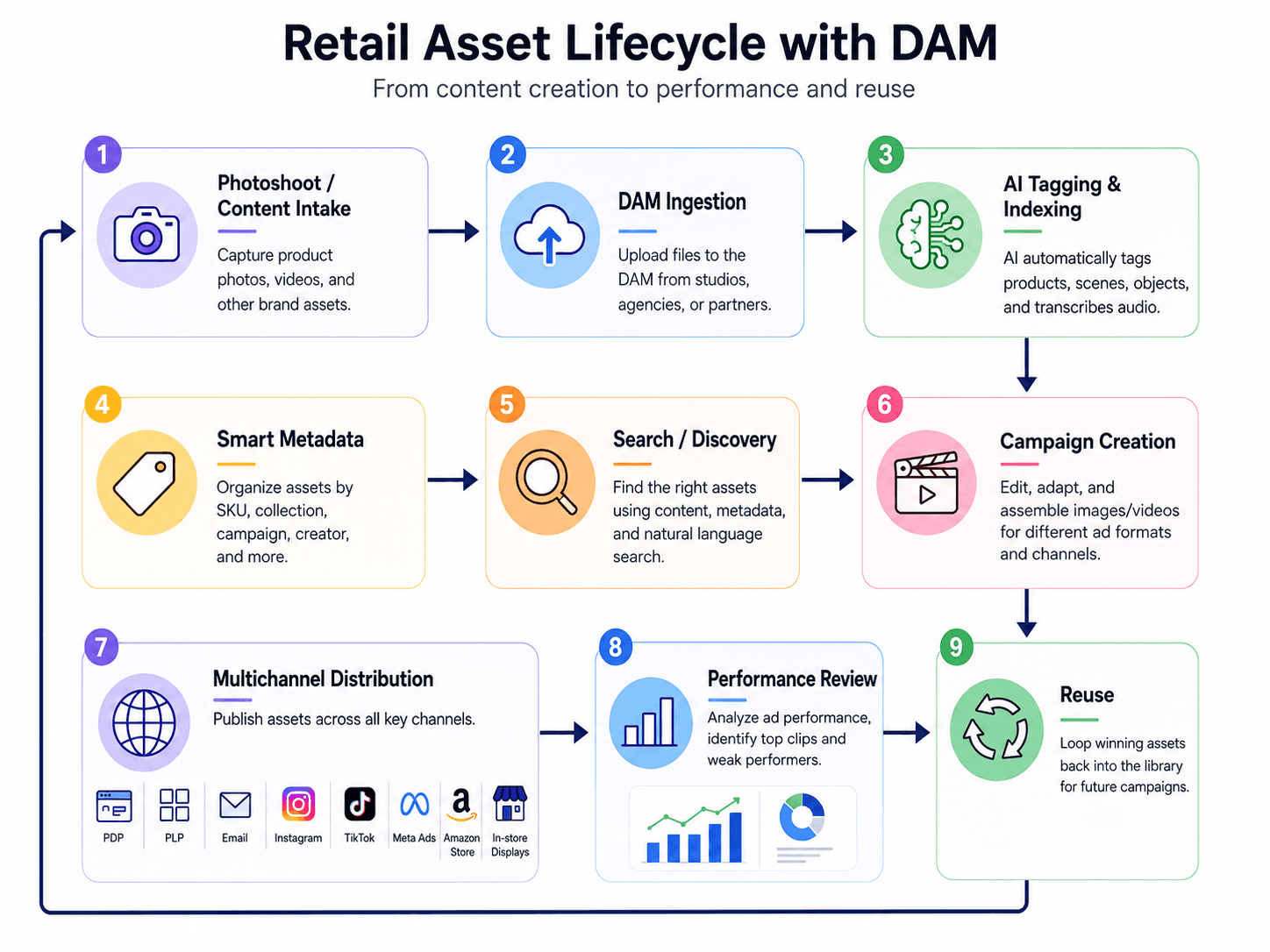
This pipeline illustrates how a DAM touches every stage from production to performance analytics.
Diagram (Omnichannel Asset Flow): Think of one product shoot as the origin. Then the arrows show the many outputs, e.g.:
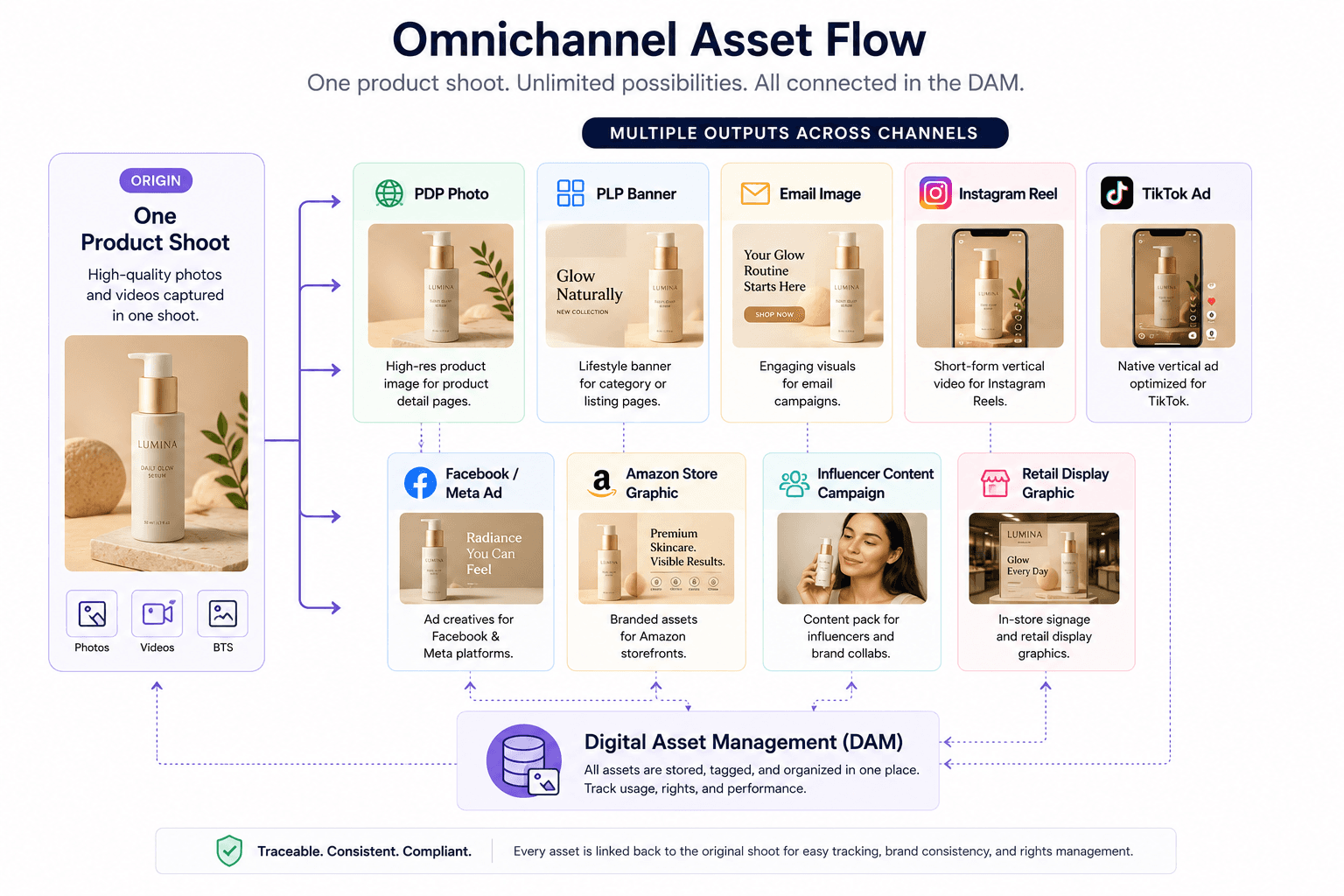
All these derivatives should tie back to the original in the DAM, so you can trace where content came from and ensure consistency/rights.
How to Choose the Right DAM
Five checks separate the right platform from an expensive mistake:
Audit your asset mix
List your content sources: static photos, studio video, influencer clips, UGC. If video and ad creative dominate your strategy, focus on a video-first platform. If your needs are mostly PDP and lifestyle images, a traditional DAM might do.
Many retailers end up running both a PIM for SKUs and a DAM for media. The key is matching the tool to your volume.
Test the search
During any trial, run real-world tasks. Load a few brand videos and try to find a specific moment: "the clip where the model points at the logo" or the testimonial line "I use this every day". Time it.
A mediocre DAM forces you to watch the video. A good one jumps to the exact second. For images, check that visual search finds "black sneakers" by content, not just the word "sneaker" in a filename.
Check the adoption path
Ask whether the vendor syncs with your current storage or demands an all-in migration. Also ask about managed services: will the vendor help tag and organize your content, or does your team do everything?
A tool that layers on top of Google Drive or Dropbox gets used, because your shots stay where they are. See Google Drive vs. Recharm for how that works in practice.
Match to team size
Enterprise DAMs often require dedicated admins, strict permissioning, and months of setup, which is overkill for many ecommerce teams. Lean brands should favor lightweight, intuitive platforms with quick onboarding and easy sharing.
A small DTC brand rarely needs the complexity and cost of enterprise permissions if the goal is simply iterating faster.
Future-proof with video
Almost every retailer faces more video ahead. Even if you rely on image carousels today, pick a DAM that handles video elegantly. If you already run social ads or influencer marketing, lean toward strong video tooling now rather than migrating later.
Costs and pricing
DAM pricing can be opaque, and many enterprise vendors only quote after a lengthy demo. What you can verify publicly: Recharm starts at $299/month for the AI plan with 1 TB storage, unlimited users, and core video indexing and search included, with add-ons like extended human tagging priced separately.
Across the market, the main price drivers are user count, storage volume, and feature tiers. Some tools charge per seat, others per storage, and enterprise platforms bundle storage caps with custom pricing. AI tagging is sometimes an extra, so always clarify what's included and watch for hidden fees: extra seats, storage overages, or usage thresholds can spike costs fast.
Pricing transparency is itself an evaluation criterion. Vendors that publish entry tiers tend to be more startup-friendly. If the price is "contact us", budget carefully before committing, especially as a small brand.
The Recharm Advantage: Video-First Asset Management
Most DAM articles focus on image libraries and brand portals, but retailers today are drowning in video and creative content. Storing product photos is solved. The unsolved problem is keeping paid social ads fresh and scalable, and that is where Recharm comes in as a complementary layer, not a copy of a standard DAM.
Recharm is built for performance marketing, not archives. With AI visual search and transcript search, a strategist types natural language like "woman holding red mug" and jumps straight to that scene, finding a specific product highlight or voice line in seconds.
Modular asset mining
Recharm automatically chops videos into context-aware clips: hooks, demos, testimonials. FabFitFun, a retail subscription brand, saw 4× more quarterly video output by tagging existing footage instead of starting new shoots.
Purdy & Figg went further: Recharm organized all their footage and enabled 100 new ads per week while saving the team 25 hours of editing time per week.
Hybrid human plus AI tagging
Complex SKUs and niche products confuse pure AI. Recharm's optional done-for-you human tagging service keeps accuracy high for catalogs with many variants.
AI easily tags "red dress" or "running shoes", but differentiating 10 similar chair models needs an expert eye. The hybrid model means every product gets correct metadata without burdening your team.
Real results, not hype
Purdy & Figg (cleaning products) launched 100 new video ads per week, grew their team by 75%, and saved 25 hours per week. HexClad (cookware) produced 3× more ad edits. These are documented on the case studies page.
Flexible integration
Recharm works with your existing CMS, PIM, and storage rather than replacing them. You manage your Shopify catalog in Shopify, and Recharm adds the creative layer on top, syncing clips back into Premiere, Canva, or Figma and pushing assets toward your ad workflows when it's time to distribute.
Priced for performance teams
At $299/month (AI plan) you get 1 TB of video, full visual and transcript search, auto-tagging, and unlimited users. That contrasts with generic DAMs charging per user or seat.
Ready to supercharge your e-commerce creative? Try Recharm free for 14 days and experience video-first asset management.
Which DAM fits your E-commerce Team?
Platform | Best For | Video Search | Modular Clips | Human Tagging | Entry Price |
Recharm | Video-first ecommerce and retail teams | ✓ Visual and transcript | ✓ | ✓ Optional | $299/month (1 TB) |
Air | Small teams and startups | Limited | ✗ | ✗ | Published tiers, free plan available |
Cloudinary | Web and ecommerce media delivery | Limited | ✗ | ✗ | Published tiers, free plan available |
Bynder | Enterprise brand portals | Metadata-based | ✗ | ✗ | Quote only |
Canto | Large organizations | Metadata-based | ✗ | ✗ | Quote only |
The pattern: Recharm leads in video intelligence, searching inside clips and transcripts with modular, clip-level organization and optional human tagging. Air is user-friendly for general assets, Cloudinary excels at delivery and CDN, and Bynder and Canto are heavyweight brand DAMs with deep governance features. None of the four are built around video content analysis.
Traditional DAM vs. video-first asset management
Traditional DAM | Video-first (modern VAM) | |
Search | Metadata or filename search | AI-driven search inside videos: objects, scenes, spoken words |
Video intelligence | Videos are just files | Automatic transcription and scene detection |
Creative reuse | Manual, storage-focused | Built for remixing old footage into new ads |
Clip-level organization | Videos are monolithic assets | Library of modular clips: hooks, demos, B-roll |
Performance support | Focused on brand consistency and distribution | Connects assets to campaigns and iteration speed |
The takeaway: traditional DAMs excel at governance (brand portals, rights, versioning) but treat videos as opaque files. Video-first systems treat each video as a collection of usable moments and optimize for creative agility.
Does your retail brand need a DAM?
If any of these apply, a DAM will likely save you time:
You have hundreds or thousands of SKUs or content assets across channels.
Multiple marketers and editors collaborate on asset creation.
You spend more hours finding or recreating content than making new content.
You run frequent multi-channel campaigns across email, social, paid ads, and marketplaces.
You use influencer or customer footage and need to track permissions.
Signs your current setup is holding you back
Editors repeatedly say "I can't find that image or video."
Multiple versions of the same asset live in different folders.
Teams recreate assets or commission new shoots because originals seem lost.
There is no single source of truth, so off-brand or expired content slips out.
Campaign launches get delayed by asset hunts or reshoots.
Paid ads underperform from creative fatigue because fresh variations can't come fast enough.
Conclusion: Your Assets Should Work as Hard as Your Team
E-commerce brands don't have a content shortage. They have shoots, UGC, and ad variants piling up faster than anyone can organize them, and every unfindable clip is money already spent that can't be reused.
A DAM turns that pile into a working library. Product imagery stays linked to SKUs, marketing content becomes searchable by what's actually inside it, rights stay tracked, and one shoot feeds campaigns for months.
The right choice comes down to your content mix. Image-heavy catalogs are well served by traditional DAMs. But if paid social video drives your growth, you need a platform that reads inside footage, breaks it into reusable clips, and keeps pace with weekly ad iteration. That is exactly what Recharm is built for, and why brands like Purdy & Figg ship 100 new ads per week from footage they already own.
Start your 14-day free trial and turn your asset library into a performance engine.
FAQ
What's the difference between a DAM and cloud storage like Google Drive?
Google Drive is a networked folder system: you share files by link, but there's no intelligence. A DAM is a database of assets with structured metadata, version control, permission rules, and powerful search. You can search "images of red shoes" or find a spoken phrase inside a video, which Drive can't do. A DAM also keeps high-res originals and generates all needed sizes and crops for marketing.
Do I need a DAM if I only sell on Shopify?
Shopify's built-in media library works for very small catalogs, but it won't tag assets by campaign, search by content, or track usage rights. Once you add Amazon, wholesale, or international channels, or start creating video ads, storefront storage falls short. A DAM gives you a single source of truth across all channels and powers everything beyond the storefront: seasonal campaigns, email, and paid ads.
How does a DAM integrate with an e-commerce platform?
Many DAMs offer plug-ins or APIs to sync with e-commerce and CMS systems. You can assign an image to a specific SKU and have it appear on the product page automatically when updated, or export assets in bulk to your site and ad accounts. The goal is to eliminate manual uploads: your team selects an asset in the DAM and pushes it where it needs to go.
What is the difference between DAM and PIM for e-commerce?
PIM manages product data: SKUs, descriptions, specs, pricing. DAM manages marketing media: images, videos, and documents. A PIM tells you what a product is ("Red Running Shoes, size 9"), while a DAM holds how it looks (photos of a model wearing them). Retailers typically run both, and for omnichannel success, they need to talk to each other.
How much does e-commerce DAM software cost?
Pricing varies widely. Some SaaS DAMs offer affordable entry plans or free tiers, while enterprise solutions typically require a custom quote that can run to thousands per month. Specialized video DAMs like Recharm start at $299/month for 1 TB of footage with unlimited users. Costs generally depend on user seats, storage volume, and feature add-ons, so always ask vendors for a clear breakdown of what's included.
Can a DAM help with creator and UGC content?
Absolutely. When creators submit videos, you upload them with fields for creator name, consent form, and license terms. The DAM makes clips searchable by product or content and alerts you before any license expires, keeping you compliant with FTC paid-use tracking requirements. It also surfaces top-performing UGC fast, like "show clips from influencer X".


