
A product page still shows last year's pricing. A campaign video sits three folders deep; nobody remembers it's approved. A blog post ranks well but references a feature that no longer exists. None of this happens because a team is careless. It happens because content has no defined path from the moment it's planned to the moment it's retired, and without that path, things simply get lost.
Every piece of content a team makes, whether it is a blog post, product photo, or 90-second ad, moves through the same basic journey. The difference between organized teams and chaotic ones isn't the content itself. It's whether that journey is deliberate.
This guide covers what content lifecycle management actually means, the stages most teams miss, and what to look for if you're ready to bring structure to how your content moves from idea to archive.
TL;DR
-
Content lifecycle management is the structured process content moves through from planning to retirement, covering every asset type, not just written content.
-
Unmanaged content creates real business risk: outdated pages hurt trust and rankings, and teams waste time recreating assets that already exist.
-
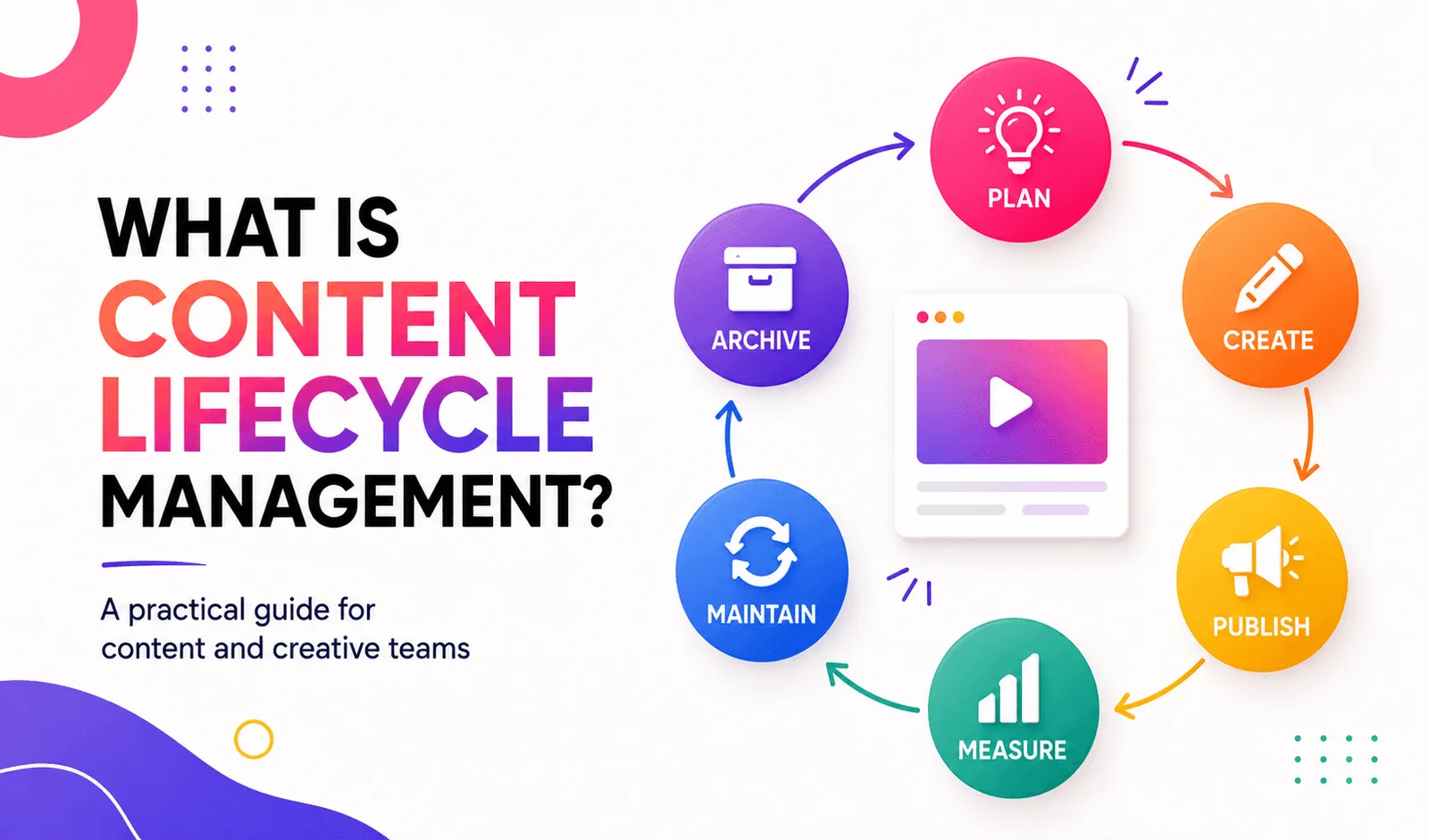
Most frameworks define five to eight stages, but the core path is plan, create, publish, measure, maintain, and archive.
-
The biggest blockers are unclear ownership, version chaos, and content scattered across disconnected tools.
-
The lifecycle doesn't end at archiving. Well-organized archived content gets revived and reused, not just stored and forgotten.
What is content lifecycle management?
Content lifecycle management is the structured process content moves through from initial planning to eventual retirement, covering every stage of its useful life in between.
This applies to more than blog posts. A product photo, a training video, a PDF one-sheet, and a landing page all move through the same fundamental lifecycle: something gets planned, made, published, measured, maintained, and eventually retired. The format changes. The underlying process doesn't.
Most teams manage this instinctively for a while. Informal management may work for a small library, but it becomes unreliable as content volume, contributors, versions, and distribution channels increase.
Why content lifecycle management matters
The business risk of stale content
Outdated content actively works against a brand rather than sitting neutrally. A page with old pricing erodes trust the moment a visitor notices the mismatch. A blog post that still references a discontinued feature signals that nobody is maintaining the site, which quietly undermines authority on every other page a visitor lands on afterward.
Operational efficiency gains
The other cost is time, not just perception. Teams without a defined lifecycle tend to recreate content that already exists, because nobody can confirm what's already been made and approved. A clear lifecycle process makes existing content easier to locate and reduces the time spent asking colleagues or recreating assets.
The stages of content lifecycle management
Most frameworks land somewhere between five and eight stages. The differences are mostly naming, not substance. Here's the version that holds up across asset types, whether you're managing blog posts, images, or video:
-
Plan. Define the purpose, audience, and format before anything gets made. This is where most wasted production is prevented, not fixed after the fact.
-
Create. The asset gets produced, written, shot, or designed, based on the plan.
-
Publish. The asset goes live on its intended channel, whether that's a website, an ad platform, or an internal library.
-
Measure. Performance data comes in: traffic, engagement, conversion, or ad metrics, depending on the asset type.
-
Maintain. The asset gets updated, refreshed, or re-approved as facts, branding, or performance change.
-
Archive. The asset is retired from active use, either stored for potential reuse or deleted permanently.
A concrete example: A brand plans a product launch video (plan), shoots and edits it (create), runs it as a paid ad (publish), tracks its click-through rate over three weeks (measure), notices performance dipping and swaps in a new hook using the same footage (maintain), and eventually pulls it from rotation once the product line changes (archive). Six stages, one asset, and at every step someone has to know where that video lives and what its current status is.
Common challenges in content lifecycle management
Where teams get stuck
Three problems show up in nearly every unmanaged content operation. Unclear ownership means nobody is responsible for deciding when a piece of content needs updating or retiring, so it just sits until someone notices it's wrong. Version chaos happens when multiple near-identical files exist with no clear indication of which one is current, forcing people to guess or ask. And siloed tools scatter content across drives, inboxes, and platforms that don't talk to each other, so no single view of "everything we've made" ever exists.
The cost of inaction
Every hour spent hunting for an existing asset, or recreating one because it could not be found, is time that could have gone into producing new content.
What's true directionally, even without a specific number: every hour spent hunting for an asset that already exists, or recreating one because it couldn't be found, is time that never goes back into making something new.
Who benefits from content lifecycle management?
The specific win differs by role, but the underlying problem is the same for everyone: too much time spent managing content instead of making it.
-
Creative ops gets a predictable production pipeline instead of firefighting. Knowing exactly where an asset sits in its lifecycle, planned, in review, live, or due for a refresh, removes the guesswork that eats into actual production time.
-
Brand teams get consistency enforcement without manually checking every asset. A defined maintain stage means outdated logos, old messaging, and expired claims get caught on a schedule instead of by accident.
-
Marketing leads get faster campaign turnaround, because the team spends less time asking "do we have anything for this already?" and more time building on what already exists.
Every role ties back to the same outcome: content ships faster and stays consistent, because the process is defined instead of improvised.
What to look for in a content lifecycle management solution
A handful of capabilities separate a system that actually manages the lifecycle from one that's just a file store with extra steps:
-
Centralized search that works across every asset type, not just documents, so a video and a blog post are equally findable.
-
Tagging that's rich enough to support real filtering: by campaign, by stage, by owner, by content type.
-
Version control, so the current, approved version is always obvious and nobody is guessing between three files named "final."
-
Workflow routing, so an asset automatically moves to the right person for review, approval, or update instead of relying on someone remembering to forward it.
One thing worth testing specifically, especially for teams working with a lot of video or image content: how well the tagging actually performs on your real assets, not a vendor's demo set. Purely automated tagging tends to drift on brand-specific terms and niche content over time.
For teams managing large video libraries, Recharm combines AI-assisted organization with editable tags and optional human tagging on managed plans. Test these capabilities using your own footage and brand-specific terminology rather than relying only on a demonstration library.
Content lifecycle management best practices
Governance basics
Three habits do most of the work. Assign clear ownership for every content type, so there's always someone accountable for its maintenance and archive stages, not just its creation. Run a regular audit cadence; quarterly works for most teams, to catch content that's drifted out of date before a customer notices first. And keep one source of truth, a single system everyone checks before assuming an asset doesn't exist, rather than five different places content might live.
Automation opportunities
Manual lifecycle management works at small scale and breaks down as volume grows. The biggest bottlenecks worth automating first are tagging and search, since those are what determine whether content actually gets reused or just accumulates. Recharm can automatically organize and tag uploaded video footage, helping teams search the library without waiting for every file to be catalogued manually. Some AI tagging capabilities are currently available in preview.
Where does the content lifecycle end?
Most guides on this topic stop at "archive" and treat it as the end of the story. It isn't.
Archiving versus deleting
These are two different decisions, not one. Delete content only when it has no future value and no legal, contractual, historical, or retention requirement. Otherwise, remove it from active use and preserve it in an appropriate archive. Archiving is different. It's cold storage for content that isn't currently in use but could be valuable again, and treating everything the same way, either keeping it all active forever or deleting anything not currently in rotation, wastes either storage or opportunity.
A reuse trigger
A well-organized archive pays off in exactly the situations that are hardest to predict. A brand that filmed dozens of product demo clips two years ago, archived rather than deleted them, and then found itself needing a new campaign angle didn't need a new shoot. The archived footage, properly tagged, became the starting point for the new campaign instead of a forgotten cost. That's the difference archiving with real structure makes versus archiving as a euphemism for "we'll never look at this again."
The lifecycle isn't a straight line ending in a trash can. It's closer to a loop: content gets planned, made, used, and either revived for something new or retired for good, and which one happens depends entirely on whether anyone can find it when the moment comes.
FAQs
What is content lifecycle management in simple terms?
It's the structured path a piece of content follows from the moment it's planned to the moment it's retired, covering creation, publishing, performance tracking, maintenance, and either archiving or deletion. It applies to any content type, not just written content.
How many stages does the content lifecycle have?
Most frameworks describe somewhere between five and eight stages. The core version most teams can work with is plan, create, publish, measure, maintain, and archive, six stages that cover the full journey without unnecessary subdivision.
What is the difference between content lifecycle management and a CMS?
A CMS is a tool for publishing and managing content on a specific channel, usually a website. Content lifecycle management is the broader process that governs an asset's entire life, planning, production, publishing, performance, maintenance, and retirement, across every channel and format, not just the ones a CMS touches.
Who owns content lifecycle management in an organization?
It varies by team structure, but creative ops or a content operations lead typically owns the process itself, while individual teams, brand, marketing, and design own the content that moves through it. The key isn't a single owner for every asset. It's clear accountability at each stage so nothing sits in limbo.
How often should content be reviewed or archived?
Quarterly reviews work for most teams, though high-volume content like paid ad creative often needs weekly or biweekly checks given how fast performance can shift. The right cadence depends on how quickly your content type goes stale, a product page changes less often than an ad campaign does.