
Modern ad teams are producing more creative content than ever before, but most of their best footage still ends up buried inside Google Drive folders, hard drives, or endless raw video libraries. Editors waste hours searching for clips, strategists struggle to reuse winning hooks, and brands keep reshooting content they already own.
That’s where Creative Asset Management (CAM) comes in.
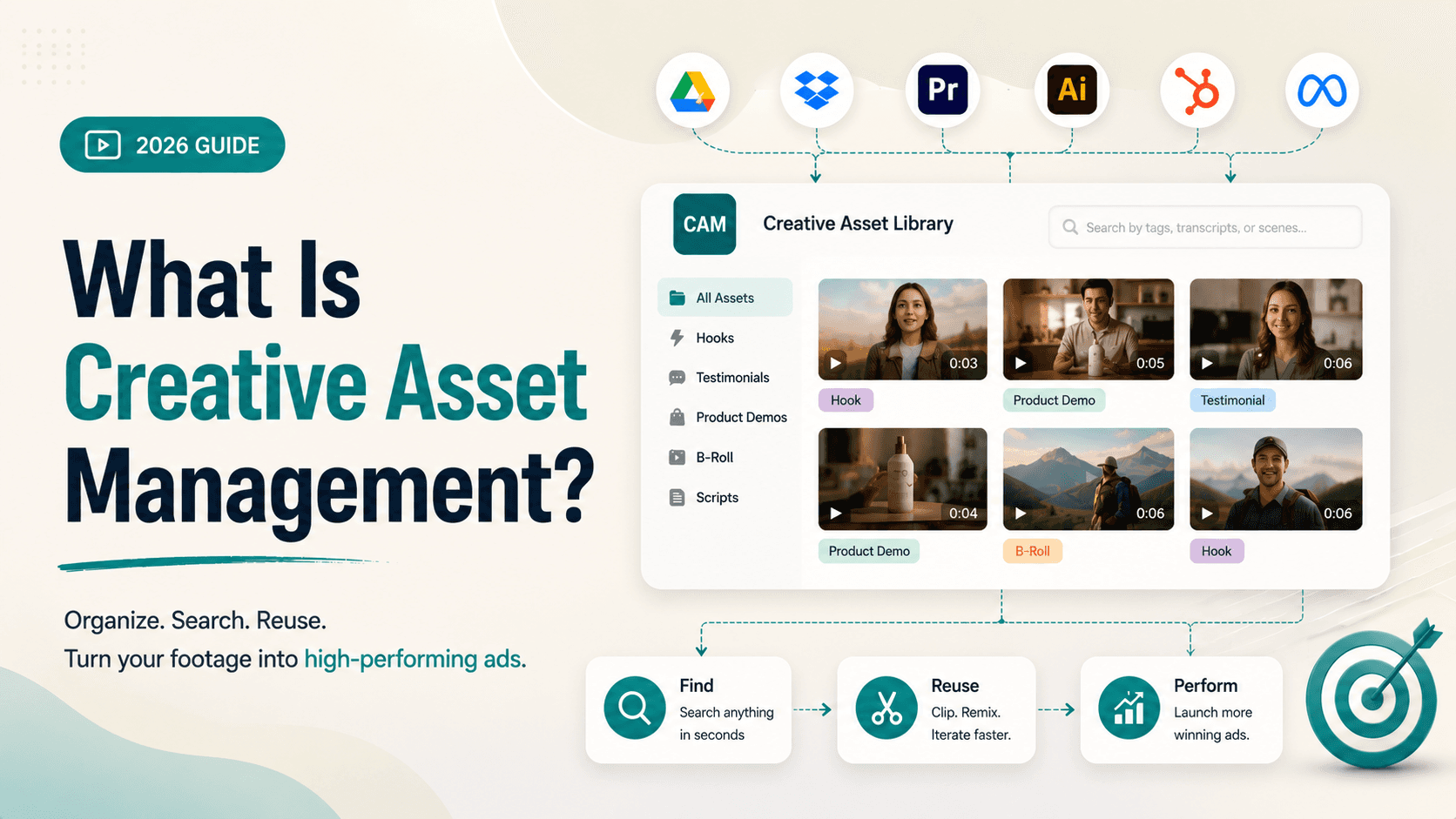
Unlike traditional DAM systems, which focus on storing finalized assets, CAM is built for the fast-moving world of performance marketing. It helps teams organize, search, tag, and remix creative assets like UGC clips, testimonials, hooks, product demos, and B-roll at scale.
In 2026, creative velocity is the competitive advantage. The brands winning on Meta and TikTok are not necessarily producing more content; they are reusing and iterating on existing footage faster. And that’s exactly what modern CAM platforms are designed to solve.
TL;DR
Creative Asset Management (CAM) helps brands organize, tag, search, and reuse creative assets used in active ad production, including UGC clips, ad edits, B-roll, testimonials, hooks, and product demos.
Unlike traditional DAM systems, which focus on storage and governance, CAM is built for creative velocity with features like AI search, transcript search, modular clips, and fast iteration workflows.
Modern DTC ad teams use CAM to quickly find and remix existing footage, making it easier to test more ad variations without constantly shooting new content.
Video-first CAM platforms like Recharm layer on top of tools like Google Drive and Frame.io, turning raw footage into searchable, tagged, and reusable creative assets.
The biggest advantage of CAM is speed. Teams can reduce search time, reuse winning hooks faster, and dramatically increase creative output and A/B testing efficiency.
What Is Creative Asset Management (CAM)?
Creative Asset Management (CAM) is the process of organizing, tagging, and retrieving all the creative assets used in active marketing and ad production. This includes everything from raw UGC footage, testimonials, product demos, B-roll, voiceovers, motion graphics, and ad edits to briefs and brand guidelines.
Unlike traditional storage systems, CAM is designed to make creative assets instantly searchable and reusable. It combines software, metadata tagging, naming structures, version control, and workflow organization to help teams move faster.
For example, instead of manually scanning a 5-minute video, an editor can instantly jump to a specific 3-second hook by searching a transcript keyword or tag like “question intro.”
In short, CAM turns your video library into a searchable database of creative clips, ensuring valuable footage never stays buried in folders.
CAM vs DAM: What’s the Difference and Why It Matters
At a high level, DAM (Digital Asset Management) systems are built for storage, governance, and distribution. They manage finalized assets like approved logos, campaign creatives, PDFs, and brand files while focusing on version control, permissions, and rights management.
CAM (Creative Asset Management), on the other hand, is built for the active creative production process. It focuses on raw footage, draft edits, scripts, hooks, and in-progress creative workflows so teams can iterate on ads faster. As LucidLink explains, CAM supports “in-progress creative workflows,” while DAM focuses on finalized assets.
This difference matters because modern performance teams are producing dozens of ad variations every week. They do not just need storage; they need speed. A team creating 50+ ad variations weekly benefits far more from fast clip search and reuse than from extra approval workflows.
In simple terms:
DAM answers: “Where is this file?”
CAM answers: “Which clip should we use for this ad angle?”
That’s why CAM platforms like Recharm are built for active creative iteration, helping teams quickly find, remix, and test winning footage instead of treating videos like static files sitting inside folders.
Why Traditional DAMs Fall Short for Creative Ad Teams
Generic DAM and creative-collaboration tools create major bottlenecks for high-volume video ad teams:
No Modular Video Indexing
Most DAMs treat a 3-minute video as a single file instead of breaking it into usable segments like hooks, testimonials, CTAs, or product shots. Editors still have to scrub through entire videos manually to find one moment. As Recharm notes, tools like Air.inc organize assets only at the file level, without automated scene extraction.
No Transcript or In-Video Search
Traditional DAMs rely heavily on file names and manual tags. They don’t transcribe spoken audio, making it nearly impossible to search for specific phrases buried inside hours of footage. A video-first CAM solves this by turning spoken words into searchable transcripts, so winning hooks and soundbites never stay hidden.
No Ad-Native Taxonomy
Most DAMs organize files by campaign name, date, or format — not by ad strategy. Performance teams need tags like hook type, creator persona, product demo, emotional angle, or UGC style. Generic platforms rarely support this level of ad-specific organization, while CAM platforms like Recharm are designed around real creative workflows.
The Creative Workspace Gap
Tools like Air.inc or Asana help with collaboration, but they are not built for fast-moving ad production. Teams still end up searching through folders or asking questions like, “Does anyone have that exact clip?” A true CAM platform delivers frame-accurate search, modular clip libraries, and faster creative retrieval.
The 2026 DTC Landscape: Why Creative Volume Is the New Gold Standard
The 2026 advertising landscape is driven by one thing: creative velocity. Platforms like Meta and TikTok no longer reward brands for repeating the same ad. Their algorithms now prioritize fresh, diverse, and highly personalized content, forcing DTC brands to produce more creative variations than ever before.
Meta’s Andromeda (GEM) Rewards Creative Diversity
Meta’s Andromeda/GEM system is built for personalized ad delivery at scale. Performance marketers report that success now depends on volume + variation, not finding one “winning ad.” Some forecasts suggest brands may need to test 4× more creative by 2026 compared to 2024.
That’s why leading brands launch 50–100 ad variations per month, continuously remixing hooks, angles, and footage to feed the algorithm enough data.
TikTok Prioritizes Freshness
TikTok’s algorithm favors content that feels native, fast, and constantly evolving. As many marketers now say, “TikTok users don’t like to be sold to.”
Brands relying on the same static creatives quickly face fatigue and declining reach. Winning teams constantly produce new variations, from founder-style videos and UGC testimonials to quick product demos and lifestyle hooks.
For example, Little Spoon doubled its monthly video output and achieved a 4× increase in winning TikTok ads simply by organizing and reusing existing footage more effectively.
Cost of Lost Winning Assets
Buried creative assets are expensive. A forgotten hook or testimonial could be the difference between a breakout ad and a failed campaign. Without a searchable system, teams often end up reshooting content unnecessarily — even though the footage already exists somewhere in a drive.
The costs add up fast, with production shoots often ranging from $3K–$15K per day. In contrast, brands using searchable CAM systems recover and reuse “owned media” instantly.
HexClad, for example, reduced clip-search time by 83% and tripled ad edit output after organizing its creative library.
Creative Velocity Is the New Competitive Advantage
The fastest-moving brands now win by building creative flywheels, continuously testing, remixing, and scaling new ideas. Teams without a structured CAM workflow struggle to keep up.
Brands like Cat Person proved this by launching 4× more winning ad variations while reducing CPA by 25%, simply by unlocking better access to existing footage.
In 2026, the competitive edge is no longer just bigger budgets. It’s the ability to turn existing content into more high-performing creative, faster than everyone else.
The 4 Core Pillars of an Automated Creative Asset Management Platform
A true video-first CAM platform (often AI-powered) delivers four key capabilities that drive creative velocity:
AI-Powered Search & Indexing
Every asset, videos, images, and audio, is automatically indexed using AI. Teams can search by spoken words, objects, actions, people, or even visual details like “person in glasses” or “best deal”.
Instead of manually digging through folders, editors can instantly jump to the exact clip they need. Recharm, for example, enables search across actions, spoken phrases, people, and objects inside videos.
Modular Clip Library
Instead of treating a long video as one file, CAM platforms automatically break footage into usable segments like hooks, testimonials, product shots, CTAs, and B-roll.
This allows editors and strategists to browse footage scene-by-scene and instantly preview moments without scrubbing through timelines. Recharm’s modular clip system helps teams explore videos as pre-cut creative assets ready for remixing.
Hybrid AI + Human Tagging
AI handles large-scale tagging quickly, but human review adds the context machines often miss. For example, AI may identify a “shoe,” while human tagging can label it as “red running sneaker” or “summer lifestyle ad.”
Recharm combines automated tagging with optional human verification to create cleaner, campaign-ready metadata across hooks, emotions, personas, creators, and products.
Seamless Workflow Integrations
A modern CAM should work with the tools teams already use, like Google Drive, Dropbox, and Frame.io, without forcing migration.
Platforms like Recharm automatically ingest and index files uploaded into synced folders, adding AI tagging and search on top of existing storage systems. This allows teams to adopt CAM without changing their current workflows or folder structures.
Ready for a hands-on look? Try Recharm’s CAM in action; it layers on your Drive and starts indexing clips right away. (Sign up for a free 14-day demo to see transcript search and modular clipping at work.)
Creative Asset Management Software: Recharm vs Generic Platforms
Feature comparisons highlight why only a video-first CAM truly serves DTC ad teams at scale:
Feature | Recharm | Air.inc | Monday.com | Generic DAM |
Transcript (speech) search | Yes | No | No | No |
Modular video clip library | Yes | No | No | No |
AI + human tagging | Yes (auto-tags + optional human) | Limited/No | No | No |
Ad-specific taxonomy | Yes (tags for hooks, products, etc.) | No | No | No |
Google Drive integration | Yes | No (imports only) | No | Limited/No |
Managed service option | Yes (with Commerce/Managed plans) | No (platform-only) | No | No |
Unlike traditional DAMs or broad creative-workspace tools, Recharm is built specifically for performance video workflows.
It combines:
Transcript search across footage
Modular clip libraries (hooks, testimonials, B-roll, CTAs)
AI + human tagging
Native Google Drive and Frame.io integrations
This allows teams to search, remix, and scale creatives without manually digging through folders.
Why Generic Platforms Fall Short
Platforms like Air.inc, Monday.com, Brandfolder, or Bynder are designed more for file organization and collaboration than high-speed ad iteration.
Most still lack:
Scene-level video indexing
Transcript-based search
Ad-specific tagging systems
Modular clip workflows for performance ads
As a result, teams still rely heavily on manual searches and folder structures.
Real Performance Results
Brands using Recharm have reported major efficiency gains:
HexClad: Reduced briefing time by 66% and tripled editor output
Cat Person: Achieved 4× more winning ads and reduced CPA by 25%
Lume: Produced 800 new ads in 2 months by remixing existing footage
Little Spoon: Doubled TikTok creative output and saw a 4× increase in winning ads
These results come from unlocking and reusing existing footage faster, not constantly producing new content.
How to Get Started with Creative Asset Management
1. Audit Your Footage Library
Start by identifying where all your creative assets currently live: Google Drive, Dropbox, Frame.io, editor hard drives, and other storage systems.
You’ll often discover valuable clips that were never reused simply because nobody knew they existed. Every buried winning hook represents lost ROI.
2. Define Your Creative Taxonomy
Establish a consistent tagging system for your team. This can include:
Hook type
Creator/Influencer name
Product
Campaign
Usage rights
Format (UGC vs studio)
Performance tags like “high-performer” or “failed test.”
These tags become the search language for your entire creative workflow.
3. Choose a Platform That Works with Existing Storage
Avoid unnecessary migrations if possible. Instead, choose a CAM platform that integrates with tools your team already uses, like Google Drive or Frame.io.
For example, Recharm can automatically watch synced folders, import new footage, and apply AI tagging, while editors continue working inside familiar folder structures.
4. Pilot with One Brand or Campaign
Don’t try to organize everything at once. Start with one high-volume brand or campaign first.
Ingest footage, apply your tagging structure, and build a searchable library around that workflow. Many teams begin seeing faster briefing and creative iteration within the first 30 days.
Early wins like “We found 10 forgotten clips we could reuse” help build momentum for wider adoption.
5. Scale After Early Wins
Once one workflow proves successful, expand gradually across teams and campaigns.
The goal is simple: create a system where footage is no longer lost in folders, and every creative asset becomes instantly reusable for future ads.
Frequently Asked Questions
What is the difference between Creative Asset Management (CAM) and Digital Asset Management (DAM)?
DAM focuses on storing and distributing finalized brand assets like logos, PDFs, and approved creatives.
CAM, on the other hand, is built for active ad production. It helps teams organize, search, and reuse raw footage, ad cuts, scripts, hooks, and creative variations quickly. In short:
DAM = governance & storage
CAM = creative velocity & iteration
What types of assets can a CAM platform manage?
A CAM platform manages everything involved in video ad production, including:
Raw UGC footage
B-roll and testimonials
Product demos
Voiceovers and music
Motion graphics and images
Creative briefs and scripts
Final ad cuts
Essentially, it acts as a searchable hub for all creative production assets.
How does CAM help DTC brands scale ad production?
CAM transforms scattered footage into a searchable creative library. Teams can instantly find and reuse high-performing clips instead of constantly shooting new content.
For example, brands like HexClad reduced briefing time by 66% and tripled editor output by implementing CAM workflows. The result is faster iteration, more ad variations, and better use of existing footage.
Does CAM replace Google Drive or Dropbox?
No, it works alongside them. Modern CAM platforms integrate directly with tools like Google Drive, Dropbox, and Frame.io instead of replacing them.
For example, Recharm can automatically watch synced folders, index uploaded footage, and apply AI tagging while teams continue using their existing storage systems normally.
What is the best CAM platform for video ad teams?
The best CAM platforms are built specifically for video-first creative workflows.
Platforms like Recharm stand out because they offer:
Transcript search
Modular clip libraries
AI-powered tagging
Scene-level indexing
Workflow integrations for ad production teams
Unlike generic DAMs, video-first CAM tools are designed for high-frequency testing, rapid iteration, and performance marketing workflows.