
Choosing a digital asset management system is no longer a simple decision for creative teams. As video production increases, teams now rely on DAM platforms not just for storage but for organizing, searching, and reusing creative assets efficiently.
However, not all DAM tools are built for the same workflows. Some platforms focus on brand governance and enterprise asset libraries. Others are designed specifically for high-volume video production and performance advertising.
For teams producing large volumes of video creatives, the difference matters. The right platform can make it easy to locate clips, build new ad variations, and move faster from idea to campaign.
This guide compares the leading DAM platforms used by video teams today. We’ll break down their key capabilities, where they work best, and which types of creative teams benefit most from each solution.
TL;DR: Top Picks at a Glance
Recharm: Tailored for DTC video ads. Think of it as a search engine for your footage; it auto-indexes transcripts and clips, supports deep linking into any scene, and is built for rapid creative iteration. Best for performance marketers churning out Meta/TikTok/Shorts ads every week.
Bynder: Enterprise-grade DAM famous for brand management. Great UI, strict version control and brand portals, AI tagging, and rights management. Ideal for large marketing teams governing logos and large campaigns across channels, but not specialized for slice-and-dice ad creative.
MediaValet: Robust video transcription and AI tagging. Lets you search spoken words and auto-tag objects and faces. Aimed at big media shops with massive asset libraries (a recent user study cites ~9 hours/week saved by smarter workflows).
Google Drive (baseline): Cheap and familiar raw storage. Has a search bar and folders, but no transcript search, no detailed metadata, and no native video preview beyond thumbnails. Suits very small teams or pilots that can’t yet justify a DAM.
Frame.io: The gold-standard for review and approval. It centralizes comments on the video timeline (time-coded feedback) and ties into Premiere Pro. Users rave about its easy review flow (“Frame.io centralizes all comments directly on the video timeline with precise timestamps”). But it isn’t a full DAM; it doesn’t build searchable libraries of clips. It’s for polishing final cuts, not organizing raw stock.
Each of the above tools has its place (and drawbacks); we’ll unpack their strengths below. Spoiler: if you’re running dozens of paid video ad campaigns with multiple creatives, a purpose-built DAM like Recharm or MediaValet will save you massive time over DIY file storage.
What Is a DAM for Video?
A digital asset management platform for video is a centralised system that stores, organises, searches, and distributes video files, built for the specific technical demands of video content.
The keyword there is "specific." Video files are not like PDFs or product images. They are large, time-based, and contain multiple usable moments within a single file. A raw 20-minute shoot might contain three usable hooks, two solid testimonials, and a dozen B-roll clips; all buried inside one .MP4 file that looks identical to every other .MP4 in your Drive folder.
A proper video DAM solves this by treating video as time-series data, indexing what is inside the file, not just the file name. That means transcript search, scene-level navigation, face tagging, and clip-level organisation.
DAM vs. General Cloud Storage at a Glance
Feature | Google Drive | Video DAM (e.g. Recharm) |
|---|---|---|
Transcript search | ✗ | ✓ |
AI tagging by scene / creator | ✗ | ✓ |
Modular clip library | ✗ | ✓ |
Face recognition | ✗ | ✓ |
Deep linking for briefs | ✗ | ✓ |
Ad-specific taxonomy | ✗ | ✓ |
Version control | Basic | Full workflow |
Key Challenges of Managing Video Files Without a DAM
Without a video DAM, teams run into the same problems repeatedly.
The footage black hole. Hard drives and Google Drive folders quickly become time sinks. Editors end up rewatching hours of raw UGC and B-roll just to find one usable shot. There is no index, no tags, and no reliable search. Assets get buried in nested folders and effectively disappear. Teams that switch to a proper DAM typically cut search time by 40–60%.
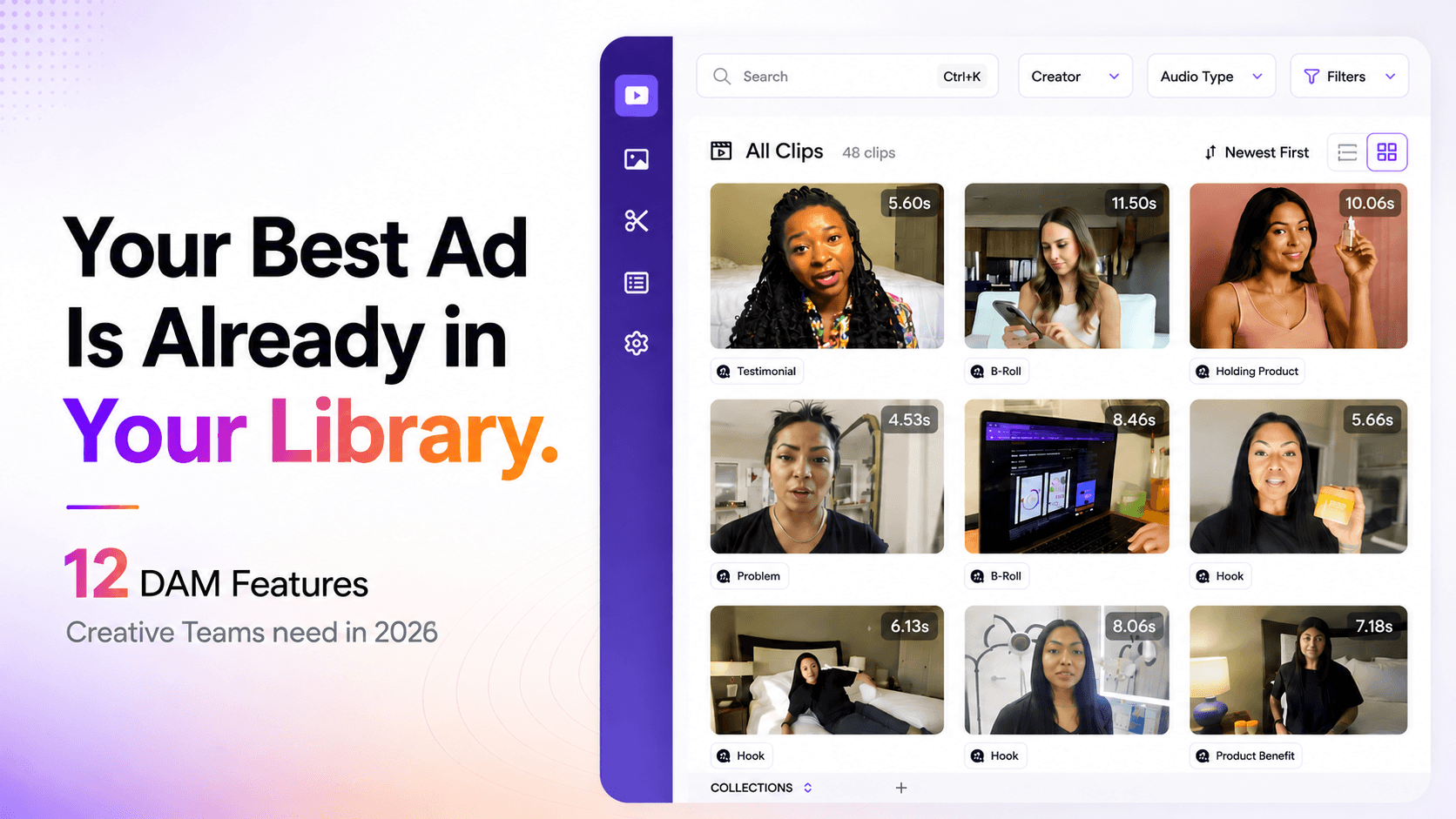
No modular structure. In a plain file locker, a 2-minute testimonial is just… a 2-minute file. The punchy one-liner buried in the middle? You're scrubbing to find it every single time. A video DAM breaks clips into hooks, testimonials, product shots, and B-roll, so you can search for "close-up product shot" or "celebrity mention" and actually get there.
Version chaos. If you've ever seen a file called Final_v2_USE_THIS.mp4, you know the problem. Without version control, multiple people edit different copies, and sooner or later, the wrong one goes live. A DAM keeps one source of truth; every iteration, one place, no guesswork.
Hook testing slows to a crawl. Performance teams live and die by testing new hooks. But if nothing's searchable, every test means re-cutting from scratch. With proper tagging and transcripts, you find an existing clip, drop it in, and test it the same day.
A video DAM isn't just a nicer folder view; it's a search engine for your footage.
6 Essential Features in a Video DAM
Not all DAMs are built the same. A platform built for managing brand images and PDFs will fail a team that lives and dies by video velocity. Here are the features that actually matter for ad creative teams.
1. Transcript and Natural Language Search
This is non-negotiable for UGC-heavy teams. You need to be able to type a phrase, something a creator actually said, like "this changed my skin." It can be taken directly to that exact second inside any video in your library. This is not a keyword search on file names. It is full transcript indexing across every piece of footage you own.
2. AI Auto-Tagging With Human Override
Generic AI tagging, "Blue," "Sky," "Human", is useless for ad creative. What you need is tagging that maps to advertising strategy: Creator, Product, Hook Type, Angle, Emotion. The best DAMs use AI to handle the initial classification automatically and allow a human to refine tags to match brand-specific terminology. Hybrid accuracy beats pure AI every time.
3. Modular Clip Library
The best DAMs treat video as a set of components rather than flat files. They automatically break raw footage into hooks, testimonials, product shots, B-roll, and CTAs, so a creative strategist can browse by content type rather than file name. Recharm is the only DAM that does this without nested folders, flattening your library into a searchable, browsable index of moments.
4. Deep Linking for Brief Writing
A creative strategist should be able to highlight a specific scene or transcript line, generate a link to that exact moment, and drop it into a brief. The editor clicks the link and lands at the precise timecode in the master file. No manual timestamps, no "use the bit at 1:42," no file transfers. This single feature can cut brief-writing time in half.
5. Cloud Storage Integration
The best DAM does not ask your team to change their upload behaviour. It auto-syncs with Google Drive or Dropbox, so footage uploaded by creators, editors, or production teams is automatically ingested, indexed, and organised without anyone doing an additional upload step.
6. Version Control and Approval Workflow
A purpose-built video DAM maintains a clear version history, ties clips to campaign phases, and enables structured review paths. This eliminates the back-and-forth of untracked revisions and ensures that everyone, media buyer, creative director, and editor, knows exactly which version is approved and live.
Cloud Storage vs. Purpose-Built DAM: Which Do You Need?
This is the most common question creative teams face. The answer is not either/or; it is about what stage your production volume is at.
What Google Drive does well
Google Drive is the industry default for raw file storage for a reason. It is cheap, familiar, and integrated with almost everything. For teams just starting out, fewer than 2 creative team members, under 50 video assets per month, it is perfectly adequate.
Where Drive fails at scale
Drive has no transcript search. It has no AI tagging, no modular clip organisation, no usage rights tracking, and no ad-specific taxonomy. When your team grows and your creative output scales, Drive becomes the single biggest bottleneck in your production pipeline. Files are opaque. Search is by file name only. Finding a specific shot requires opening and scrubbing the file manually every time.
The layering model: keep Drive, add intelligence
The good news is that the best solution does not require abandoning Google Drive. Recharm auto-syncs on top of Google Drive, adding search intelligence, AI tagging, and modular clip organisation without forcing any migration. Your editors keep uploading footage the same way they always have. Recharm does the rest.
When is a purpose-built DAM essential? If your team produces more than 50 video assets per month, has more than 2 creative team members, or runs paid ads at scale on Meta or TikTok, a purpose-built platform is no longer a "nice to have"; it is a production requirement.
DAM Best Practices: Integration With Creative Tools
The best DAM is one your team actually uses. That means it has to slot into the tools your editors, strategists, and media buyers already work in every day.
Map your existing stack first
Before adding any new layer, audit which tools your team already uses daily. A DAM that disrupts existing tools creates resistance and low adoption. The goal is to add intelligence to existing workflows, not replace them.
Google Drive sync
Recharm auto-syncs with Google Drive, so editors continue uploading footage normally. The moment a file lands in Drive, Recharm begins indexing it; transcribing, tagging, and breaking it into modular clips without any additional step from the team.
Frame.io as the review layer
Frame.io is excellent for frame-accurate video review and approval. Think of it as sitting downstream of the DAM. Use Recharm to find and select the right clips. Use Frame.io to manage structured review once you know what you are working with.
Premiere and editing handoff
The ideal handoff: a creative strategist finds the exact clip they need in Recharm, generates a deep link to that specific moment, and drops it into the brief. The editor receives the brief, clicks the link, and lands at the precise timecode in the master file. No file transfer. No re-explanation. No wasted time.
How We Evaluated These Platforms
Every platform in this guide was assessed against five criteria relevant to performance marketing and ad creative teams, not general brand management use cases.
Video-native capability: Does the platform handle raw 4K files, transcript search, scene-level navigation, and modular clip storage? Or is it primarily built for images and PDFs?
Ad workflow fit: How well does it map to the actual workflow: hooks, CTAs, UGC tagging, brief writing, and iteration speed?
AI depth: How accurate is the AI tagging? Can it distinguish between a product shot and a testimonial? Can a human override or refine tags to match brand-specific language?
Integration ease: Can it layer on top of existing Google Drive or Dropbox workflows without requiring a full migration?
Value for DTC teams: Does the pricing and feature depth make sense for teams in the 7-to-8-figure DTC range, not just enterprise brands with dedicated DAM administrators?
Top DAM Platforms for Video Teams: Compared
Here is an honest breakdown of the main platforms, what they are good at, where they fall short, and which type of team they actually serve.
Recharm: Best for Performance Ad Creative Teams
Recharm is the only DAM on this list built specifically for video ad production. Where other platforms started as general asset managers and added video features, Recharm was designed from the ground up for the velocity demands of performance marketing.
What makes it different:
It treats video as modular components, not as flat files. Raw footage is automatically broken into hooks, testimonials, B-roll, and CTAs.
It has no nested folders, which is the only DAM to take this approach. Folders are where videos go to hide. Recharm replaces folder hierarchy with a flat, searchable, AI-organised index.
Transcript search and deep linking are built-in, so you can find a specific line a creator said, generate a link to that moment, and paste it directly into a brief.
AI tagging is trained on advertising concepts, not just generic visual recognition. It tags by Creator, Product, Hook Type, and Action; not by "Blue" and "Sky."
The managed service layer means a human team is continuously organising your library alongside AI, which generally ensures accuracy that pure automation cannot match.
Real-world result: HexClad's Head of Paid Creative reported an 83% reduction in time spent finding a single clip after switching to Recharm, dropping from 30 minutes to under 5. Their team also achieved briefs written in half the time and a 3x increase in ad output.
Best for: DTC brands and agencies running paid ads on Meta, TikTok, and YouTube Shorts. Especially suited to teams producing 50+ video assets per month.
Bynder: Best for Enterprise Brand Governance
Bynder is a well-established enterprise DAM with a strong UI, solid version control, and a polished brand portal. It is widely adopted by marketing teams managing logos, product images, and campaign assets across multiple channels and regions.
MediaValet: Best for Larger Media Organisations
MediaValet is designed for organisations managing broad asset catalogs, video alongside images, brand documents, and other file types. It lacks the ad-specific taxonomy and modular clip structure that DTC performance teams need. It is a capable general DAM that handles video well, but it is not optimised for the hooks-and-CTAs workflow of paid creative teams.
Google Drive: The Baseline (Not a DAM)
It is free, familiar, and already in your stack. For teams with very early-stage or minimal video ad production. Google Drive is not a DAM. It does not provide transcript search, AI tagging, modular clip organisation, and ad-specific taxonomy. It is cloud storage. The moment your team starts producing at scale, Drive becomes the single biggest bottleneck in your workflow. That’s why Recharm is built to sit on top of Drive.
Frame.io: Best for Review and Approval (Not Asset Management)
Frame.io is the leader in video review and approval workflows. It does not organise your footage library, does not support transcript search or AI tagging, and is not designed for retrieval at scale. It belongs downstream of a DAM in your stack. Use Recharm to find and select the right clips, then use Frame.io to manage the review loop.
Conclusion
Choosing the right DAM ultimately depends on how your creative team works. Many platforms offer strong asset storage and collaboration features, but video-heavy teams often need more than that. When you're producing dozens of ad creatives every week, speed of discovery and reuse becomes critical.
This is where purpose-built solutions stand out. A system like Recharm, designed specifically for performance ad workflows, makes it easier to turn raw footage into a searchable library of hooks, testimonials, and product shots. Instead of digging through folders, teams can quickly find the right clips and build new ad variations faster.
For DTC brands and agencies scaling paid campaigns, that efficiency can make a real difference in how quickly winning creatives are discovered and deployed.
Ready to see what your library could look like?
Try Recharm's free demo and see how fast your team can find, brief, and ship creative at scale.
Frequently Asked Questions
What is a video DAM, and how is it different from Google Drive?
A video DAM indexes the content inside your videos. Google Drive stores files. With a DAM, you can search by transcript, tag by creator or product, browse clips by type, and share links to specific moments. Drive cannot do any of that.
What features should I look for in a DAM for video ad production?
The six that matter most are: transcript and natural language search, AI auto-tagging with human override, a modular clip library, deep linking for brief writing, cloud storage sync, and version control with approval workflow.
Can a video DAM work alongside my existing Google Drive setup?
Yes, and it should. Recharm auto-syncs with Google Drive. Footage continues to be uploaded normally, and Recharm handles ingestion, indexing, and organisation in the background. Your team does not change how they work.
How accurate is AI auto-tagging, and does it need human review?
Generic AI applies broad labels that are useless for ad creative. The better platforms use AI trained on advertising concepts, then add a human review layer on top to keep accuracy consistent over time. The combination is more reliable than either alone.
Which platform is best for DTC brands running paid ads on Meta and TikTok?
Recharm. It is the only platform built specifically for performance marketing workflows, with modular clip libraries, transcript search, ad-specific tagging, deep linking, and a managed service that keeps your library organised. For a DTC brand producing 50 to 100 ad variants per week, it is the clear choice.
What is modular video asset management?
It means treating video as a library of reusable components, hooks, testimonials, product shots, B-roll, and CTAs, rather than flat, opaque files. Instead of scrubbing through a 30-minute raw file, your team browses a searchable library of individual moments. A winning hook from six months ago can be found and repurposed in minutes.