

User Generated Content (UGC) is exploding in popularity it is relatable content for commercials, viral videos, and ad campaigns. Instead of expensive video shoots, UGC features real individuals in their authentic environments, which, when done right, can give the consumer a feeling of relatable authenticity that is hard to replicate in a studio. Here are 5 effective tips to maximize the impact of your UGC:
Tip 1: Invest in a Ring Light
Ring lights eliminate shadows and add different shades of light and color to your video. The circular-shaped lights are typically placed on an adjustable tripod with a built-in phone mount, but if you prefer to shoot your content while holding your phone, they make smaller clip-on models as well.

Source

Here are a couple of links where you can find both the tripod and handheld models.
Tip 2: Keep natural light behind your camera
When you position yourself directly in front of a window, the natural light entering the room tends to produce a “washed-out” look which can add shadows and take away from the natural color and intensity of your shot. Don’t let the light hit your back. Keeping natural light in front of your face and behind your camera can help create the look you want to share with your viewers.
The Verge gave a great example here.

Tip 3: Invest in Audio Quality
Spend equal time on how you look on camera and how you sound. Here are some audio tips.
Get a USB Shotgun microphone to capture sound from further distances when the you can’t use a lavaliere or handheld microphone. You can plug this directly into your phone and use it as the native microphone for your camera.
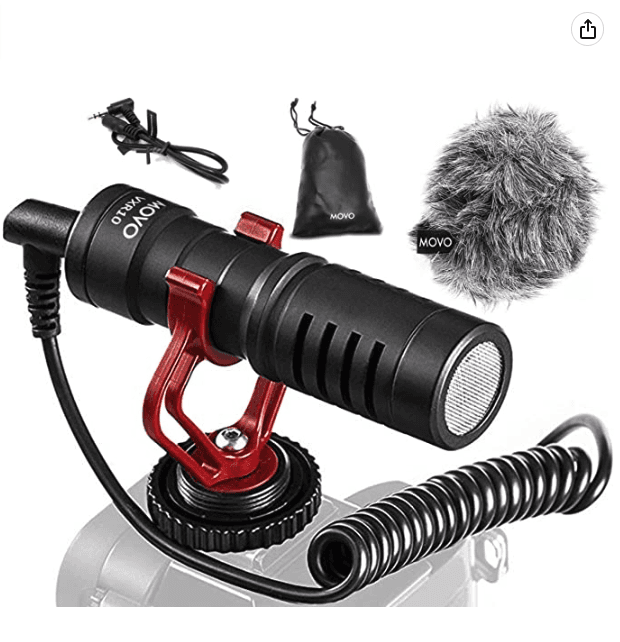
Consider using wireless earbuds. The built-in microphones in even mid-range brands are still pretty good and will almost always be able to pick up better audio than the built-in mic in your phone.
If all else fails, get a miniature recording device or even a second phone that can be closer to you but still out of the shot. There are many digital recording devices out there that are made for this exact purpose. This way, even if your camera's native audio is not up to par, you will still have a clean audio source that can be overlayed into your video in post-production. Better safe than sorry!
Here are a few links to some of Amazon's best selling USB mics, reasonably priced earbuds, and mini recording devices.
Tip 4: Vary Your Angles
UGC should make the viewer feel a personal connection to you and your space. Set up a specific area to record Move around your space and share additional angles to make your viewers feel closer to you. They should feel as if they are in the room with you and have access to the same space you are filming in. Investing in a selfie stick or a motorized camera slider will give you better control over your shot while moving.


Here are a couple of links to some of Amazon's best-selling selfie sticks and motorized sliders.
Tip 5: Product Placement
Recording your content in the appropriate aspect ratio - 9:16 for TikTok, Reel,s 4:5 for Instagram, and 1:1 Facebook. A simple trick you can use for all 3 formats is to create an invisible box around your head. Inside of this box you should create equal space (roughly a hands worth) on all 4 sides of your head. This should give you ample space to showcase both your face and your product all while keeping everything central to the video.
If you put your product too high or too low, you run the risk of having it cut off or covered up by marketing copy which will typically be added to the top or bottom of your video in the editing phase. Not every platform has the same viewing format so ensuring you shoot in the proper format is key to the impact of your content!
How to Brief UGC Creators for Performance Results
A bad brief produces unusable content. Not because the creator did a bad job, but because they were not given what they needed to shoot for performance. Most briefs focus on brand guidelines and talking points. Performance briefs focus on outcomes.
Here are the five elements every performance-oriented UGC brief must include:
1. The Hook Requirement: Tell the creator exactly how to open the video. Give them 2 to 3 specific hook options to choose from, or ask them to shoot multiple openings. The first 3 seconds are the highest-leverage part of the video. Do not leave them to chance.
2. The Delivery Style: Specify the tone and energy. Conversational and casual? High energy and direct? Storytelling and emotional? Creators default to what feels natural to them, which may not match your audience. Be explicit.
3. The Key Product Moment: Identify the single most important moment in the video where the product must be shown or demonstrated clearly. Give the creator a time stamp target, for example, show the product within the first 10 seconds. This is the moment your ad lives or dies on.
4. The Format Spec: Specify the aspect ratio, minimum length, and maximum length. Remind the creator to shoot in the correct format for the platform (9:16 for TikTok and Reels, 4:5 for Instagram feed, 1:1 for Facebook). Raw footage is always better than pre-edited content, so ask for both.
5. The CTA: Tell the creator exactly what action you want the viewer to take and how to phrase it. "Link in bio" is not a CTA. "Go to the link below and use code X for 20% off" is a CTA.
Here is a short template you can adapt:
Hook options: [give 2 to 3 specific opening lines or scenarios]
Delivery style: [conversational / high energy / storytelling]
Key product moment: [describe what to show and when]
Format: [aspect ratio, length range, raw footage required]
CTA: [exact phrase to use at the end]
Common UGC Mistakes That Kill Performance
Most UGC underperforms not because the creator was bad, but because the team made avoidable mistakes before the camera even started rolling. Here are the most common ones:
Over-producing it. UGC works because it feels real. The moment you add heavy motion graphics, studio-grade colour grading, or a polished voiceover, it stops feeling like UGC and starts feeling like a brand ad. Audiences can tell instantly. Keep the editing minimal and the feel authentic.
Scripting every word. Giving a creator a word-for-word script produces stiff, unnatural delivery. Give them the key points and the hook options, then let them speak in their own voice. The slight imperfections in natural speech are what make UGC believable.
Not asking for raw footage. Edited content locks you into one version of the ad. Raw footage gives you the flexibility to pull different hooks, cut different lengths, and repurpose across formats. Always ask for raw footage as a deliverable, not just the finished edit.
Ignoring the hook entirely. Most briefs describe the product and the key message but say nothing about how the video should open. The hook determines whether anyone watches the rest. If it is not in the brief, it will not be in the video.
Shooting in the wrong format. Receiving a landscape video when you needed vertical is a problem that cannot be fixed in post. Always specify the aspect ratio in the brief before the creator picks up their phone.
Repurposing One UGC Shoot Into Multiple Ad Variations
Most teams treat a UGC video as a single asset. They receive the video, edit it into one ad, launch it, and move on. That is leaving most of the value on the table.
A single UGC shoot can fuel multiple ad variations across formats and tests without paying the creator again. Here is how:
Different Hook Cuts: Take the same video body and attach different openings. Ask your creator to shoot 3 to 5 hook variations during the original shoot. Each one becomes a separate ad to test. This is the single highest-ROI thing you can do with UGC footage.
Short-Form Versions: Cut a 15-second version from the strongest 15 seconds of the full video. This works especially well for retargeting campaigns where the audience already has some familiarity with your brand.
Still Frames: Pull the strongest single frame from the video, particularly the key product moment, and use it as a static image ad. Static ads often outperform video in certain placements and audience segments.
Carousel Assets: If the creator demonstrated multiple product features or use cases, pull each moment as a separate carousel card. One video shoot becomes a multi-card ad with no additional production cost.
The key is to brief for repurposing from the start. Ask your creator to shoot the key product moment as a standalone clip in addition to the full video. That one extra minute of footage gives you raw material for every format above.
For more on organising your footage efficiently, check out our footage organisation page.
Recharm is built for exactly this workflow. Upload your UGC footage, pull the strongest clips, attach different hooks, and export multiple ad variations ready to launch without briefing your editor or starting from scratch.
Great UGC Is a System, Not a Stroke of Luck
The teams getting the most out of UGC are not the ones with the biggest creator budgets. They are the ones who brief well, shoot smart, and squeeze every possible variation out of every piece of footage they get.
A ring light and good natural light handle the visuals. A tight brief handles the content. And a clear repurposing strategy turns one shoot into ten ad variations without spending another dollar on production.
The five tips in this blog are not complicated. But most teams skip at least two of them on every shoot. Stop leaving performance on the table.
Frequently Asked Questions
What's the best way to handle lighting when shooting UGC at home?
Natural light is your best free resource. Position yourself facing a window so the light falls on your face, not your back. Shooting with your back to a window creates a washed-out silhouette effect that kills the quality of the shot. If natural light is inconsistent or unavailable, a ring light is the most practical investment. It eliminates shadows, adds even lighting across your face, and works in any room at any time of day.
What video format and aspect ratio should UGC ads be shot in?
Always shoot in 9:16 vertical format as your primary format. This covers TikTok, Instagram Reels, and Facebook Stories natively. From a 9:16 shoot you can crop to 4:5 for Instagram feed and 1:1 for Facebook feed without losing the key subject in the frame, as long as you kept your framing central during the shoot. Never shoot in landscape and try to reformat for vertical. You will lose too much of the frame and the content will look like an afterthought.
How do I measure whether my UGC video ads are performing well?
Start with three metrics. Hook rate tells you whether the opening is stopping the scroll. A hook rate above 25 to 30% is a reasonable benchmark to aim for, though this varies by account and niche. Watch-time drop-off tells you where in the video people are leaving, which helps you identify whether the problem is the hook, the body, or the CTA. Cost per result tells you whether the creative is driving the outcome you are paying for. If hook rate is strong but cost per result is high, the problem is likely the offer or the CTA rather than the creative itself.